10 Best Bluetooth Wireless Mouse Ergonomic Of 2026
Bluetooth Wireless Mouse Ergonomic — Reviews, Recommendations & Updated Buying Guide November 2026


Logitech Lift Vertical Ergonomic Mouse
Why We Love It


UGREEN Vertical Wireless Mouse BT5.4/2.4G Ergonomic 4000DPI
Why We Love It

TECKNET Wireless Mouse
Why We Love It

TECKNET Ergonomic Mouse, Wireless Bluetooth Vertical Mouse
Why We Love It
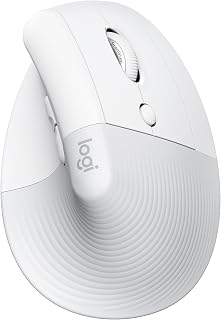
Logitech Lift Vertical Ergonomic Mouse
Why We Love It

Wireless Bluetooth Mini Mouse for Multi-Device Use
Why We Love It

Logitech MX Vertical Ergonomic Mouse
Why We Love It

Seenda Bluetooth Wireless Mouse
Why We Love It

Logitech Lift Vertical Ergonomic Mouse
Why We Love It

ProtoArc EM11 NL Wireless Ergonomic Vertical Mouse
Why We Love It
Quick Pick
10 Best Bluetooth Wireless Mouse Ergonomic Of 2026
Quick Pick
Logitech Lift Vertical Ergonomic Mouse, Wireless, Bluetooth or Logi Bolt USB Receiver, Quiet clicks, 4 Buttons, Compatible with Windows/macOS/iPadOS, Laptop, PC-Graphite | Wireless, Bluetooth or Logi Bolt, Silent clicks, 4 buttons, Windows/macOS/iPadOS, Laptop, PC - Grey
UGREEN Vertical Wireless Mouse BT5.4/2.4G Ergonomic 4000DPI 6-Button | Vertical wireless mouse, Bluetooth5.4/2.4G, ergonomic, 4000 DPI, 6 buttons, wrist relief, for PC Mac
TECKNET Wireless Mouse, Bluetooth Mouse (BT5.3/5.0 & 2.4G) Rechargeable Ergonomic Optical Mouse with 6 Adjustable DPI, Side Scroll, Quiet Clicks, USB A Receiver, 7 Buttons, Wide Compatibility - Black
TECKNET Ergonomic Mouse, Wireless Bluetooth Vertical Mouse, 4800 DPI Optical Tracking, 6 Adjustable DPI, Quiet Clicks, 2.4GHz with USB A Receiver, 6 Buttons, Wide Compatibility (Single-mode)
Logitech Lift Vertical Ergonomic Mouse, Wireless, Bluetooth or Logi Bolt USB Receiver, Quiet clicks, 4 Buttons, Compatible with Windows/macOS/iPadOS, Laptop, PC-White | Wireless, Bluetooth, Logi Bolt USB Receiver, Silent Clicks, 4 Buttons, Windows/macOS/iPadOS, Laptop, PC - White
Wireless Bluetooth Mini Mouse for Multi-Device Use, Portable Travel Wireless Mouse with Quiet Click, Smooth Optical Tracking, Ergonomic Compact Design, Compatible with Laptop, MacBook, iPad, PC
Logitech MX Vertical Ergonomic Mouse, Multi-Device, Bluetooth or 2.4GHz Wireless with USB Unifying Receiver, 4000 DPI Optical Tracking, 4 Buttons, Fast Charging, Laptop/PC/Mac/iPad OS- Black
seenda Bluetooth Wireless Mouse, Bluetooth & 2.4G USB Dual Mode, Quiet Clicks, 1600 DPI Smooth Tracking, Ergonomic Design, 24-Months Battery Life, Portable Mouse for Laptop/Mac/Ipad/PC/Tablet - Black
Logitech Lift Vertical Ergonomic Mouse, Wireless, Bluetooth or Logi Bolt USB Receiver, Quiet clicks, 4 Buttons, Compatible with Windows/macOS/iPadOS, Laptop, PC-Pink | Wireless, Bluetooth, Logi Bolt USB, Quiet clicks, 4 buttons, Windows/macOS/iPadOS, Laptop, PC - Pink
ProtoArc EM11 NL Wireless Ergonomic Vertical Mouse, Black | 58° Vertical Design Supports a Natural Wrist Posture, Connect 3 Devices via Bluetooth/2.4G USB-A, 500mAh USB-C Rechargeable
Buying Guide: Bluetooth Wireless Mouse Ergonomic
📋 Table of Contents
1What Bluetooth version should I look for in an ergonomic wireless mouse?
Opt for Bluetooth 5.0 or higher for better range, stability, and lower power consumption. Newer versions reduce lag and interference, which is especially important for tasks requiring precision like graphic design or video editing.
2How does an ergonomic mouse differ from a standard one in terms of health benefits?
Ergonomic mice are designed to reduce strain on the wrist and hand by promoting a more natural hand position. They often feature contoured shapes, vertical or split designs, and may include thumb rests to prevent repetitive strain injuries over long use.
3What battery life should I expect from a Bluetooth wireless ergonomic mouse?
Most models offer 12–24 months of battery life on a single AA or AAA battery, depending on usage. Look for models with low-power Bluetooth and sleep modes to extend battery life, especially if you use the mouse for extended periods daily.
4Are there specific materials that make an ergonomic mouse more comfortable for long-term use?
Look for mice with soft-touch rubber or silicone grips, and avoid hard plastic surfaces that can cause fatigue. Some models use memory foam or gel padding in the palm rest for added comfort during long sessions.
5Is a scroll wheel or trackball better for an ergonomic wireless mouse?
A scroll wheel is better for general use and quick navigation, while a trackball offers more precision and reduces wrist movement. Choose based on your primary tasks — trackballs are ideal for graphic design, while scroll wheels suit office work and web browsing.
How we choose
Our editors are people who genuinely love testing and writing about products. We compare each product's real-world usability and strengths, then distill what matters most into our own "Why We Love It" points — so you get an honest, at-a-glance sense of what counts before you buy.