10 Best Bluetooth Code Readers Scan Tools Of 2026
Bluetooth Code Readers Scan Tools — Reviews, Recommendations & Updated Buying Guide November 2026


OBD2 Bluetooth Diagnostic Tool for iOS iPhone Android
Why We Love It


Vgate iCar Pro Bluetooth 4.0 (BLE) OBD2 Fault Code Reader
Why We Love It

Upgraded B26 Bluetooth OBD2 Scanner for iOS & Android
Why We Love It

Bluetooth OBD2 OBDII Diagnostic Scanner Adapter for Eonon
Why We Love It

Vgate iCar Pro Bluetooth 3.0 OBD2 Code Reader OBDII Scanner
Why We Love It
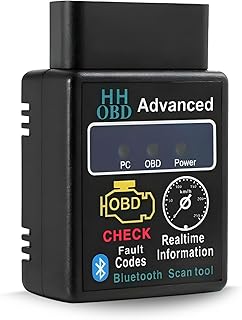
Bluetooth OBD2 Scanner for Car and Vehicles
Why We Love It

Bluetooth Car Scanner
Why We Love It

OBD2 Scanner Bluetooth for iOS iPhone and Android
Why We Love It

Bluetooth 4.0 (BLE) OBD2 Scanner for iOS iPhone and Android
Why We Love It
Bluetooth OBD2 Scanner for Car and Vehicles
Why We Love It
Quick Pick
10 Best Bluetooth Code Readers Scan Tools Of 2026
Quick Pick
OBD2 Bluetooth Diagnostic Tool for iOS iPhone Android Adapter Scanner | For All Vehicles Car Diagnostic Device Code Reader OBD ODB2 Connector Diagnostic Tool Reader for iOS Android Windows
Vgate iCar Pro Bluetooth 4.0 (BLE) OBD2 Fault Code Reader OBDII Code Scanner Car Check Engine Light for iOS/Android
Upgraded B26 Bluetooth OBD2 Scanner for iOS & Android, Subscription-Free Check Engine Code Reader, Diagnostic Tool to Reset Temporary & Pending Faults, Car Scanner for All Vehicles
Bluetooth OBD2 OBDII Diagnostic Scanner Adapter for Eonon Android Car Stereo, Real-Time Engine Code Reader, Wireless Scan Tool for Car Fault Diagnosis and Live Data Monitoring
Vgate iCar Pro Bluetooth 3.0 OBD2 Code Reader OBDII Scanner Scan Tool Car Fault Check Engine Light for Torque Android Compatible with ELM327 Adapter
Bluetooth OBD2 Scanner for Car and Vehicles, Wireless OBD II Diagnostic Code Reader for Engine Fault Diagnosis, Universal Professional Auto Scan Tool and Tester Adapter Accessory
Bluetooth Car Scanner, Auto Diagnostic Scan Tool Car Fault Code Reader SinoTrack OBD2 Car Fault Reader Wireless Car Code Reader for iOS & Android Compatible with OBDII Protocol Vehicle Bluetooth 4.2
OBD2 Scanner Bluetooth for iOS iPhone and Android, Car OBDII Reader to Clear Error Codes, Auto Diagnostic Car Scanner Tool for Year 1996 and Newer Cars (5CM)
Bluetooth 4.0 (BLE) OBD2 Scanner for iOS iPhone and Android, Car OBDII Reader to Clear Error Codes, Auto Diagnostic Car Scanner Tool for Year 1996 and Newer Vehicles, Compatible ELM327 Adapter
Bluetooth OBD2 Scanner for Car and Vehicles, Wireless OBD II Diagnostic Code Reader for Engine Fault Diagnosis, Universal Professional Auto Scan Tool and Tester Adapter Accessory
Buying Guide: Bluetooth Code Readers Scan Tools
📋 Table of Contents
1What Bluetooth version should I look for in a code reader scan tool?
Opt for Bluetooth 5.0 or higher for faster data transfer and better range. Older versions like Bluetooth 4.2 may work but can be slower and less reliable, especially when scanning multiple vehicles or in areas with interference.
2How does OBD2 compatibility affect the performance of a Bluetooth code reader?
Ensure the tool supports OBD2 standards for universal vehicle compatibility, especially for cars from 1996 onwards. Some advanced models also support CAN bus and newer protocols, which are essential for reading data from modern vehicles with complex systems.
3What is the difference between a basic and a premium Bluetooth code reader?
Basic models typically offer essential functions like reading and clearing codes, while premium tools include features like live data streaming, graphing, and support for advanced diagnostics. Premium models often come with apps that provide more detailed vehicle insights and troubleshooting guidance.
4How important is the battery life of a Bluetooth code reader?
Look for at least 4-6 hours of continuous use on a single charge, especially if you plan to use it for extended diagnostics or on the go. Some models offer USB-C fast charging, which can be a significant convenience for frequent users.
5What accessories should I consider when buying a Bluetooth code reader?
A durable carrying case, a USB-C or micro-USB cable, and a user manual are essential. Some models also include a screen for standalone use, which can be helpful if you don’t always have a smartphone nearby for the app interface.
How we choose
Our editors are people who genuinely love testing and writing about products. We compare each product's real-world usability and strengths, then distill what matters most into our own "Why We Love It" points — so you get an honest, at-a-glance sense of what counts before you buy.