10 Best Bluetooth Audio Mixers For Recording Of 2026
Bluetooth Audio Mixers For Recording — Reviews, Recommendations & Updated Buying Guide November 2026


Behringer FLOW 8 8-Input Digital Mixer with Bluetooth Audio
Why We Love It


Professional Audio Mixer, DJ Audio Mixers
Why We Love It

Audio Mixer 5 Channel BT Sound DJ Stereo Mixing Console USB
Why We Love It

KASTWAVE 4 Channel Mixer for Streaming
Why We Love It

BOMGE Audio Mixer
Why We Love It

Audio Mixer
Why We Love It
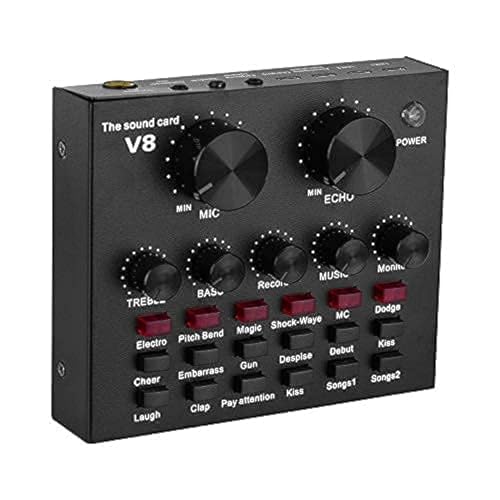
CEZO V8 Portable Audio Mixer Interface
Why We Love It

Mackie ProFX10v3+ 10-Channel Mixer
Why We Love It
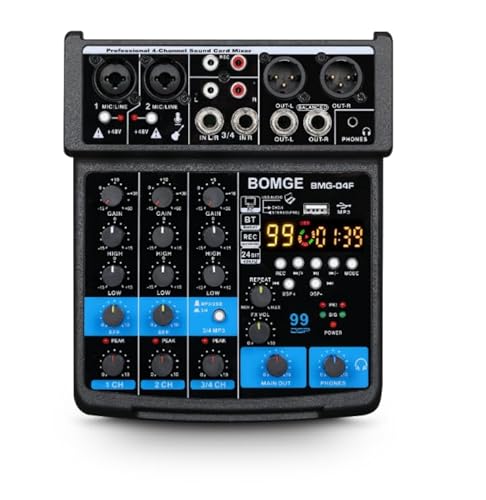
BOMGE 4 Channel mini DJ Audio Sound Mixer Interface with MP3
Why We Love It

4-Channel Bluetooth Audio Mixer
Why We Love It
Quick Pick
10 Best Bluetooth Audio Mixers For Recording Of 2026
Quick Pick
Behringer FLOW 8 8-Input Digital Mixer with Bluetooth Audio and App Control, 60 mm Channel Faders, 2 FX Processors and USB/Audio Interface, Compatible with PC and Mac
Professional Audio Mixer, DJ Audio Mixers, 4 Channel Sound Board with Bluetooth, NEW BAXS Sound Mixer Board XLR/1/4" Interface, 48V Phantom Power Stereo, for Recording, Live Streaming, Podcasting
Audio Mixer 5 Channel BT Sound DJ Stereo Mixing Console USB for Performance Stage Podcasting Recording PC 48V Phantom Power Reverb Effects
KASTWAVE 4 Channel Mixer for Streaming, Professional Mini 4 Stereo Audio Mixer, Low Noise DJ Mixer, 48V Phantom Power, USB Audio Interface for Podcasting, Live Performance, Recording, DJ, PC
BOMGE Audio Mixer, Sound Board Mixing Console with 5 Channel Digital USB Bluetooth Echo Delay Effect, 48V Phantom Power Stereo DJ Mixers for Recording, Live Streaming, Podcasting
Audio Mixer, Live Sound Card with DJ Effects & Voice Changer, Denoise, One-Click Mute, RGB Sound Board, Bluetooth, Music Recording Equipment for Streaming, Podcasting & Gaming
CEZO V8 Portable Audio Mixer Interface, Bluetooth Sound Card for Live Streaming/Recording/Podcast/Voice Change/Karaoke/Gaming/Singing with Sound Effects, 3.5mm Mic Jack for Guitar (V8 Black)
Mackie ProFX10v3+ 10-Channel Mixer, Bluetooth + USB Recording, GigFX+
BOMGE 4 Channel mini DJ Audio Sound Mixer Interface with MP3 USB Bluetooth Stereo Recording 48V Phantom Power 99 DSP for karaoke, performance, church singing podcas streaming
4-Channel Bluetooth Audio Mixer,Recording PC Mixer with XLR USB Interface
Buying Guide: Bluetooth Audio Mixers For Recording
📋 Table of Contents
1What input options are essential for a Bluetooth audio mixer for recording?
Look for at least 2-4 XLR/TRS combo inputs for microphones or instruments, plus a dedicated USB input for connecting a computer. Bluetooth connectivity should support both mono and stereo sources, and a 3.5mm aux input is useful for portable devices like phones or MP3 players.
2How important is latency when using Bluetooth for recording?
Low latency (under 50ms) is crucial for real-time monitoring and vocal/instrument tracking. Bluetooth 5.0 or later with aptX or AAC codecs typically offers the best performance, reducing lag between input and playback for a more natural recording experience.
3Should I prioritize phantom power or built-in preamps?
Phantom power (48V) is essential if you use condenser microphones, so ensure the mixer provides it on at least 2 channels. High-quality preamps (look for 24-bit or higher) improve signal clarity and reduce noise, making a big difference in the final audio quality, especially in home studios.
4What recording features should I look for in a Bluetooth mixer?
A built-in USB interface with DAW compatibility and direct-to-USB recording is a major time-saver. Some models offer dual outputs for monitoring and recording simultaneously, while others include effects like reverb or EQ to tweak your sound without extra software.
5Are Bluetooth mixers suitable for multi-track recording?
Yes, but only if the mixer supports individual channel routing and has enough inputs for your setup. Bluetooth is best for adding a voiceover or background music, while wired inputs handle instruments and mics. For full multi-track sessions, pair the mixer with a DAW and use Bluetooth as a supplementary input.
How we choose
Our editors are people who genuinely love testing and writing about products. We compare each product's real-world usability and strengths, then distill what matters most into our own "Why We Love It" points — so you get an honest, at-a-glance sense of what counts before you buy.