10 Best Benq Gaming Monitor 2k Qhd Of 2026
Benq Gaming Monitor 2k Qhd — Reviews, Recommendations & Updated Buying Guide November 2026


BenQ EW270Q 27" 2K QHD 200Hz IPS Gaming Monitor with USB-C
Why We Love It


BenQ EX3203R 32 Inch 1800R Curved Gaming Monitor QHD 2K HDR
Why We Love It

BenQ PD2706QN 27” IPS 2K QHD Display P3 90W USB-C Designer
Why We Love It

BenQ MOBIUZ EX271QZ 27” 2K QHD Gaming Monitor
Why We Love It

BenQ GW3290QT 31.5" IPS QHD 2K Monitor
Why We Love It

BenQ Mobiuz Ex2710R 27 Inch 2K Qhd Curved Gaming Monitor
Why We Love It

KTC 32 Inch Curved Monitor VA 1500R
Why We Love It

Z-EDGE 27inch Gaming Monitor
Why We Love It

Xiaomi 2K Gaming Monitor G27Qi
Why We Love It
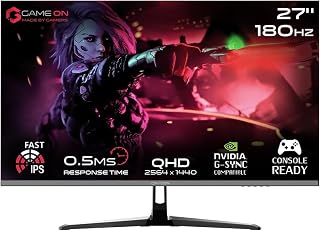
GAMEON GOPS27QHD180IPS 27 Inch Gaming Monitor QHD 2K 180Hz
Why We Love It
Quick Pick
10 Best Benq Gaming Monitor 2k Qhd Of 2026
Quick Pick
BenQ EW270Q 27" 2K QHD 200Hz IPS Gaming Monitor with USB-C (65W) HDRi | 1200:1 Contrast | 90% P3 Gamut | 350 Nits | Built-in Speakers (5W x2) | AMD FreeSync Premium | HDMI | Game Color Mode
BenQ EX3203R 32 Inch 1800R Curved Gaming Monitor QHD 2K HDR 144Hz | FreeSync Premium | Eye Care Technology | HDMI, Display Port, USB-C
BenQ PD2706QN 27” IPS 2K QHD Display P3 90W USB-C Designer Monitor
BenQ MOBIUZ EX271QZ 27” 2K QHD Gaming Monitor, 3rd Gen QD-OLED, 500Hz, 0.03ms, HDMI2.1, USB-C, VESA DisplayHDR True Black 500, MOBIUZ Color Tuning, eARC, 3-Year OLED Warranty
BenQ GW3290QT 31.5" IPS QHD 2K Monitor, USB-C(65W PD), 75Hz, 99% sRGB, Daisy Chain, Height Adjust, Noise Filter Speaker & Mic, HDMI, Display Port, USB Hub, Eye Safe Certified (White)
BenQ Mobiuz Ex2710R 27 Inch 2K Qhd Curved Gaming Monitor, 165Hz 1Ms, 1000R Curve, Hdri, Dual Speakers + Subwoofer, Amd Freesync Premium Pro, Eyecare & Height/Tilt AdjUStable Stand, Hdmi & Display Port
KTC 32 Inch Curved Monitor VA 1500R, 2K QHD 1440P@180Hz Gaming Monitor | 1ms MPRT FreeSync Premium G-Sync HDR10 122%sRGB VESA HMDI 2.0 DP 1.4 Compatible with Desktop, Laptop, PS5, Xbox and More
Z-EDGE 27inch Gaming Monitor,IPS,Max 180Hz,QHD 2560×1440,1ms,Black,UG27QF | FreeSync/Frameless/1ms/Brightness 350cd/m²/HDR/VESA Compatible/HDMI & DisplayPort/for Game,Office
Xiaomi 2K Gaming Monitor G27Qi, QHD 2560×1440, Fast IPS, 180Hz 1ms, AMD Freesync, 100% sRGB, 178 Viewing Angle, 2× HDMI2.0 DP 1.4×2, Black
GAMEON GOPS27QHD180IPS 27 Inch Gaming Monitor QHD 2K 180Hz Fast IPS Computer Monitor, 0.5ms MPRT, HDMI 2.1, HDR, 99% sRGB, G-Sync & FreeSync Compatible, Built-in Speakers, PS5 & Console Ready, Black
Buying Guide: Benq Gaming Monitor 2k Qhd
📋 Table of Contents
1What refresh rate should I choose for gaming on a BenQ 2K monitor?
For competitive gaming, aim for 144Hz or higher, while 60-75Hz works for casual gaming and single-player titles. Higher refresh rates reduce motion blur and input lag, making a noticeable difference in fast-paced games like shooters and MOBAs.
2What's the difference between IPS and VA panels on BenQ gaming monitors?
IPS panels offer better color accuracy and wider viewing angles, ideal for content creators, while VA panels provide deeper blacks and higher contrast ratios, better for dark gaming environments. Choose IPS if you value color precision; VA if you prioritize visual depth.
3Is 2K resolution worth it over 1440p for gaming?
2K (2560×1440) and 1440p are essentially the same resolution, offering a sweet spot between 1080p sharpness and 4K performance demands. You'll get noticeably sharper visuals than 1080p without needing a top-tier graphics card.
4What screen size should I get for a 2K gaming monitor?
27 inches is the ideal size for 2K resolution, providing sharp pixels without excessive head movement, while 32-inch options give more screen real estate but may require sitting further back. Sizes below 27 inches can feel cramped at this resolution.
5Should I pay extra for HDR on a BenQ 2K gaming monitor?
HDR significantly improves contrast and color vibrancy in compatible games, making it worth the extra cost if your graphics card supports it. Without HDR capability, you'll miss out on a more immersive visual experience in newer AAA titles.
How we choose
Our editors are people who genuinely love testing and writing about products. We compare each product's real-world usability and strengths, then distill what matters most into our own "Why We Love It" points — so you get an honest, at-a-glance sense of what counts before you buy.