10 Best Benq 4k Monitors Of 2026
Benq 4k Monitors — Reviews, Recommendations & Updated Buying Guide November 2026


BenQ MA270U 27" 4K 3840x2160 Monitor for MacBook Pro/Air
Why We Love It


BenQ MA320U 32 inch 4K 3840x2160 Monitor for MacBook Pro/Air
Why We Love It

[NEW 2026] BenQ MA270UP 27” 4K 3840x2160 Nano Gloss Monitor
Why We Love It

BenQ PD3205U 32 Inch 4K UHD Monitor for Designers | HDR10
Why We Love It

BenQ MA320UG 32” 4K 120Hz Nano Gloss Monitor for Mac
Why We Love It
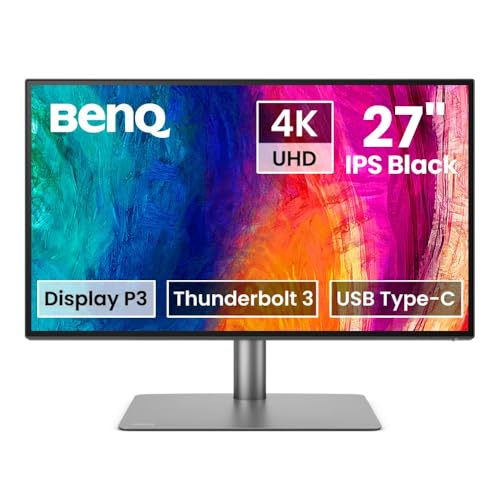
BenQ PD2725U 27” 4K Monitor for Mac/Designers
Why We Love It

BenQ PD3225U 32 Inch 4K IPS Black UHD Thunderbolt Monitor
Why We Love It

BenQ EW270Q 27" 2K QHD 200Hz IPS Gaming Monitor with USB-C
Why We Love It
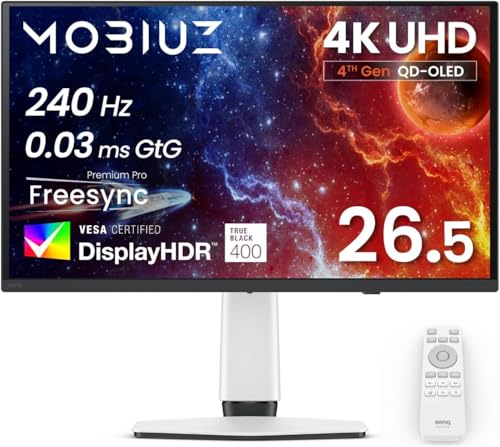
BenQ MOBIUZ EX271UZ 27” 4K QD-OLED Gaming Monitor
Why We Love It

BenQ GW2490T 60.5 cm IPS 1080p Home Office Monitor
Why We Love It
Quick Pick
10 Best Benq 4k Monitors Of 2026
Quick Pick
BenQ MA270U 27" 4K 3840x2160 Monitor for MacBook Pro/Air, Dual USB-C, 90W Power Delivery, Mac Color Match, USB Hub, Brightness & Volume Control on Mac, Height & Tilt Adjustable Stand, P3 Color Gamut
BenQ MA320U 32 inch 4K 3840x2160 Monitor for MacBook Pro/Air, Dual USB-C, 90W Power Delivery, Mac Color Match, USB Hub, Brightness & Volume Control on Mac, Adjustable Stand, P3 Color Gamut
[NEW 2026] BenQ MA270UP 27” 4K 3840x2160 Nano Gloss Monitor for MacBook, Dual USB-C 90W/15W, Mac Color Match,USB Hub, Brightness & Volume Control on Mac,Height & Tilt Adjustable Stand,P3 Color Gamut
BenQ PD3205U 32 Inch 4K UHD Monitor for Designers | HDR10, IPS, USB-C 90W, sRGB, Rec.709, KVM Switch, CAD/CAM Mode, Factory Calibrated, Eye-Care, Height Adjustable, USB Hub
BenQ MA320UG 32” 4K 120Hz Nano Gloss Monitor for Mac, Dual Thunderbolt 4 96W/15W, Mac Color, Daisy Chain, KVM, Brightness & Volume Control on Mac, Height & Tilt Adjustment, P3 Color Gamut
BenQ PD2725U 27” 4K Monitor for Mac/Designers, 3840x2160 UHD, IPS, HDR, AQCOLOR Technology, Display P3, DCI-P3, sRGB, Rec.709, Factory-Calibrated, Thunderbolt 3, Hotkey Puck G2, ICCsync, KVM
BenQ PD3225U 32 Inch 4K IPS Black UHD Thunderbolt Monitor for MacBook, AQCOLOR, 98% P3, 100% sRGB & Rec.709, DeltaE ≤2, Uniformity, Factory Calibration, USB-C 85W, USB Hub, Daisy Chain, KVM Switch
BenQ EW270Q 27" 2K QHD 200Hz IPS Gaming Monitor with USB-C (65W) HDRi | 1200:1 Contrast | 90% P3 Gamut | 350 Nits | Built-in Speakers (5W x2) | AMD FreeSync Premium | HDMI | Game Color Mode
BenQ MOBIUZ EX271UZ 27” 4K QD-OLED Gaming Monitor | 240Hz Ultra-Smooth, 0.03ms Response Time | PS5 & Xbox Compatible | HDR, 99% DCI-P3 | 3-Year Burn-In Warranty
BenQ GW2490T 60.5 cm IPS 1080p Home Office Monitor, FHD, 100Hz, Ergo Design, High Refresh Rate, 99% sRGB, VESA MediaSync, B.I, Flicker Free, Low Blue Light, ePaper, Coding Mode, TÜV Rheinland
Buying Guide: Benq 4k Monitors
📋 Table of Contents
1What resolution should I look for based on my use?
For general use and office work, 1920x1080 (Full HD) is sufficient. For photo editing, video work, or gaming, aim for at least 2560x1440 (QHD) or 3840x2160 (4K) for sharper details and more screen real estate.
2Does panel type really affect my experience?
Yes — IPS panels offer wider viewing angles and better colour accuracy, ideal for creative work, while TN panels are faster and better for competitive gaming. VA panels provide deep blacks but may have slower response times for fast action.
3What refresh rate do I actually need?
60Hz is fine for basic tasks and web browsing. For smooth video playback and casual gaming, 75-120Hz is better. If you play fast-paced games, look for 144Hz or higher to reduce motion blur and input lag.
4Is a curved monitor worth the extra cost?
Curved monitors can reduce eye strain and offer a more immersive experience, especially for large screens (27” and above). They’re great for media consumption and multitasking, but may not be necessary for standard office use or small desks.
5What connectivity options should I check for?
Ensure the monitor has the ports you need — at least one HDMI and one DisplayPort for most setups. USB-C with power delivery is ideal for laptops, and multiple USB ports can reduce cable clutter. Avoid relying on outdated DVI or VGA connections.
How we choose
Our editors are people who genuinely love testing and writing about products. We compare each product's real-world usability and strengths, then distill what matters most into our own "Why We Love It" points — so you get an honest, at-a-glance sense of what counts before you buy.