10 Best Belkin Laptop Docking Station Of 2026
Belkin Laptop Docking Station — Reviews, Recommendations & Updated Buying Guide November 2026


Belkin USB-C 11-in-1 Multiport Dock
Why We Love It


Belkin USB C Hub
Why We Love It

Belkin USB-C Hub, 11-in-1 Pro GaN Dock 150W
Why We Love It
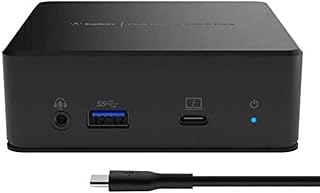
Belkin USB C Dual Display Docking Station
Why We Love It

Belkin Connect 16-in-1 Docking Station 140W
Why We Love It

Belkin Connect USB-C Dock 6-in-1 Core GaN
Why We Love It

Belkin USB C 4-in-1 MultiPort Adapter (with 4K HDMI
Why We Love It

Belkin USB C Hub 6-in-1 MultiPort Adapter Dock
Why We Love It

Belkin 14-port USB-C Docking Station
Why We Love It

Belkin Connect Thunderbolt 4 Docking Station
Why We Love It
Quick Pick
10 Best Belkin Laptop Docking Station Of 2026
Quick Pick
Belkin USB-C 11-in-1 Multiport Dock,Silver,INC004btSGY
Belkin USB C Hub, 8-in-1 Multi-Port Docking Station 100W - Dual Display Support for Mac, Windows and Chromebook w/ 10Gbps Data Transfer Speeds, Ethernet, Resolutions up to 4K@60Hz
Belkin USB-C Hub, 11-in-1 Pro GaN Dock 150W, Multi-Port Docking Station w/USB-C, USB-A, Ethernet, SD, MicroSD, 3.5mm Port, 4K HDMI Ports for Triple Monitor Display - Compatible w/MacBook Pro & More
Belkin USB C Dual Display Docking Station - 85W Power Delivery, HDMI, USB A 3.1 Gen 1, Gigabit Ethernet, Audio I/O for MacBook, XPS, and Other USB C Laptops, Black
Belkin Connect 16-in-1 Docking Station 140W, Triple Display USB C Dock with 4K@60Hz Support, DisplayLink Technology, USB C Dock with 10Gbps Data Transfer, 2.5Gb Ethernet Port - Laptop Expansion Hub
Belkin Connect USB-C Dock 6-in-1 Core GaN, 130W, Multiport Docking Station with 96W PD to Peripherals, USB-C, USB-A, Gigabit Ethernet, & HDMI 4K Ports for Gaming, MacBook Pro, PC Laptops, & Chromebook
Belkin USB C 4-in-1 MultiPort Adapter (with 4K HDMI, USB-C 100W PD Pass-Through Charging, 2 x USB A Ports for MacBook Pro, MacBook Air, iPad Pro, XPS and More)
Belkin USB C Hub 6-in-1 MultiPort Adapter Dock, 4K HDMI, USB-C 100 W PD, 2x USB a, Gigabit Ethernet, SD Slot, for MacBook and Laptops, Silver
Belkin 14-port USB-C Docking Station, 65W Power Delivery, 4K Display, 2 HDMI Ports, 2 DisplayPort, 3 USB-C, 5 USB-A Ports, and 1 Gigabit Ethernet, USB-C Dock for Chromebook, Windows PCs, XPS and other
Belkin Connect Thunderbolt 4 Docking Station, 5-in-1 USB-C Multiport Core Hub w/ 96W Power Delivery for Mac, Windows, Single 8K or Dual 4K Display, Thunderbolt 4 Cable & Power Supply Included
Buying Guide: Belkin Laptop Docking Station
📋 Table of Contents
1What's the difference between Belkin USB-C and Thunderbolt docking stations?
USB-C docks work with any modern laptop but offer slower data transfer and charging speeds, while Thunderbolt docks provide faster performance but only work with compatible devices. If you have a MacBook Pro or newer Dell XPS, Thunderbolt is worth it for video editing or large file transfers.
2How many USB ports do I actually need on a docking station?
Most people need 4-6 USB ports total to cover keyboard, mouse, external drive, and phone charging simultaneously. If you use lots of peripherals like printers, scanners, or multiple external drives, go for a dock with at least 6 ports or look for one with USB expansion options.
3Will a Belkin docking station work with my laptop?
Check if your laptop has USB-C or Thunderbolt ports first, then verify the dock supports your specific laptop model since compatibility varies. Most newer Windows laptops and MacBooks work with Belkin docks, but older machines may need different adapters.
4What's the benefit of paying more for a premium Belkin dock?
Higher-end models typically offer faster charging wattage, more USB ports, better video output (4K support), and more durable construction for daily use. Spend more if you dock your laptop multiple times daily or work with high-resolution displays and large files.
5Do I need a dock with power delivery built in?
Power delivery is essential if you want to charge your laptop through the dock instead of using a separate charger—it consolidates cables and keeps your desk cleaner. Check your laptop's power requirements and ensure the dock provides enough wattage (typically 60W or higher for laptops).
How we choose
Our editors are people who genuinely love testing and writing about products. We compare each product's real-world usability and strengths, then distill what matters most into our own "Why We Love It" points — so you get an honest, at-a-glance sense of what counts before you buy.