10 Best Beginner Graphics Tablets Of 2026
Beginner Graphics Tablets — Reviews, Recommendations & Updated Buying Guide November 2026


XPPen 6 * 4 inch Drawing Tablet with 16384 Pressure Levels
Why We Love It


HUION HS64 Graphics Drawing Tablet Battery-Free Stylus
Why We Love It

XP-Pen®G640 6 x 4 inch Graphic Drawing Tablet for OSU!
Why We Love It
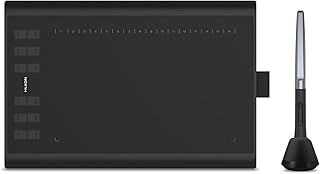
HUION Inspiroy H1060P Graphics Drawing Tablet
Why We Love It

HUION HS610 Graphics Drawing Tablet with Battery-Free Stylus
Why We Love It

VEIKK Voila L Graphic Tablet 10 x 6 Inch Drawing Tablet with
Why We Love It

HUION H950P Graphics Drawing Tablet 8.7x5.4 inches 8192
Why We Love It

XP-Pen G430S OSU Tablet Ultrathin Graphic Tablet 4 x 3 inch
Why We Love It

XP-Pen Star03 V2 12 Inch Graphic Tablet with Passive Stylus
Why We Love It

Wacom Intuos S tavoletta Grafica 2540 lpi (linee per
Why We Love It
Quick Pick
10 Best Beginner Graphics Tablets Of 2026
Quick Pick
XPPen 6 * 4 inch Drawing Tablet with 16384 Pressure Levels IT640 Digital Graphic Art Tablet Battery-Free Stylus 60° Tilt Support OSU Drawing Pad for Beginner Compatible with Android Windows macOS
HUION HS64 Graphics Drawing Tablet Battery-Free Stylus Android Windows macOS with 6.3 x 4 in Working Area Pen Tablet for Linux, Mac, Windows PC and Android
XP-Pen®G640 6 x 4 inch Graphic Drawing Tablet for OSU! Digital Tablet Gameplay with Our Battery-Free Stylus Design
HUION Inspiroy H1060P Graphics Drawing Tablet, 10 x 6.25 in, 12+16 Hot Keys | 8192 Pressure Levels, Battery-Free Stylus, Digital Art Tablet Works with Mac, Windows PC and Android
HUION HS610 Graphics Drawing Tablet with Battery-Free Stylus with 10x6.25inch Working Area Pen Tablet for Android Windows MAC OS
VEIKK Voila L Graphic Tablet 10 x 6 Inch Drawing Tablet with Pressure-Sensitive Pen, 4 Adjustment Mechanical Buttons and 1 Wheel Graphics Tablet for Drawing, Online, E-Signatures, Photo and Video
HUION H950P Graphics Drawing Tablet 8.7x5.4 inches 8192 Pressure Sensitivity with 8 Express Keys Battery-Free Stylus Suit for Windows, Mac OS, Android OS, Linux
XP-Pen G430S OSU Tablet Ultrathin Graphic Tablet 4 x 3 inch Digital Tablet Drawing Pen Tablet for OSU!8192 Levels 266RPS (Rev A)
XP-Pen Star03 V2 12 Inch Graphic Tablet with Passive Stylus 8192 Levels and 8 Shortcuts Digital Drawing Tablet
Wacom Intuos S tavoletta Grafica 2540 lpi (linee per pollice) 152 x 95 mm USB/Bluetooth Nero
Buying Guide: Beginner Graphics Tablets
📋 Table of Contents
1What pressure sensitivity level is enough for a beginner?
A sensitivity of 1024 to 2048 levels is sufficient for most beginners, allowing for smooth shading and line control. Higher levels (4096 or more) are better for advanced work but not essential for learning the basics.
2Should I choose a wired or wireless tablet for my first one?
Wired tablets are more reliable and cost-effective for beginners, avoiding potential latency or battery issues. Wireless models offer more freedom but may require regular charging and are usually more expensive.
3What active area size is best for learning digital art?
A 6x4 inch (152x101 mm) active area is ideal for beginners, offering enough space for drawing without being overwhelming. Larger sizes are better for detailed work but may be harder to handle for new users.
4Do I need a tablet with a built-in display for basic use?
No — a non-display tablet is more affordable and easier to start with. You’ll draw on your computer screen and see results in real time, which is perfectly suitable for learning fundamentals and basic illustration.
5What stylus features matter most for a first-time user?
Look for a stylus with at least 1024 pressure levels, a comfortable grip, and no need for batteries. A stylus with palm rejection and tilt sensitivity adds value but is not essential for beginners.
How we choose
Our editors are people who genuinely love testing and writing about products. We compare each product's real-world usability and strengths, then distill what matters most into our own "Why We Love It" points — so you get an honest, at-a-glance sense of what counts before you buy.