10 Best Be5000 Wireless Access Point Of 2026
Be5000 Wireless Access Point — Reviews, Recommendations & Updated Buying Guide November 2026


Omada 7 BE5000 WiFi Access Point
Why We Love It


TP-Link Omada WiFi 7 Wall Plate Wireless Access Point
Why We Love It

Omada 7 BE5000 Wireless Access Point 2.5G Port
Why We Love It

Omada EAP727
Why We Love It
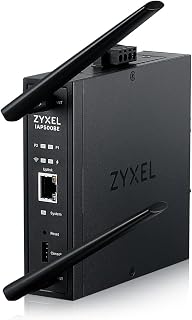
Zyxel WiFi 7 BE5000 Wireless Access Point
Why We Love It

TP-Link EAP725-Outdoor WiFi 7 Access Point
Why We Love It

TP-Link Omada EAP727 BE5000 WiFi 7 Wireless Access Point
Why We Love It

TP-Link EAP610
Why We Love It

Omada EAP725-Outdoor
Why We Love It

TP-Link Omada EAP720 BE3600 Dual Band Wi-Fi 7
Why We Love It
Quick Pick
10 Best Be5000 Wireless Access Point Of 2026
Quick Pick
Omada 7 BE5000 WiFi Access Point, 2.5G Port, w/o DC Adapter(EAP723) | WiFi 7 Dual Band, 5yr Warranty, PoE+/DC Powered, Mesh/WPA3/Roaming Supported, Omada Managed, Business Level WiFi Experience
TP-Link Omada WiFi 7 Wall Plate Wireless Access Point | BE5000 Dual Band | 2.5G PoE Input Port | 1 * 2.5G+2 * 1G Downlink Port | Seamless Roaming | 5-Year Warranty | Omada Remote Managed(EAP725-Wall)
Omada 7 BE5000 Wireless Access Point 2.5G Port, w/DC Adapter(EAP720) | WiFi 7 Dual Band, 5yr Warranty, PoE+/DC Powered, Mesh/WPA3/Roaming Supported, Omada Managed, Business Level WiFi Experience
Omada EAP727, WiFi 7 BE5000 Dual Band Wireless Access Point
Zyxel WiFi 7 BE5000 Wireless Access Point | Industrial Robust Product Design | 4-Stream Dual-Radio | Flexible Installation| Nebula App, Cloud, Controller, or Standalone [IAP500BE]
TP-Link EAP725-Outdoor WiFi 7 Access Point, Dual-Band, BE5000, 2.4GHz and 5GHz, Directional and Omnidirectional Antennas, PoE, IP66 Weatherproof, Outdoor
TP-Link Omada EAP727 BE5000 WiFi 7 Wireless Access Point, 2.5G PoE+ Port, 5-Stream AP, Seamless Roaming, Mesh, Ideal Access Point Alternative for Home & Business, Ceiling Mount, Supports 510+ Devices
TP-Link EAP610 | Omada Business WiFi 6 AX1800 Wireless Gigabit Access Point| Support Mesh, OFDMA, Seamless Roaming & MU-MIMO | SDN Integrated | Cloud Access & Omada App | PoE+ Powered | White
Omada EAP725-Outdoor, WiFi 7 BE5000 Indoor/Outdoor Dual Band Access Point
TP-Link Omada EAP720 BE3600 Dual Band Wi-Fi 7, PoE, Cloud Managed | 2.5 Gigabit PoE+ port, Simplified management via the Omada app, Omada Mesh, ideal for offices, hotels/shops
Buying Guide: Be5000 Wireless Access Point
📋 Table of Contents
1What Wi-Fi standards does the BE5000 wireless access point support?
The BE5000 typically supports Wi-Fi 6E (802.11ax) and 802.11ac standards, enabling faster speeds and better performance in crowded networks. Look for dual-band or tri-band support for improved coverage and reduced interference, especially in larger homes or offices.
2How many devices can the BE5000 handle simultaneously?
The BE5000 is designed to handle up to 100+ connected devices at once, making it ideal for homes with multiple smart devices or small to medium-sized offices. Ensure your router has Quality of Service (QoS) features to prioritize bandwidth for critical tasks like video conferencing or gaming.
3What is the maximum throughput of the BE5000?
The BE5000 offers a maximum theoretical throughput of up to 5.9 Gbps, combining Wi-Fi 6E and 802.11ac bands. Real-world speeds will depend on your internet plan and network conditions, but this makes it suitable for 4K streaming, online gaming, and high-speed downloads.
4Does the BE5000 support MU-MIMO technology?
Yes, the BE5000 includes MU-MIMO (Multi-User, Multiple Input, Multiple Output) technology, allowing it to communicate with multiple devices at the same time. This reduces lag and improves efficiency, especially when multiple users are streaming or gaming simultaneously.
5What mounting options are available for the BE5000?
The BE5000 usually comes with a wall-mount bracket and can also be placed on a desk or shelf. For optimal coverage, position it centrally in your home or office. Avoid placing it near metal objects or thick walls that can block the signal and reduce performance.
How we choose
Our editors are people who genuinely love testing and writing about products. We compare each product's real-world usability and strengths, then distill what matters most into our own "Why We Love It" points — so you get an honest, at-a-glance sense of what counts before you buy.