10 Best Av Access Laptop Docking Station Of 2026
Av Access Laptop Docking Station — Reviews, Recommendations & Updated Buying Guide November 2026


AV Access Docking Station Dual Monitor for Laptop & Desktop
Why We Love It


AV Access KVM Switch Docking Station 2 Monitors 2 Laptops
Why We Love It
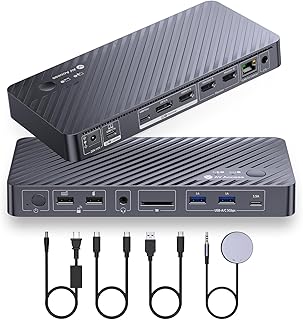
AV Access Docking Station Dual Monitor for Laptop & Desktop
Why We Love It

AV Access KVM Switch Docking Station for 2 Monitors 2
Why We Love It

AV Access KVM Switch Dock 2 Monitors 2 Laptops
Why We Love It

AV Access 8K Docking Station KVM Switch 2 Monitors 2
Why We Love It

AV Access KVM Switch Docking Station for MacBook
Why We Love It

AV Access iDock X20 Dual USB C KVM Docking Station 2 Laptops
Why We Love It

AV Access USB C KVM Switch Docking Station Dual Monitor 2
Why We Love It

AV Access KVM Switch Docking Station for a Laptop and 2
Why We Love It
Quick Pick
10 Best Av Access Laptop Docking Station Of 2026
Quick Pick
AV Access Docking Station Dual Monitor for Laptop & Desktop - USB-C Charge, Full Aluminum, KVM Switcher for 2 PCs with Ethernet, EDID, 4K@60Hz/2K@144Hz/1080P@240Hz, 3xUSB 3.0, Power Supply
AV Access KVM Switch Docking Station 2 Monitors 2 Laptops, 4K Dual Display | 100W PD for Each PC, 1G Ethernet, EDID Emulation, 4K KVM Dock for Home Office
AV Access Docking Station Dual Monitor for Laptop & Desktop, KVM Switch 2 Monitors 2 Computers with Ethernet, EDID, 4K@60Hz Dual Display, 4xUSB, 1xUSB-C, Power Supply for Laptop, Audio, SD
AV Access KVM Switch Docking Station for 2 Monitors 2 Computers, 4K KVM Switch Dual Monitor for Laptop & Desktop, EDID, 1G Ethernet, 100W USB-C Charging, 3X USB 3.0, Ideal for Home Office & Gaming
AV Access KVM Switch Dock 2 Monitors 2 Laptops, 4K KVM Switch Dual Monitor, 2 USB C MST Ports, 60W PD for Each PC, 1G Ethernet, EDID Emulation, 2K@144Hz, 1080P@240Hz, Ideal for Home Office & Gaming
AV Access 8K Docking Station KVM Switch 2 Monitors 2 Computers for Laptop & Gaming PC/Mac mini, 100W PD, GbE, 4xUSB 3.2 10Gbps USB C Hub, Dual Monitor 8K@60Hz/4K@165Hz, Audio, SD, Remote Switch
AV Access KVM Switch Docking Station for MacBook, USB C KVM Switch 2 Monitors 2 Computers, 4K Dual HDMI Displays, 1 Laptop&1 Desktop Switching, Plug&Play, Ethernet, 100W Power Delivery, EDID Emulation
AV Access iDock X20 Dual USB C KVM Docking Station 2 Laptops Switch | EDID, Dual 4K60 Displays 1 or 2 PCs Simultaneously, 65W Charging, USB 5Gbps Hub, 1G LAN, 240Hz, Wired Remote Switching
AV Access USB C KVM Switch Docking Station Dual Monitor 2 Laptops | EDID, 100W PD Passthrough, 3×5Gbps Type-A + 1×5Gbps Type-C, SDXC, Gigabit Ethernet, 144Hz/120Hz
AV Access KVM Switch Docking Station for a Laptop and 2 Desktop PCs Dual 4K | Type-C 65W Charging for Laptop, Ethernet, EDID, Hotkey Switch, HDMI, 4K@60Hz, 1080P@240Hz, USB 3.0
Buying Guide: Av Access Laptop Docking Station
📋 Table of Contents
1Will an AV Access docking station work with my laptop?
Check your laptop's connection ports first—most AV Access docks use USB-C, Thunderbolt, or USB 3.0. You also need to verify that your laptop supports video output through its charging port, since some models don't allow this.
2What's the difference between a simple docking station and one with video outputs?
Basic docks just charge and add USB ports, while video-capable docks let you connect external monitors, projectors, or TVs directly. If you work with multiple displays or presentations, a model with HDMI or DisplayPort is essential.
3How many USB ports do I actually need on a docking station?
Count your regular devices—keyboard, mouse, external drive, printer—and aim for at least 4 USB ports so you're not constantly unplugging things. If you use many peripherals simultaneously, look for docks with 6+ ports or ones that support additional USB hubs.
4Is it worth buying a more expensive docking station with more features?
Spend more if you need multiple monitors, Ethernet for stable internet, or faster charging for power-hungry laptops. A basic dock is fine if you just need extra USB ports and occasional HDMI output.
5What should I check about power delivery before buying?
Match the dock's wattage to your laptop's needs—check your charger to see how many watts it uses, as underpowered docks may charge slowly or not at all. Most modern laptops need 60W or higher for reliable charging while in use.
How we choose
Our editors are people who genuinely love testing and writing about products. We compare each product's real-world usability and strengths, then distill what matters most into our own "Why We Love It" points — so you get an honest, at-a-glance sense of what counts before you buy.