10 Best Asus Zenbook Of 2026
Asus Zenbook — Reviews, Recommendations & Updated Buying Guide November 2026


Asus Zenbook 14 14" WUXGA 2K (1920x1200) OLED Touch Screen
Why We Love It


ASUS Zenbook 14 AI Laptop (Jade Black) | AMD Ryzen AI 7 445
Why We Love It

ASUS Zenbook 14 Laptop 14" WUXGA OLED Touchscreen 500nits
Why We Love It

Asus Zenbook A14; Copilot+ PC
Why We Love It
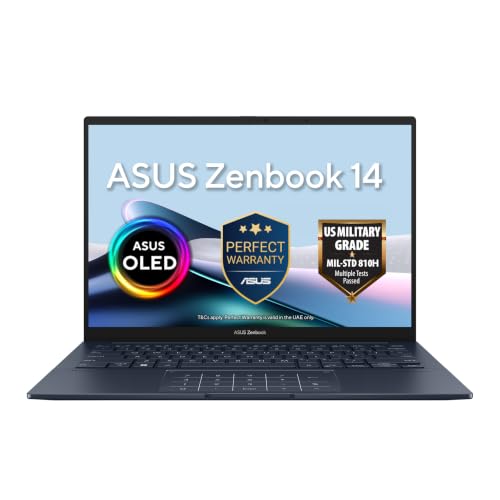
ASUS Zenbook 14 OLED UX3405CA-SU1650W Laptop
Why We Love It

ASUS Zenbook Duo Laptop (2026)
Why We Love It
ASUS Zenbook 14 OLED UX3405CA-SU1652W Laptop
Why We Love It

ASUS Zenbook A14 Laptop
Why We Love It

Asus Zenbook 14 UM3406G
Why We Love It

ASUS Zenbook 14 UX3407QA-QD180W /Snapdragon X X126100 Purwa
Why We Love It
Quick Pick
10 Best Asus Zenbook Of 2026
Quick Pick
Asus Zenbook 14 14" WUXGA 2K (1920x1200) OLED Touch Screen, AMD Ryzen 9 465 AI PC, 16GB DDR5 Ram, 512GB SSD, Windows 11 Home, Co-Pilot PC, Jasper Grey
ASUS Zenbook 14 AI Laptop (Jade Black) | AMD Ryzen AI 7 445, 14"WUXGA Display, 32GB LPDDR5X RAM, 1TB SSD, AMD Radeon Graphics, AMD XDNA NPU up to 50TOPS, Win11 [UM3406GA-QD031W]
ASUS Zenbook 14 Laptop 14" WUXGA OLED Touchscreen 500nits Peak HDR AMD AMD 6-core Ryzen AI 7 445 (Up to 50 AI Tops) 16GB RAM 1TB SSD Backlit Type-c for Creator Business Professional Win11Pro ICP Hub
Asus Zenbook A14; Copilot+ PC, Ultrathin Laptop, 14” WUXGA OLED, Snapdragon X Processor, 16 GB Memory, 512GB SSD, Wi-Fi 6E, Zabriskie Beige, UX3407QA-DS52-CA
ASUS Zenbook 14 OLED UX3405CA-SU1650W Laptop | Intel® Core™ Ultra 9 285H Processor | 32GB RAM | 1TB 4.0 SSD | 14" 3K OLED Touchscreen 120Hz | Intel® Arc™ Graphics | Win11 Home | Eng/AR Keyboard | Blue
ASUS Zenbook Duo Laptop (2026), Dual 14” OLED 3K 144Hz Touch Display, Intel Core Ultra 9 Processor 386H, Intel Graphics, 32GB RAM, 1TB SSD, Sleeve and Stylus Included, WiFi 7, Windows 11, Moher Gray
ASUS Zenbook 14 OLED UX3405CA-SU1652W Laptop | Intel Core Ultra 7 255H Processor | 16GB RAM | 512GB PCIe 4.0 SSD | 14" 3K OLED Touchscreen 120Hz | Intel Graphics | win11 Home | Eng/Ar Keyboard | Blue
ASUS Zenbook A14 Laptop, 14" WUXGA OLED 60Hz Display, Snapdragon X Plus X1P 42 100, 16GB LPDDR5X RAM, 512GB PCIe 4.0 SSD, Qualcomm Adreno GPU, Windows 11 Home, Zabriskie Beige(Upgraded)
Asus Zenbook 14 UM3406G, 14" OLED WUXGA 60Hz, AMD Ryzen AI 7 445, 16GB RAM 1TB SSD, AMD Radeon Graphics, Windows 11 Home. Jade Black
ASUS Zenbook 14 UX3407QA-QD180W /Snapdragon X X126100 Purwa SE/16GB RAM/1TB SSD/14 WUXGA (1920x1200) OLED/Windows 11 Home, Eng/Arb keyboard - Zabriskie Beige
Buying Guide: Asus Zenbook
📋 Table of Contents
1How much RAM do I actually need for everyday use?
For basic tasks like web browsing and office apps, 8GB is sufficient. If you multitask heavily or use photo/video editing software, aim for at least 16GB. More than 32GB is usually only necessary for advanced workstations or gaming laptops.
2Is an SSD or HDD better for storage, and why?
SSDs are faster, more durable, and boot up systems in seconds, making them ideal for most users. HDDs offer more storage for the price but are slower and more prone to damage. A hybrid setup (SSD for the OS and HDD for files) can be a good middle ground.
3What screen size and resolution should I choose for my needs?
13-14 inches is great for portability, while 15-17 inches suits media consumption and productivity. For clarity, 1080p is standard, but 4K is better for creative work. Higher resolution on smaller screens can strain the eyes, so balance size and pixels carefully.
4How long should a laptop battery last for all-day use?
Look for at least 8-10 hours of battery life for general use. Laptops with OLED screens or low-power processors often last longer. Actual runtime depends on brightness, apps, and background processes, so check real-world reviews for accuracy.
5What are the most important ports to look for?
At minimum, include USB-A, USB-C (preferably Thunderbolt 3 or 4), and an HDMI port for connecting to external displays. A card reader and headphone jack are also handy for some users. Consider docking stations if you need more connectivity.
How we choose
Our editors are people who genuinely love testing and writing about products. We compare each product's real-world usability and strengths, then distill what matters most into our own "Why We Love It" points — so you get an honest, at-a-glance sense of what counts before you buy.