10 Best Asus Rog Of 2026
Asus Rog — Reviews, Recommendations & Updated Buying Guide November 2026


ASUS ROG Strix G16 (2025) Gaming Laptop
Why We Love It


ASUS ROG Strix XG27AQDMGR
Why We Love It

ASUS ROG Strix OLED 27” 1440P Gaming Monitor (XG27AQWMG) ―
Why We Love It

ASUS ROG Swift OLED PG32UCDM Gen 3 32" 4K UHD QD-OLED Gaming
Why We Love It

ASUS ROG Strix G16 (Eclipse Gray) Gaming Laptop
Why We Love It

ASUS ROG Zephyrus G16 GU605CP (2025) Gaming Laptop
Why We Love It
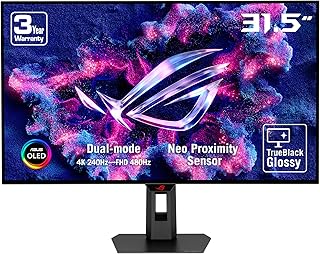
ASUS ROG Strix XG32UCWMG Monitor ―32" TrueBlack Glossy
Why We Love It

ASUS ROG Strix G16 Gaming Laptop (UAE Version)
Why We Love It

ASUS ROG Strix OLED XG27AQDMES gaming monitor ― 27-inch
Why We Love It

Asus ROG Sheath II XXL Gaming Mouse Pad
Why We Love It
Quick Pick
10 Best Asus Rog Of 2026
Quick Pick
ASUS ROG Strix G16 (2025) Gaming Laptop, 16” FHD+ 16:10 165Hz/3ms, NVIDIA® GeForce RTX™ 5060, Intel® Core™ i7 Processor 14650HX, 16GB DDR5, 1TB Gen 4 SSD, Wi-Fi 7, Windows 11 Home, G615JMR-AS74
ASUS ROG Strix XG27AQDMGR - OLED-Monitor - Gaming - 68.6 cm (27")
ASUS ROG Strix OLED 27” 1440P Gaming Monitor (XG27AQWMG) ― QHD, TrueBlack Glossy Tandem OLED, 280Hz, 0.03ms, Neo Proximity Sensor, DisplayHDR True Black 500, 99% DCI-P3, DisplayWidget, 3yr Warranty | TrueBlack Glossy OLED, Neo Proximity Sensor, 0.03ms, DisplayHDR 500, 99% DCI-P3, FreeSync Premium, for PS5 and Xbox
ASUS ROG Swift OLED PG32UCDM Gen 3 32" 4K UHD QD-OLED Gaming Monitor, 240Hz, 0.03ms GTG, G-SYNC Compatible, FreeSync Premium Pro, HDMI 2.1, DisplayPort 1.4, USB-C 90W - Black
ASUS ROG Strix G16 (Eclipse Gray) Gaming Laptop | NVIDIA RTX 5050 8GB | Intel Core i7 14650HX | 16GB RAM | 1TB SSD | 16"FHD+ 165Hz | Win11 [G615JHR-1SG7821W]
ASUS ROG Zephyrus G16 GU605CP (2025) Gaming Laptop | Intel Core Ultra 9-285H | 16″ 2.5K OLED 240Hz | RTX 5070 | 16GB RAM | 1TB SSD | Wi-Fi 7 | Thunderbolt 4 | Eclipse Gray
ASUS ROG Strix XG32UCWMG Monitor ―32" TrueBlack Glossy, Dual Mode (4K@240Hz, FHD@480Hz), 0.03ms, heatsink, OLED Care Pro, Neo Proximity Sensor, VESA DisplayHDR 400 True Black, USB-C, HDMI 2.1 | Dual Mode 4K@240Hz FHD @ 480Hz, 0.03ms, Sync-Tech, HDR 400 TrueBlack, USB-C, DP, HDMI. USB Hub
ASUS ROG Strix G16 Gaming Laptop (UAE Version) | 16"FHD+ 165Hz Display, AMD Ryzen 9 8940HX, NVIDIA RTX5070 Ti 12GB GDDR7, 32GB RAM, 1TB SSD, Win11 - Eclipse Gray [G614PR-RV003W]
ASUS ROG Strix OLED XG27AQDMES gaming monitor ― 27-inch (26.5-inch viewable) 1440p 240 Hz, 0.03ms, Care Pro, ELMB, G-SYNC® compatible, 99% DCI-P3, and DisplayWidget Center
Asus ROG Sheath II XXL Gaming Mouse Pad, Advanced Cooling Soft Fabric, Anti-Fray, Nonslip, 900 x 400 x 3 mm, Black
Buying Guide: Asus Rog
📋 Table of Contents
1How much RAM do I really need for gaming?
At least 16GB is standard for most modern games and multitasking, while 32GB future-proofs your system for higher-end titles and content creation. Less than 16GB can lead to lag, especially in open-world or multiplayer games.
2Is a dedicated GPU better than integrated graphics?
Yes — a dedicated GPU (like an RTX or RX series) handles complex graphics and ray tracing, ensuring smooth performance at high settings. Integrated graphics work for casual or older games but struggle with modern AAA titles.
3What storage capacity should I choose for a gaming laptop?
A 1TB SSD is ideal for most users, offering fast load times and enough space for 10-15 large games. If budget allows, a 2TB SSD or a hybrid setup (1TB SSD + 2TB HDD) gives more flexibility without sacrificing speed.
4How important is a high refresh rate display for gaming?
A 144Hz or higher refresh rate reduces motion blur and input lag, making fast-paced games like FPS or racing titles feel smoother. For casual gaming, 60Hz is acceptable, but 120Hz or more is recommended for a competitive edge.
5Should I prioritize a lightweight or a powerful gaming laptop?
Powerful models are often heavier due to cooling systems and high-end components, while lighter laptops may sacrifice performance. If portability matters, look for a balance — 2.5kg or less with a mid-tier GPU and good battery life is a good compromise.
How we choose
Our editors are people who genuinely love testing and writing about products. We compare each product's real-world usability and strengths, then distill what matters most into our own "Why We Love It" points — so you get an honest, at-a-glance sense of what counts before you buy.