10 Best Asus Gaming Monitors Of 2026
Asus Gaming Monitors — Reviews, Recommendations & Updated Buying Guide November 2026


ASUS TUF Gaming Series 5 VG279QML5A Gaming Monitor: 27-inch
Why We Love It


ASUS TUF Gaming Series 5 - VG279Q5R Gaming Monitor – 27-inch
Why We Love It

ASUS ROG Strix XG27AQDMGR
Why We Love It

ASUS TUF Gaming VG249Q5R 24 Inch Full HD Monitor (200 Hz
Why We Love It

ASUS TUF Gaming VG279QM1A Gaming Monitor: 27-inch
Why We Love It

ASUS ROG Strix XG259QNS eSports Gaming Monitor: 25 inch
Why We Love It

ASUS ROG Strix OLED 27” 1440P Gaming Monitor (XG27AQWMG) ―
Why We Love It
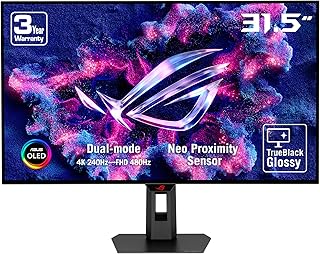
ASUS ROG Strix XG32UCWMG Monitor ―32" TrueBlack Glossy
Why We Love It

ASUS ROG Strix OLED XG27AQDMES gaming monitor ― 27-inch
Why We Love It

ASUS TUF Gaming Series 5
Why We Love It
Quick Pick
10 Best Asus Gaming Monitors Of 2026
Quick Pick
ASUS TUF Gaming Series 5 VG279QML5A Gaming Monitor: 27-inch Full HD Fast-IPS panel, 240Hz, 0.3ms, G-SYNC® compatible, AMD FreeSync™ Premium, ELMB SYNC, 99% sRGB, Height adjustment - Black
ASUS TUF Gaming Series 5 - VG279Q5R Gaming Monitor – 27-inch, Full HD(1920x1080), 200Hz, Fast IPS, ELMB, 0.3ms GTG (min.), Stereo speaker, DisplayWidget Center, AI Visual
ASUS ROG Strix XG27AQDMGR - OLED-Monitor - Gaming - 68.6 cm (27")
ASUS TUF Gaming VG249Q5R 24 Inch Full HD Monitor (200 Hz, 0.3ms GtG, FreeSync Premium, Adaptive Sync, ELMB, GameFast Input, HDR10, Fast-IPS Panel, 16:9, 1920x1080, DisplayPort, HDMI, Speaker)
ASUS TUF Gaming VG279QM1A Gaming Monitor: 27-inch, Full HD(1920x1080), 280Hz(OC), Fast IPS, ELMB Sync, 1ms (GTG), Freesync Premium™, G-Sync compatible, Variable Overdrive - Black
ASUS ROG Strix XG259QNS eSports Gaming Monitor: 25 inch (24.5 inch viewable) FHD (1920 x 1080), 380 Hz (OC), Fast IPS, 1 ms GTG (0.3 ms minimum), HDR, DisplayWidget Center - Black
ASUS ROG Strix OLED 27” 1440P Gaming Monitor (XG27AQWMG) ― QHD, TrueBlack Glossy Tandem OLED, 280Hz, 0.03ms, Neo Proximity Sensor, DisplayHDR True Black 500, 99% DCI-P3, DisplayWidget, 3yr Warranty | TrueBlack Glossy OLED, Neo Proximity Sensor, 0.03ms, DisplayHDR 500, 99% DCI-P3, FreeSync Premium, for PS5 and Xbox
ASUS ROG Strix XG32UCWMG Monitor ―32" TrueBlack Glossy, Dual Mode (4K@240Hz, FHD@480Hz), 0.03ms, heatsink, OLED Care Pro, Neo Proximity Sensor, VESA DisplayHDR 400 True Black, USB-C, HDMI 2.1 | Dual Mode 4K@240Hz FHD @ 480Hz, 0.03ms, Sync-Tech, HDR 400 TrueBlack, USB-C, DP, HDMI. USB Hub
ASUS ROG Strix OLED XG27AQDMES gaming monitor ― 27-inch (26.5-inch viewable) 1440p 240 Hz, 0.03ms, Care Pro, ELMB, G-SYNC® compatible, 99% DCI-P3, and DisplayWidget Center
ASUS TUF Gaming Series 5, VG279QM5A Gaming Monitor, 27 inch Full HD Fast IPS panel, 240Hz, 0.3ms , G SYNC compatible, AMD FreeSync Premium, ELMB SYNC, 99% sRGB, DisplayWidget Center, Gaming AI | 240 Hz, ELMB Sync, 0.3ms, 99% sRGB, Gaming AI, G-SYNC Compatible, DisplayWidget Center
Buying Guide: Asus Gaming Monitors
📋 Table of Contents
1What refresh rate is actually necessary for gaming?
For competitive gaming, 144Hz or higher is ideal to reduce motion blur and input lag. Casual gamers can get by with 120Hz, while 60Hz is only suitable for non-action-heavy titles and may feel sluggish in fast-paced games.
2Is a higher resolution always better for a gaming monitor?
Not necessarily — 1080p is fine for 144Hz monitors and budget setups, while 1440p balances sharpness and performance. 4K offers stunning visuals but requires a powerful GPU to maintain high frame rates, especially in modern AAA games.
3What panel type should I choose for the best gaming experience?
IPS panels offer excellent color and wide viewing angles, ideal for media and casual gaming. TN panels have the fastest response times and are best for competitive FPS games. VA panels provide deep blacks and high contrast but can suffer from slower motion handling.
4What response time is worth paying extra for?
Look for at least 5ms for general gaming, but 1ms or GtG (gray-to-gray) is best for fast-paced genres like FPS or fighting games. Be cautious of marketing terms like 'overdrive' — real-world performance should be verified through user reports or lab tests.
5Are adaptive sync technologies like G-Sync or FreeSync essential?
Yes, if you want to eliminate screen tearing and stuttering. G-Sync and FreeSync synchronize your monitor’s refresh rate with your GPU’s frame rate. For the best value, match your GPU brand (NVIDIA or AMD) with the corresponding sync technology.
How we choose
Our editors are people who genuinely love testing and writing about products. We compare each product's real-world usability and strengths, then distill what matters most into our own "Why We Love It" points — so you get an honest, at-a-glance sense of what counts before you buy.