10 Best Asus Gaming Headset Of 2026
Asus Gaming Headset — Reviews, Recommendations & Updated Buying Guide November 2026


ASUS ROG Pelta Wireless Gaming Headset (BT
Why We Love It

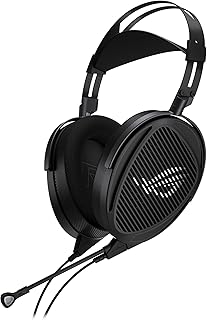
ASUS ROG Kithara Wired Gaming Headset (Open back
Why We Love It

ASUS ROG Pelta White Wireless Gaming Headset (BT
Why We Love It

ASUS ROG Delta II Wireless Gaming Headset (BT
Why We Love It

ASUS ROG Delta II Wireless Gaming Headset (50mm Titanium
Why We Love It
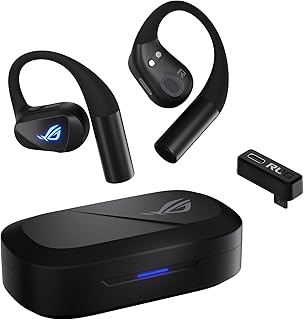
ASUS ROG Cetra Open Wireless Gaming Earbuds (2.4GHz & BT
Why We Love It
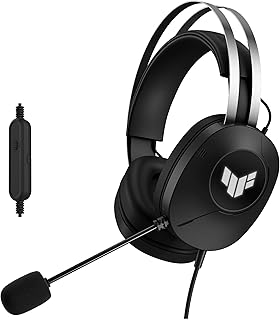
ASUS TUF Gaming H1 Gen II Headset (Lightweight 297-g
Why We Love It

ASUS ROG Delta II Wireless Gaming Headset with Detachable
Why We Love It

Asus ROG Theta 7.1 USB-C Gaming Headset with 7.1 Surround
Why We Love It
ASUS ROG Cetra Open Wireless Open Ear Earbuds
Why We Love It
Quick Pick
10 Best Asus Gaming Headset Of 2026
Quick Pick
ASUS ROG Pelta Wireless Gaming Headset (BT, ROG SpeedNova 2.4GHz, USB-C, Lightweight 309g, 50mm ROG Titanium-Plated Drivers, 10mm Super-Wideband Mic, RGB, 70HR Battery, For PC, Switch, PS5)- Black
ASUS ROG Kithara Wired Gaming Headset (Open back, 100mm HIFIMAN Planar Magnetic driver, Balanced Cable with Swappable 4.4/3.5/6.3 plugs, Full-band MEMS Boom Mic, For PC, Switch, PS5, mobile)- Black
ASUS ROG Pelta White Wireless Gaming Headset (BT, ROG SpeedNova 2.4GHz, USB-C, Lightweight 309g, 50mm Titanium-Plated Drivers, 10mm Super-Wideband Mic, RGB, 70HR Battery, PC, Switch, PS5)- White
ASUS ROG Delta II Wireless Gaming Headset (BT, ROG SpeedNova 2.4GHz, 3.5mm, 50mm Titanium-Plated Drivers, 10mm Super-Wideband Mic, 110HR, DualFlow Audio, For PC, Switch, PS5, Xbox)- Moonlight White
ASUS ROG Delta II Wireless Gaming Headset (50mm Titanium Drivers, ROG SpeedNova, 10mm Super-Wideband Mic, 110-HR Battery, DualFlow Audio, BT, 2.4GHz, 3.5mm, For PC, Switch, PS4, PS5, Xbox)- Black
ASUS ROG Cetra Open Wireless Gaming Earbuds (2.4GHz & BT, ROG SpeedNova, 14.2mm DLC-Coated Diaphragm Drivers, Personalized Audio Profles, Quad AI Noise-Canceling Mics, 16H Playtime, IPX5)- Black
ASUS TUF Gaming H1 Gen II Headset (Lightweight 297-g, wired USB-A connection, 40 mm Drivers, Virtual 7.1 Surround Sound, Team-Speak Certified Mic, Durable Ear Cushions, For PC, PS5)- Black
ASUS ROG Delta II Wireless Gaming Headset with Detachable Mic – Tri-Mode (BT, 2.4GHz, 3.5mm), 50mm Titanium-Plated Drivers, 110Hr Battery, Lightweight, for PC, PS5, PS4, Xbox, Switch, Mobile - White
Asus ROG Theta 7.1 USB-C Gaming Headset with 7.1 Surround Sound, AI Noise-Cancelling Microphone, ROG Home-Theatre-Grade 7.1 DAC, ESS Quad-Drivers for PC, PS5, Nintendo Switch and Smart Devices,Black
ASUS ROG Cetra Open Wireless Open Ear Earbuds – Dual-Mode (BT/2.4GHz), Quad AI Noise-Canceling Mic, Low Latency, 16H Playtime, IPX5 Water Resistant, for Daily/Workout/Outdoor/Gaming Use - Black
Buying Guide: Asus Gaming Headset
📋 Table of Contents
1What's the difference between ASUS ROG and TUF gaming headsets?
ROG headsets are built for competitive gaming with lighter designs and sharper audio, while TUF models prioritize durability and comfort for longer sessions. TUF headsets typically cost less and work well for casual players, whereas ROG is better if you play competitive shooters or want premium sound quality.
2Should I get a wired or wireless ASUS gaming headset?
Wired headsets have zero latency and never need charging, making them ideal for competitive play, but wireless offers freedom of movement and cleaner desk setup. Choose wireless if you value comfort during long sessions or play story-driven games; go wired if you play fast-paced competitive titles.
3What's the most important spec to check before buying?
Driver size (40mm or 50mm) and impedance matter for sound quality, but comfort is equally critical since gaming sessions can last hours. Check reviews about headband padding, ear cup fit, and weight—a heavy or uncomfortable headset ruins the gaming experience regardless of sound.
4Do I need surround sound in an ASUS gaming headset?
7.1 virtual surround sound helps in competitive games for directional audio cues, but stereo headsets work fine for most players and often sound more natural. Surround is worth it if you play tactical shooters like Counter-Strike or Valorant where enemy position matters; skip it for casual gaming.
5What should I check about microphone quality?
Look for noise-cancelling mics that isolate your voice from background noise—essential if you play team games. A detachable or flip-to-mute mic is convenient, and USB or 3.5mm connection type matters depending on your gaming device.
How we choose
Our editors are people who genuinely love testing and writing about products. We compare each product's real-world usability and strengths, then distill what matters most into our own "Why We Love It" points — so you get an honest, at-a-glance sense of what counts before you buy.