10 Best Asus 32 Inch Computer Monitor Of 2026
Asus 32 Inch Computer Monitor — Reviews, Recommendations & Updated Buying Guide November 2026

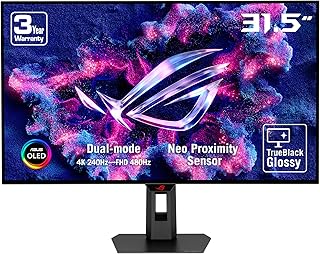
ASUS ROG Strix XG32UCWMG Monitor ―32" TrueBlack Glossy
Why We Love It


ASUS ROG Strix XG32WCS USB Type-C Gaming Monitor–32-inch
Why We Love It
ASUS ROG Strix XG32WCMS USB Type-C Gaming Monitor
Why We Love It

ASUS TUF Gaming VG328H1B Curved Monitor –31.5 inch Full HD
Why We Love It

ASUS ROG Strix XG32UCWG
Why We Love It

ASUS TUF Gaming 32" 1080P Curved Monitor (VG328H1B)
Why We Love It

ASUS ROG XG32UCG 32 Inch 4K 60Hz USB-C G-SYNC UHD Gaming
Why We Love It

ASUS ProArt Display PA278QV Gen2 (PA278QGV) Professional
Why We Love It

ASUS ROG Strix XG32UCDS Gaming Monitor
Why We Love It

ASUS ProArt Display PA32QCV
Why We Love It
Quick Pick
10 Best Asus 32 Inch Computer Monitor Of 2026
Quick Pick
ASUS ROG Strix XG32UCWMG Monitor ―32" TrueBlack Glossy, Dual Mode (4K@240Hz, FHD@480Hz), 0.03ms, heatsink, OLED Care Pro, Neo Proximity Sensor, VESA DisplayHDR 400 True Black, USB-C, HDMI 2.1 | Dual Mode 4K@240Hz FHD @ 480Hz, 0.03ms, Sync-Tech, HDR 400 TrueBlack, USB-C, DP, HDMI. USB Hub
ASUS ROG Strix XG32WCS USB Type-C Gaming Monitor–32-inch, 2560x1440, Curved, 180Hz (Above 144Hz), 1ms (GTG), Fast VA, Extreme Low Motion Blur Sync, USB Type-C, FreeSync, DisplayWidget Center, HDR
ASUS ROG Strix XG32WCMS USB Type-C Gaming Monitor – 32-inch (31.5 viewable) 2560x1440, Curved, 280Hz (Above 144Hz), 1ms (GTG), Fast VA, Extreme Low Motion Blur Sync
ASUS TUF Gaming VG328H1B Curved Monitor –31.5 inch Full HD (1920x1080), 165Hz (Above 144Hz), Extreme Low Motion Blur, Adaptive-sync, FreeSync Premium, 1ms (MPRT)
ASUS ROG Strix XG32UCWG, 31.5" 4K UHD OLED Gaming Monitor (3840 x 2160), 0.03ms Response Time, 165Hz, Compatible with G-SYNC, USB-C, DisplayPort, HDMI, Audio Jack, Display Widget Center, Black | (3840x2160), 0.03ms Response Time, 165Hz, Compatible with G-SYNC, USB-C, DisplayPort, HDMI, Audio Jack, DisplayWidget Center
ASUS TUF Gaming 32" 1080P Curved Monitor (VG328H1B) - Full HD, 165Hz (Supports 144Hz), 1ms, Extreme Low Motion Blur, Speaker, Adaptive-Sync, FreeSync Premium, VESA Mountable, HDMI, Tilt Adjustable
ASUS ROG XG32UCG 32 Inch 4K 60Hz USB-C G-SYNC UHD Gaming Monitor | Dual Mode FHD 320Hz, Fast IPS, ELMB Sync, DCI-P3 95%, Gaming AI, DisplayHDR 400, Aura Sync, 1ms, DP, 0.3ms, for PS5 and Xbox
ASUS ProArt Display PA278QV Gen2 (PA278QGV) Professional Monitor – 27-inch, IPS, QHD (2560 x 1440), 120Hz, Light Sync, ergonomic stand, VESA MediaSync, Green Sustainability - Grey
ASUS ROG Strix XG32UCDS Gaming Monitor, 31.5" 4K UHD QD-OLED (3840 x 2160), 165Hz, 0.03ms (GTG) Response Time, Neo Proximity Sensor, G-SYNC Compatible, DisplayWidget Center, Black
ASUS ProArt Display PA32QCV, 31.5-inch 6K IPS Professional Monitor (6016 x 3384), 60Hz, 5ms (GTG) Response Time, 98% DCI-P3, Color Accuracy ΔE < 2, Thunderbolt 4 Ports, HDMI, DisplayPort
Buying Guide: Asus 32 Inch Computer Monitor
📋 Table of Contents
1Is a 32-inch monitor too big for a desk?
A 32-inch monitor works well if your desk is at least 60cm deep and you sit about 60-80cm away from it. If you're closer than that, the screen becomes harder to scan and you'll strain your neck. Measure your setup first before buying.
2What refresh rate should I choose for gaming?
For competitive gaming, look for 144Hz or higher, though you'll need a powerful graphics card to take advantage of it. For general use and casual gaming, 60Hz is fine and costs less. The difference matters most if you play fast-paced games regularly.
3What's the difference between IPS and VA panels in ASUS monitors?
IPS panels offer better colour accuracy and wider viewing angles, making them ideal for design work and content creation. VA panels provide deeper blacks and higher contrast, which suits gaming and movies better. Choose based on what you'll use the monitor for most.
4Does resolution matter at 32 inches?
Yes—at 32 inches, 1080p (Full HD) looks blurry because the pixels are spread too far apart. Go for 1440p minimum, or 4K if your GPU can handle it and you do detailed work like photo editing. This is one of the most important specs at this screen size.
5What connections do I need to check?
Make sure the monitor has HDMI, DisplayPort, or both depending on your device. If you use a laptop or older PC, check for USB-C with power delivery so you can charge and display from one cable. Also check if it has USB ports if you want to connect peripherals directly.
How we choose
Our editors are people who genuinely love testing and writing about products. We compare each product's real-world usability and strengths, then distill what matters most into our own "Why We Love It" points — so you get an honest, at-a-glance sense of what counts before you buy.