10 Best Arcade Sticks Of 2026
Arcade Sticks — Reviews, Recommendations & Updated Buying Guide November 2026


HORI PlayStation 5 Fighting Stick Alpha (TEKKEN 8 Edition)
Why We Love It


HORI Fighting Stick Mini for PS5
Why We Love It

8Bitdo Arcade Stick for Xbox Series X|S
Why We Love It

Qanba N3 Drone 2 Wired Joystick for PlayStation 5/4 and PC
Why We Love It

Qanba B1 Titan Wired Joystick for PlayStation 5/4 and PC
Why We Love It
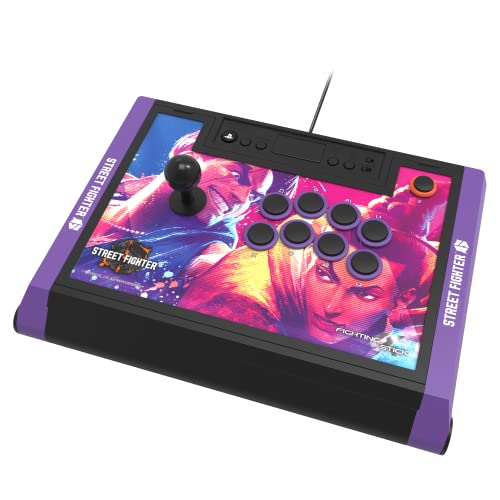
HORI PlayStation 5 Fighting Stick Alpha (Street Fighter 6
Why We Love It

MAYFLASH Arcade Stick F700 for PS5
Why We Love It
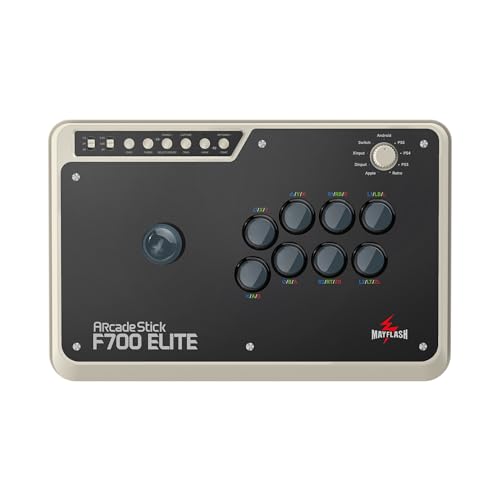
MAYFLASH Arcade Stick F700 Elite with Sanwa buttons and
Why We Love It

Fighting Stick Gaming Controller
Why We Love It

Razer Kitsune All-Button Optical Arcade Controller for PS5 &
Why We Love It
Quick Pick
10 Best Arcade Sticks Of 2026
Quick Pick
HORI PlayStation 5 Fighting Stick Alpha (TEKKEN 8 Edition) - Tournament Grade Fightstick for PS5, PS4, PC - Officially Licensed by Sony
HORI Fighting Stick Mini for PS5, PS4, and PC - Officially Licensed by Sony
8Bitdo Arcade Stick for Xbox Series X|S, Xbox One and Windows 10, Arcade Fight Stick with 3.5mm Audio Jack - Officially Licensed (Black)
Qanba N3 Drone 2 Wired Joystick for PlayStation 5/4 and PC (Fighting Stick) Officially Licensed Sony Product
Qanba B1 Titan Wired Joystick for PlayStation 5/4 and PC (Fighting Stick) Officially Licensed Sony Product
HORI PlayStation 5 Fighting Stick Alpha (Street Fighter 6 Edition) - Tournament Grade Fightstick for PS5, PS4, PC - Officially Licensed by Sony
MAYFLASH Arcade Stick F700 for PS5, PS4, Switch, Switch 2, Windows, Apple, Android and more. Fight Stick Support Wireless Bluetooth, 2.4G Receiver and Wired Connection
MAYFLASH Arcade Stick F700 Elite with Sanwa buttons and joystick for PS5, PS4, Switch/Switch 2, Windows, Apple, Android and more. Fighting Stick Support Wireless Bluetooth, 2.4G and Wired Connection
Fighting Stick Gaming Controller, Sensitive USB Wired Game Joystick, Stable Signal Ergonomic Retro Arcade Fighting Controller, Games Console Gamepad for PS3 for PS4 for Switch PC
Razer Kitsune All-Button Optical Arcade Controller for PS5 & PC: Low-Profile Optical Switches, Slim Form Factor, Removable Top Plate, Chroma RGB Lighting, USB Type C - 2XKO Edition
Buying Guide: Arcade Sticks
📋 Table of Contents
1What input types should I look for in an arcade stick?
Most arcade sticks use microswitches for buttons and optical or mechanical switches for directional pads. Optical D-pads offer faster response and durability, while mechanical switches are more affordable but may wear out faster with heavy use.
2How many buttons do I actually need for different games?
A standard 6-button layout (2 punch, 2 kick, start/select) is ideal for most arcade games. 8-button sticks add extra options for modern or modded games, but may be overkill for traditional fighting games or 2D brawlers.
3What build quality should I prioritize for long-term use?
Look for a solid metal chassis and reinforced PCB to prevent flexing and damage. A well-secured D-puck or Sanwa JLF D-pad ensures precise inputs and longevity, especially for competitive or frequent use.
4Is a wired or wireless connection better for arcade sticks?
Wired sticks offer the most reliable and lag-free performance, which is crucial for competitive play. Wireless models are more convenient but may introduce input delay or require regular battery charging, which can be a drawback in tournaments.
5What accessories are essential for setup and portability?
A sturdy carrying case and a durable USB cable are must-haves. For modding or custom builds, consider extra buttons, D-pads, and a screwdriver set to adjust tension and alignment for optimal feel and performance.
How we choose
Our editors are people who genuinely love testing and writing about products. We compare each product's real-world usability and strengths, then distill what matters most into our own "Why We Love It" points — so you get an honest, at-a-glance sense of what counts before you buy.