10 Best Amazon Whole Home Wifi Systems Of 2026
Amazon Whole Home Wifi Systems — Reviews, Recommendations & Updated Buying Guide November 2026


TP-Link Deco M4(3-pack) AC1200Mbps Whole Home Mesh WiFi
Why We Love It


TP-Link Deco M4(2-Pack) AC1200Mbps Whole Home Mesh System
Why We Love It

TP-Link Deco X20 AX1800 Whole Home Mesh WiFi 6 System
Why We Love It

TP-Link Deco WiFi 6 Mesh System (Deco X20)
Why We Love It

TP Link Deco E4 AC1200 Advanced Whole Home Mesh Wi Fi System
Why We Love It

TP-Link AC1200 Whole Home Mesh WiFi System
Why We Love It

TP-Link Deco E4(3-Pack) Whole Home Mesh WiFi System
Why We Love It

Eero Amazon 6 dual-band mesh Wi-Fi 6 router
Why We Love It

TP-Link Deco X60(3-pack) AX5400Mbps Whole Home Mesh WiFi 6
Why We Love It
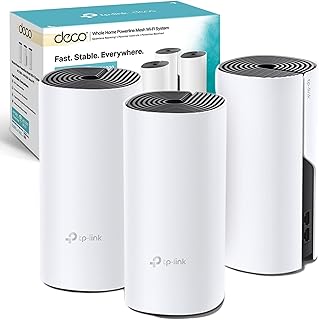
TP-Link Deco P9(3-pack) AC1200Mbps Whole Home Powerline Mesh
Why We Love It
Quick Pick
10 Best Amazon Whole Home Wifi Systems Of 2026
Quick Pick
TP-Link Deco M4(3-pack) AC1200Mbps Whole Home Mesh WiFi System, up to 4000 sq ft Coverage, Qualcomm CPU, Dual-Band WiFi Booster with Gigabit Ports, Compatible with Amazon Echo/Alexa, Parent Control
TP-Link Deco M4(2-Pack) AC1200Mbps Whole Home Mesh System, Seamless & Speedy WiFi Extender, Up to 2800 ft² Coverage, Work with Amazon Alexa, Router and Internet Booster Replacement
TP-Link Deco X20 AX1800 Whole Home Mesh WiFi 6 System, AI-Driven Mesh, Up to 5,800 Sq ft Coverage, 1 GHz Quad-Core CPU, Compatible with Amazon Alexa, With TP-Link HomeShield's kit, Pack of 3, White
TP-Link Deco WiFi 6 Mesh System (Deco X20) - Covers up to 5800 Sq.Ft, Replaces Wireless Routers and Extenders, 3-Pack, 6 Ethernet Ports in Total, Supports Wired Backhaul, Dual-Band WiFi
TP Link Deco E4 AC1200 Advanced Whole Home Mesh Wi Fi System, Covergae upto 4000 Sq. Ft. Parental Controls 3 Pack, White, DECO E4(3-PACK)
TP-Link AC1200 Whole Home Mesh WiFi System | Whole House Coverage up to 140 m². Unified Network. Gigabit ports. Parental Control. App Deco.
TP-Link Deco E4(3-Pack) Whole Home Mesh WiFi System, Seamless Roaming Speed AC1200Mbps for Large Home, up to 4,000 Sq Ft Coverage, Work with Amazon Echo/Alexa, Router and WiFi Booster Replacement | Homogeneous WiFi throughout the house, compatible with all Boxes, ideal HD streaming
eero Amazon 6 dual-band mesh Wi-Fi 6 router | with built-in Zigbee smart home hub
TP-Link Deco X60(3-pack) AX5400Mbps Whole Home Mesh WiFi 6 System, up to 7,100 Sq ft Coverage, AI Driven WiFi Booster, 1 GHz Quad-Core CPU, Compatible with Amazon Alexa, HomeShield Security,Easy Setup | 1 GHz Quad-Core CPU, Dual-Band AI-Roaming WiFi Extender Booster, Gigabit Ports, IoT Network, HomeShield, Alexa & Google
TP-Link Deco P9(3-pack) AC1200Mbps Whole Home Powerline Mesh WiFi System, Up to 6000 Sq ft Coverage, Dual-Band WiFi Booster with HomePlug AV1000, Gigabit Ports, Qualcomm Quad-core CPU
Buying Guide: Amazon Whole Home Wifi Systems
📋 Table of Contents
1How many nodes do I need for full coverage?
Aim for one node per 100-150 square meters, depending on walls and obstacles. Most systems include a base unit and 1-3 satellite nodes, but larger homes may need additional nodes for dead zones in basements or upper floors.
2Does mesh or dual-band matter for performance?
Mesh systems self-optimise for the fastest path to your device, ideal for large homes. Dual-band (2.4GHz and 5GHz) splits traffic for better speed and less interference, while tri-band adds a dedicated backhaul for smoother performance with many devices.
3What speed should I look for in a router?
For 4K streaming and online gaming, look for at least 1200Mbps on the 5GHz band. If you have many devices or use heavy bandwidth, consider systems with 2000Mbps or higher for future-proofing and reduced lag.
4Can I control the system with a voice assistant?
Many systems support voice assistants for tasks like turning off the network at bedtime or checking connected devices. Ensure the system you choose is compatible with your preferred assistant for seamless integration.
5What setup features save time and hassle?
Look for systems with easy-to-use apps that guide you through setup and let you manage guest networks, parental controls, and device prioritisation. Self-healing systems automatically adjust for signal drops, reducing the need for manual troubleshooting.
How we choose
Our editors are people who genuinely love testing and writing about products. We compare each product's real-world usability and strengths, then distill what matters most into our own "Why We Love It" points — so you get an honest, at-a-glance sense of what counts before you buy.