10 Best Acer Touchscreen Laptops Of 2026
Acer Touchscreen Laptops — Reviews, Recommendations & Updated Buying Guide November 2026


Acer Chromebook Spin 312 2-in-1 Touchscreen Laptop
Why We Love It


Acer Chromebook Plus Spin 714 Laptop with Google AI
Why We Love It

Acer Aspire Laptop, 14" WUXGA Touch IPS Display
Why We Love It

Acer Chromebook Spin 714 14" Touchscreen FHD+ 2-in-1 Laptop
Why We Love It

Acer Chromebook 311 Laptop for Business Students 2025
Why We Love It
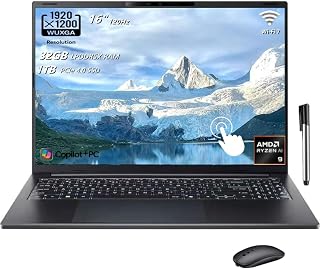
Acer Swift Go 16 AI Copilot+PC Laptop
Why We Love It

HP - 15.6" Full HD Touch-Screen Laptop
Why We Love It

HP Laptop - AMD Ryzen 5-7520U / 15.6inch FHD Touch/ 512GB
Why We Love It

Acer Spin 311-2H 11.6" 2-in-1 Touchscreen Chromebook (Intel
Why We Love It

Acer Aspire Lite 16 Laptop
Why We Love It
Quick Pick
10 Best Acer Touchscreen Laptops Of 2026
Quick Pick
Acer Chromebook Spin 312 2-in-1 Touchscreen Laptop, 12.2" WUXGA Display, Intel Core i3-N305 Processor, 8GB LPDDR5 RAM, 128GB eMMC Storage, ChromeOS, Wi-Fi 6E, Silver, with Laptop Sleeve and Stylus Pen
acer Chromebook Plus Spin 714 Laptop with Google AI, 14" WUXGA Touchscreen, Intel Core Ultra 5 115U, 8GB LPDDR5 RAM, 256GB SSD, Backlit Keyboard, Thunderbolt 4, Chrome OS
Acer Aspire Laptop, 14" WUXGA Touch IPS Display, Intel Ultra 5-226V, 8 Cores, 16GB LPDDR5X RAM,1TB SSD, BK, AI Copilot+PC, Webcam, Windows 11 Home, TWE 16GB USB Pen
Acer Chromebook Spin 714 14" Touchscreen FHD+ 2-in-1 Laptop, 13th Gen Intel 10-Core i5-1335U (Beat i7-1270P), 8GB LPDDR4X RAM, 128GB PCIe SSD, WiFi 6, Bluetooth 5.2, Backlit Keyboard, Chrome OS
Acer Chromebook 311 Laptop for Business Students 2025, Intel N4500 Dual-Core Processor, 11.6" HD Display, 4GB RAM, 192GB (64GB eMMC + 128GB Card), Webcam WiFi
Acer Swift Go 16 AI Copilot+PC Laptop, 16-Inch WUXGA 120Hz Touch Display, AMD Ryzen AI 9 465 (10 Cores, up to 50 Tops), 32GB RAM, 1TB SSD, Windows 11, Wi-Fi 7, Backlit KB
HP - 15.6" Full HD Touch-Screen Laptop - Intel Core i5 1334U 2023-16GB Memory - 512GB SSD - Natural Silver (15-FD0215DX)
HP Laptop - AMD Ryzen 5-7520U / 15.6inch FHD Touch/ 512GB SSD / 8GB RAM/Shared AMD Radeon Graphics/Windows 11 / English Keyboard/Natural Silver/International Version - [15-FC0025DX]
Acer Spin 311-2H 11.6" 2-in-1 Touchscreen Chromebook (Intel 4-Core Celeron N4000, 64GB eMMC, 4GB RAM, Stylus, Webcam, IPS) Flip Convertible Home & Education Laptop, IST Computers Pen, Chrome OS
Acer Aspire Lite 16 Laptop, 16" WUXGA IPS Display, Intel Core i3-1305U, 8GB DDR5 RAM, 256GB SSD, Intel UHD Graphics, Silver
Buying Guide: Acer Touchscreen Laptops
📋 Table of Contents
1What's the difference between a 2-in-1 convertible and a standard Acer touchscreen laptop?
Convertible models have hinges that flip the screen back 360 degrees, letting you use them as tablets or tents, while standard touchscreen laptops stay in traditional clamshell form. Choose convertibles if you want flexibility for presentations or drawing; pick standard models if you just need touch input while keeping a traditional setup.
2Does a touchscreen drain the battery faster on Acer laptops?
Touchscreen adds some battery drain, but it's usually minor — expect 10-15% less runtime compared to non-touch versions with the same specs. If battery life is critical, check the specific model's battery capacity and real-world reviews rather than assuming all touchscreen models are poor on battery.
3What processor and RAM should I look for in an Acer touchscreen laptop?
For everyday work and light multitasking, Intel Core i5 or AMD Ryzen 5 with 8GB RAM works fine; jump to i7/Ryzen 7 and 16GB if you'll be running heavy programs like video editing or design software. Touchscreen performance itself doesn't depend heavily on these specs, so prioritize them based on what apps you actually use.
4How do I know if an Acer touchscreen will hold up to regular use?
Check for Gorilla Glass or hardened screens (they resist scratches better), and read user reviews specifically mentioning durability and responsiveness after months of use. Also verify the warranty covers accidental damage or touch input failures, as screen repairs can be costly.
5Is a 14-inch or 15-inch Acer touchscreen better for my needs?
Go for 14-inch if you move it around frequently or need something compact; pick 15-inch if it'll stay mostly on a desk since the larger screen makes touch navigation more comfortable. Both sizes work fine for touchscreen input, so portability and desk space should drive your decision.
How we choose
Our editors are people who genuinely love testing and writing about products. We compare each product's real-world usability and strengths, then distill what matters most into our own "Why We Love It" points — so you get an honest, at-a-glance sense of what counts before you buy.