10 Best A4 Wireless Color Printer Of 2026
A4 Wireless Color Printer — Reviews, Recommendations & Updated Buying Guide November 2026


Canon PIXMA TR4755i Wireless Colour 4-in-1 Inkjet Photo
Why We Love It


HP Smart Tank 581 Wireless All In One Printer
Why We Love It

Brother Wireless All in One Printer
Why We Love It

Phomemo M08F Thermal Printer Bluetooth Portable Wireless
Why We Love It

EPSON EcoTank L3252 Home ink tank printer A4
Why We Love It

Portable Printers Wireless for Travel
Why We Love It

Brother HL-L3220CW Colour Wireless LED Printer
Why We Love It

Canon i-SENSYS MF752Cdw 3-in-1 Colour Laser Printer
Why We Love It

EPSON EcoTank L3550 Home Ink Tank Printer
Why We Love It
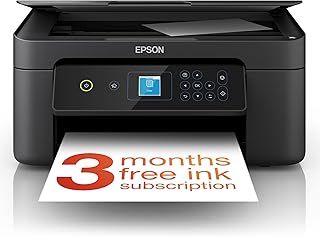
Epson Expression Home XP-3205 3-in-1 Ink Multifunction
Why We Love It
Quick Pick
10 Best A4 Wireless Color Printer Of 2026
Quick Pick
Canon PIXMA TR4755i Wireless Colour 4-in-1 Inkjet Photo Printer - A4 Print, Copy, Scan, Fax, Wi-Fi - ADF, Auto 2 Sided-Print - PIXMA Print Plan Compatible - Suitable for Home Office Print
HP Smart Tank 581 Wireless All In One Printer, Print, Scan, Copy, Print up to 6000 black or 6000 color pages - Grey [4A8D4A]
Brother Wireless All in One Printer, DCP-L3520CDW, with Advanced LED Color Laser Print, Duplex & Mobile Printing, High Yield Ink Toner
Phomemo M08F Thermal Printer Bluetooth Portable Wireless Inkless Mobile Printer for Office, Home, Images, Compatible with Phone & Laptop(Gray) | Wireless Inkless Mobile Printer for Office, Home, Images, Compatible with Phone & Laptop
EPSON EcoTank L3252 Home ink tank printer A4, colour, 3-in-1 printer with WiFi and SmartPanel App connectivity
Portable Printers Wireless for Travel, N80 Wireless Thermal Printer Bluetooth Inkless Printer Support 8.5" X 11" US Letter & A4, Compatible with iOS, Android, Laptop
Brother HL-L3220CW Colour Wireless LED Printer | Single Function |USB 2.0 | A4|UK Plug
Canon i-SENSYS MF752Cdw 3-in-1 Colour Laser Printer - Wireless, Wi-Fi, PC Connected & Network - A4 Print, Copy, Scan - 33ppm, Auto Duplex Print, Auto Scan - Compatible w/Mac, Windows, Linux
EPSON EcoTank L3550 Home Ink Tank Printer, High-speed A4 colour 3-in-1 printer with Wi-Fi Direct, Photo Printer, with Smart App connectivity
Epson Expression Home XP-3205 3-in-1 Ink Multifunction Printer, Scanner, Copier, WiFi, 1440dpi, Duplex, 1.45 Inch Display, DIN A4, incl. 3 Months Readyprint Flex Trial
Buying Guide: A4 Wireless Color Printer
📋 Table of Contents
1What print resolution should I look for in an A4 wireless color printer?
A minimum of 1200 x 1200 dpi ensures sharp text and vibrant photos. For professional documents or high-quality images, aim for 4800 x 1200 dpi or higher, which is common in premium inkjet models and provides smoother gradients and finer detail.
2Is a color laser or inkjet printer better for home use?
Inkjet printers offer richer color and are better for photos, while laser printers are faster and more cost-effective for high-volume text printing. For casual home use with mixed color and photo needs, an inkjet with pigment or dye-based inks is usually the better choice.
3How important is wireless connectivity for an A4 color printer?
Wireless (Wi-Fi or Bluetooth) is essential if you want to print from multiple devices without cables. Look for Wi-Fi Direct or MFi-certified Bluetooth for mobile printing. Some models also support cloud printing via Google Cloud Print or Apple AirPrint for added flexibility.
4What paper capacity is enough for most home users?
A 150-250 sheet paper tray is sufficient for casual home printing. If you print frequently or need to switch paper types often, a printer with a 250+ sheet tray and a manual feed slot for specialty media (like photo paper) will save time and reduce interruptions.
5Are third-party ink cartridges a good idea to save money?
Third-party inks can be cheaper but may void your warranty or cause clogging and color inconsistencies. Stick to OEM inks for the first few print jobs to ensure reliability, then try reputable third-party brands if you're satisfied with print quality and want to cut costs long-term.
How we choose
Our editors are people who genuinely love testing and writing about products. We compare each product's real-world usability and strengths, then distill what matters most into our own "Why We Love It" points — so you get an honest, at-a-glance sense of what counts before you buy.