10 Best 75 Wireless Keyboards Of 2026
75 Wireless Keyboards — Reviews, Recommendations & Updated Buying Guide November 2026

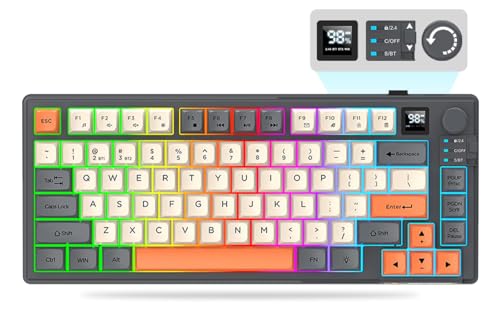
Mechanical Keyboard
Why We Love It


Keychron B1 Pro Ultra-Slim Wireless Keyboard
Why We Love It

Aula AU75 Wireless Mechanical Keyboard
Why We Love It

AULA F75 Mechanical Keyboard
Why We Love It

GravaStar Mercury K1 75% Wireless Mechanical Gaming Keyboard
Why We Love It

Redragon BS8772 RP Wireless Keyboard and Mouse Combo
Why We Love It

HyperX Alloy Rise 75 Wireless Hot-Swappable 75% Mechanical
Why We Love It

EPOMAKER x Aula F75 Gasket Mechanical Keyboard
Why We Love It

EPOMAKER Ajazz AK820 Pro 75% Gasket-Mounted Mechanical
Why We Love It

EPOMAKER X Aula EA75 MAX Wireless Gaming Keyboard with
Why We Love It
Quick Pick
10 Best 75 Wireless Keyboards Of 2026
Quick Pick
Mechanical Keyboard, 75% Wireless Gaming Keyboard with Display& Volume Knob, BT/2.4G/USB-C, RGB with PBT Keycaps, 2000mAh Battery, Software Support for PC Laptop Windows (Black)
Keychron B1 Pro Ultra-Slim Wireless Keyboard – Arabic & English Layout, 75% Scissor-Switch, Bluetooth 5.2/2.4GHz / USB-C, 1200-Hour Battery, Programmable via ZMK, Mac/Windows/Linux
Aula AU75 Wireless Mechanical Keyboard, Hot Swap Gasket Gaming Keyboard with Knob, BT/2.4G/Wired Custom Keyboard, 4000mAh Battery, 75% Five-Layer Padding PBT Keycaps, RGB Side-Strip for Win/Mac/PC.
AULA F75 Mechanical Keyboard,75% Wireless Gaming Creamy Keyboards,Hot Swappable Custom Bluetooth Keyboard with Knob, BT5.0/2.4GHz/USB-C,RGB Backlit,Sounding-Switches PBT Keycaps- Gradient Blue
GravaStar Mercury K1 75% Wireless Mechanical Gaming Keyboard – Hot-Swappable, Custom Kailh Switches, Durable Aluminum Alloy Design, and Radiant Backlighting (Gradient Black)
Redragon BS8772 RP Wireless Keyboard and Mouse Combo, 75% 78 Keys 2.4Ghz Wireless Low-Profile Mechanical Keyboard w/Rechargeable Battery, Single Blue Blacklight, 2400 DPI Ergonomic Mouse
HyperX Alloy Rise 75 Wireless Hot-Swappable 75% Mechanical Gaming Keyboard | PC | Up to 80 Hours | Backlighting On | Dual Wireless 2.4GHz & Bluetooth
EPOMAKER x Aula F75 Gasket Mechanical Keyboard, 75% Wireless Hot Swappable Gaming Keyboard with Five-Layer Padding&Knob, BT/2.4GHz/USB-C, RGB (Black Gradient, LEOBOG Reaper Switch)
EPOMAKER Ajazz AK820 Pro 75% Gasket-Mounted Mechanical Keyboard with TFT Screen, 3 Modes(BT/2.4G Wireless & Type-C Wired), Sound Dampening Foams (White Purple, Ajazz Gift Switch)
EPOMAKER X Aula EA75 MAX Wireless Gaming Keyboard with Screen & Knob
Buying Guide: 75 Wireless Keyboards
📋 Table of Contents
1What battery life should I look for in a 75-wireless keyboard?
Opt for models with at least 24 hours of battery life on a single charge. Keyboards with replaceable AA or AAA batteries offer flexibility, while those with built-in rechargeable batteries may require USB-C or wireless charging. Longer battery life is especially important for frequent users or those who travel often.
2What connection technology is best for a 75-wireless keyboard?
Bluetooth 5.0 or later is ideal for stable, low-latency performance and better range. Some keyboards use proprietary 2.4 GHz wireless technology, which can offer faster response times. Choose based on your device compatibility and whether you need multi-device pairing capabilities.
3What size and layout options are available for 75-wireless keyboards?
A 75% layout typically includes a compact design with a number row and arrow keys, but without a dedicated numeric keypad. Look for models with customizable keycaps or programmable keys for added functionality. Some include a built-in trackpad or touchpad for added convenience on smaller desks.
4Are mechanical or membrane switches better for a 75-wireless keyboard?
Mechanical switches offer a more tactile and durable typing experience, ideal for heavy users or those who prefer a clicky or linear feel. Membrane switches are quieter and more budget-friendly but may wear out faster. Choose based on your typing style and noise tolerance.
5What accessories are worth including with a 75-wireless keyboard?
A USB-C charging cable or battery compartment is essential for recharging or replacing batteries. Some models come with a wrist rest or stand for added comfort. A carrying case is useful for travel, and extra keycaps or a keycap puller can be helpful for customization or maintenance.
How we choose
Our editors are people who genuinely love testing and writing about products. We compare each product's real-world usability and strengths, then distill what matters most into our own "Why We Love It" points — so you get an honest, at-a-glance sense of what counts before you buy.