10 Best 7 In 1 Smart Door Lock Multi Bolt Of 2026
7 In 1 Smart Door Lock Multi Bolt — Reviews, Recommendations & Updated Buying Guide November 2026


Eufy Security Smart Lock C210
Why We Love It


ULTRALOQ Bolt Fingerprint WiFi Smart Lock with Handle
Why We Love It

Smart Lock
Why We Love It
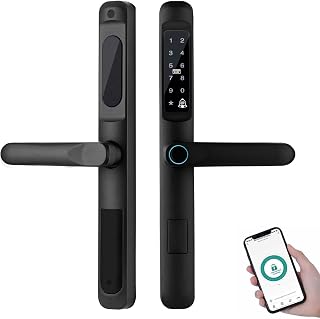
Smart Door Lock
Why We Love It

OBEST Smart Door Lock
Why We Love It

EZVIZ Smart Lock DL50FVS
Why We Love It
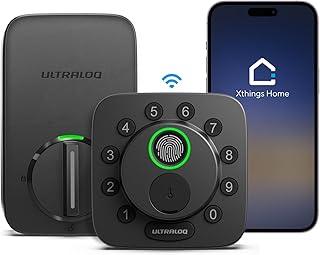
ULTRALOQ Bolt SE Smart Lock
Why We Love It

WELOCK ToucD41-UAE Biometric Fingerprint Smart Cylinder Door
Why We Love It

Makayuron Smart Door Lock
Why We Love It

Smart Door Lock with Bluetooth TTLock App
Why We Love It
Quick Pick
10 Best 7 In 1 Smart Door Lock Multi Bolt Of 2026
Quick Pick
eufy Security Smart Lock C210, 5-in-1 Keyless Entry Door Lock, Built-in WiFi Deadbolt, Smart Door Lock, No Bridge Required, Easy Installation, Touchscreen Keypad, App Remote Control, BHMA Cert
ULTRALOQ Bolt Fingerprint WiFi Smart Lock with Handle, Remote Access, Black
Smart Lock,Fingerprint Door Lock with 4585 Mortise.Keyless Entry Bluetooth Lock,Free APP,IC Card,Anti-peep Code,TT Lock App Control,for Home,Office,Apartment (R1)
Smart Door Lock, 6-in-1 Door Handle with Remote WiFi Weatherproof, Fingerprint Keyless Security Entry Door Lock, Electronic Deadbolt, Smartphone Access, Smart Door Handle for Home Apartment
OBEST Smart Door Lock, 5 in 1 Unlock Methods, Fingerprint Keyless Entry Handle, Password, Card, TUYA App Control, Mechanical Key, 4 AA Batteries, Suitable for Residential, Office, Hotel, Rental, Black
EZVIZ Smart Lock DL50FVS, 7-in-1 Keyless Entry Door Lock, 3D Face Recognition Door Lock, Built-in 8GB storage, 2-meter Night Vision, Active Intercom, App Control (6068)
ULTRALOQ Bolt SE Smart Lock, Built-in Wi-Fi, Matter Over Thread, Works with Apple Home, Alexa, Google, 7-in-1 Keyless Entry Deadbolt with Fingerprint ID, App, Keypad, Remote Control, 18 Months Battery | Works with Apple Home, Alexa, Google, Smart Door Locks for Front Door with Fingerprint ID, App, Code, Auto Lock, Deadbolt
WELOCK ToucD41-UAE Biometric Fingerprint Smart Cylinder Door Lock with Password WI-FI App RFID Card Unlock For Home Office Airbnb
Makayuron Smart Door Lock, 7IN1,3D Face Recognition,Palmprint, Fingerprint, IC card,Passcode,Mechanical keys.Tuya app supported.Equipped with 6068 mortise,Class C lock cylinder (M06-FH)
Smart Door Lock with Bluetooth TTLock App, Fingerprint, Passcode, 7*Cards & Key – 5-Way Access Control for Home and Office Security, Battery Included(T306TTble)
Buying Guide: 7 In 1 Smart Door Lock Multi Bolt
📋 Table of Contents
1What battery life should I look for in a 7 in 1 smart door lock multi bolt?
Opt for models with at least 6-12 months of battery life on a single charge, depending on usage. Frequent use of biometric scans, Wi-Fi connectivity, and alarm features can drain the battery faster, so look for locks with low-power modes or backup batteries for uninterrupted security.
2How does a 7 in 1 smart door lock compare to a standard smart lock?
A 7 in 1 lock offers additional features like multi-bolt locking, keyless entry, mobile app control, voice assistant integration, and real-time alerts. Standard locks typically only offer keyless entry and basic remote access, making the 7 in 1 ideal for users seeking comprehensive home security and convenience.
3What type of connectivity is best for a smart door lock?
Wi-Fi is ideal for full app control and remote access, while Bluetooth is better for short-range use with your phone. Zigbee or Z-Wave are good for smart home ecosystems but require a hub. Choose based on your home network setup and preferred smart devices.
4Is a multi-bolt system worth the extra cost?
Yes, if you live in a high-traffic or high-risk area. Multi-bolt systems provide added security by locking multiple points on the door, making forced entry more difficult. However, they may require more maintenance and are less common in standard door frames, so check compatibility with your door type.
5What security features should I prioritize in a 7 in 1 smart door lock?
Look for AES-256 encryption for data security, tamper alerts, and auto-locking functions. Two-factor authentication and biometric verification (like fingerprint or facial recognition) also enhance security. Avoid models with weak password policies or outdated firmware update support.
How we choose
Our editors are people who genuinely love testing and writing about products. We compare each product's real-world usability and strengths, then distill what matters most into our own "Why We Love It" points — so you get an honest, at-a-glance sense of what counts before you buy.