10 Best 6 In 1 Docking Stations Of 2026
6 In 1 Docking Stations — Reviews, Recommendations & Updated Buying Guide November 2026


UGREEN USB C Hub
Why We Love It


UGREEN Steam Deck Dock 4K@120Hz HDMI 6-in-1 USB C Docking
Why We Love It

6-in-1 USB-C Docking Station for Steam Deck
Why We Love It

Usb C Docking Station With 100W Pd Charging Port
Why We Love It

Docking Station For Steam Deck Rog Ally
Why We Love It
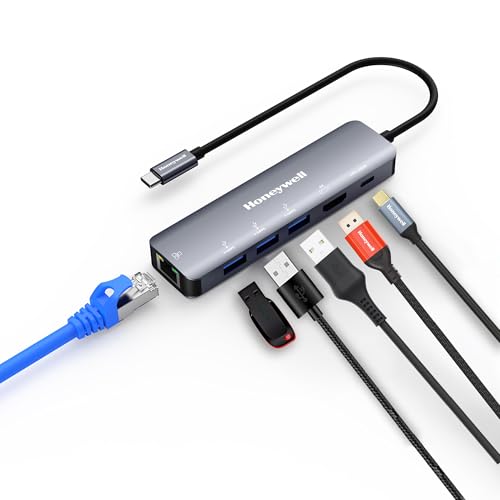
Honeywell New Launch 6-in-1 Type C Docking Station with 4K
Why We Love It

Baseus Docking Station USB C Hub (Upgrade) Invisible 6 in 1
Why We Love It

Lemorele USB C Docking Station Dual Monitor - 6 in 1
Why We Love It

ORICO 10Gbps Magnetic M.2 Docking Station
Why We Love It
Quick Pick
10 Best 6 In 1 Docking Stations Of 2026
Quick Pick
UGREEN USB C Hub, 6 in 1Revodok 4K@60Hz HDMI USB-C Multiport Adaptor | Type-C to HDMI Adapter, 4x 10Gbps USB-A & C Data Port, 100W PD, Aluminum Dock for MacBook Neo/Air/Pro, HP Laptops
UGREEN Steam Deck Dock 4K@120Hz HDMI 6-in-1 USB C Docking Station | 100W PD, 1Gbps Ethernet, USB-A & C Ports, Adjustable Stand, Detachable USB-C Cable for Steam Deck, ROG Xbox Ally X, Legion Go
6-in-1 USB-C Docking Station for Steam Deck, Aluminum Dock Hub with HDMI 2.0 (4K@60Hz), Gigabit Ethernet, 3 USB-A 3.0 Ports, USB-C Charging
Usb C Docking Station With 100W Pd Charging Port | Multiport 6 In 1 Hub Hdmi 4K30Hz Adapter, 3 Usb-A Data Ports(5.0Gbps) And Rj45(1000 Mbps)
Docking Station For Steam Deck Rog Ally, 6 In 1 Stream Dock With Hdmi 2.0 4K@60Hz, 1000Mbps Gigabit Ethernet, 3 Usb-A 3.0, And Full Speed Charging Usb-C Port Compatible Valve
Honeywell New Launch 6-in-1 Type C Docking Station with 4K HDMI port, 1GBPS RJ45 Ethernet Port, 3xUSB port & Type C 3.0 PD 100W, for All Type C Devices-Windows/MacBook, On-The-Go Feature
Baseus Docking Station USB C Hub (Upgrade) Invisible 6 in 1 Dongle Adapter with 4K HDMI 2 USB 3.0, USB-C PD 60W 3.5mm Audio Micro SD for iPad Pro 2018 2019 2020 2021 MacBook Pro and more
Lemorele USB C Docking Station Dual Monitor - 6 in 1, USB-C Hub with 2 HDMI 4K, 3 USB 3.0/2.0 and Type -C PD 100W, Multiport USB-C Dock for MacBook Dell Lenovo HP Laptop
ORICO 10Gbps Magnetic M.2 Docking Station, 6-in-1 USB C HUB & M.2 2230 NVMe Enclosure with HDMI 4K@60Hz, AUX, 100W PD Pass-Through Charging for iPhone/MacBook/iPad MG5
Buying Guide: 6 In 1 Docking Stations
📋 Table of Contents
1What devices are typically supported by a 6 in 1 docking station?
Most 6 in 1 docking stations support USB-C or Thunderbolt 3/4 laptops, including models from Dell, HP, Lenovo, and MacBook Pro. They often include ports for HDMI, USB-A, SD card slots, Ethernet, and 3.5mm audio jacks, making them ideal for connecting monitors, peripherals, and storage on the go.
2How important is the port speed for my workflow?
Look for at least 10Gbps USB 3.2 or Thunderbolt 3 speeds for fast data transfers and smooth 4K video output. Slower docks (USB 2.0 or 5Gbps) can bottleneck performance, especially when using external SSDs or dual monitors with high resolution.
3Can I use a 6 in 1 dock with both Windows and macOS?
Yes, most docks are OS-agnostic, but check for compatibility with your specific laptop model. Some docks may require drivers for full functionality on Windows, while macOS typically works plug-and-play with USB-C or Thunderbolt docks.
4Is a power delivery (PD) port necessary, and how much wattage should it support?
A PD port is essential if you want to charge your laptop through the dock. Look for at least 60W PD to support most 13-15” laptops, though 85-100W is better for high-performance models. Without PD, you’ll need a separate charger for your laptop.
5What are the most useful accessories to pair with a 6 in 1 docking station?
A second monitor, a wired keyboard and mouse, and an external SSD or HDD maximize the dock’s value. Some docks also support dual monitors via HDMI and DisplayPort, so check if your setup needs multiple video outputs for productivity or creative work.
How we choose
Our editors are people who genuinely love testing and writing about products. We compare each product's real-world usability and strengths, then distill what matters most into our own "Why We Love It" points — so you get an honest, at-a-glance sense of what counts before you buy.