10 Best 4k Webcams For Pc Of 2026
4k Webcams For Pc — Reviews, Recommendations & Updated Buying Guide November 2026


UGREEN 4K/30fps Webcam for PC
Why We Love It

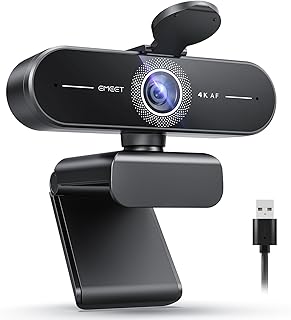
EMEET C60E 4K Webcam for Streaming & Gaming – PDAF Autofocus
Why We Love It

UGREEN FineCam 4K Webcam
Why We Love It

EMEET C960 4K Webcam for PC
Why We Love It
UGREEN USB Webcam, Full HD 1080P/30fps Webcam for PC
Why We Love It

EMEET S600L 4K Webcam for Streaming with Ring Light
Why We Love It

UGREEN Full HD 1080P/30fps Webcam for PC/Laptop/Mac (Space
Why We Love It

Logitech Brio 100 Full HD Webcam for Meetings and Streaming
Why We Love It

Logitech MX Brio Ultra HD 4K Collaboration and Streaming
Why We Love It

EMEET C960 Ultra 4K Webcam for Mac & PC
Why We Love It
Quick Pick
10 Best 4k Webcams For Pc Of 2026
Quick Pick
UGREEN 4K/30fps Webcam for PC, Full HD Webcam for Laptop, Clear Stereo Audio Microphone, Auto Light Correction, 70° View Web Cam USB Camera for Live Streaming, Video Calling, Conferences | Support Clear Stereo Audio Microphone, 70° View Web Cam USB Camera for Laptop, Live Streaming, Video Calling, Conferences
EMEET C60E 4K Webcam for Streaming & Gaming – PDAF Autofocus | Dual Mics, Live Streaming Camera with Auto Light Correction, Plug & Play USB Webcam for PC & Mac
UGREEN FineCam 4K Webcam, 1/2.55" Sensor, AI Noise Canceling Microphone | Auto Focus &Face AE, Portrait Mode with Privacy Cover and Tripod, Compatible for PC Mac Streaming Conference OBS Zoom Teams
EMEET C960 4K Webcam for PC, 4K UHD Sony Sensor, PDAF Auto Focus, Dual AI Noise-Cancelling Mics, Auto Light Correction, 73° FOV, Plug&Play Webcam w/Privacy Cover, Works w/Zoom/Teams/Google Meet
UGREEN USB Webcam, Full HD 1080P/30fps Webcam for PC, Webcam with Microphone, Clear Stereo Audio, Auto Light Correction, 85° View Web Cam for Live Streaming, Video Calling, Studying, Conferences | Clear Stereo Audio Mics, Fixed Focus, Plug&Play, 85° View Webcam USB Camera for Live Streaming, Video Calling, Conferences
EMEET S600L 4K Webcam for Streaming with Ring Light, 1/2" Sensor, 0.2S PDAF | 4 Lighting Modes Rainbow Effect, 2 Mics, Dial Control, 4K Webcam with Light for OBS/Twitch/YouTube/Zoom/PC/Mac
UGREEN Full HD 1080P/30fps Webcam for PC/Laptop/Mac (Space Grey) | Clear Stereo Audio Mics, Auto Light Correction, 85° View Web Cam USB Camera for Live Streaming, Video Calling, Conferences
Logitech Brio 100 Full HD Webcam for Meetings and Streaming, Auto-Light Balance, Built-in Mic, Privacy Shutter, USB-A, for Microsoft Teams, Google Meet, Zoom and More-Graphite | Lighting Balance, Microphone, Lens Cap, USB-A for Microsoft Teams, Google Meet, Zoom etc - Graphite
Logitech MX Brio Ultra HD 4K Collaboration and Streaming Webcam, 1080p at 60 FPS, Dual Noise Reducing Mics, Show Mode, USB-C, Webcam Cover, Works with Microsoft Teams, Zoom, Google Meet, Graphite | 1080p/60fps, dual noise cancelling microphones, USB-C, webcam protection, Microsoft Teams, Zoom, Google Meet - Graphite
EMEET C960 Ultra 4K Webcam for Mac & PC, 1/1.5" Large Sensor, Metal Body | 0.2s Autofocus DRC, Whiteboard Mode, Built-in Privacy Cover, 2 Mics, USB Webcam 4K for Meetings, Streaming & Content Creation
Buying Guide: 4k Webcams For Pc
📋 Table of Contents
1What frame rate should I look for in a 4K webcam for smooth video?
Aim for at least 30 frames per second (fps) in 4K resolution for fluid motion. Some models offer 60fps, which is ideal for fast movement or gaming streams, but may require a stronger PC to handle the higher processing load.
2Does autofocus matter for a 4K webcam, or is manual focus enough?
Autofocus is better for dynamic use like video calls or streaming, as it adjusts to your position automatically. Manual focus works if you sit in a fixed spot, but can be inconvenient if you move around often.
3What type of sensor is best for low-light performance in a 4K webcam?
Look for a CMOS sensor with at least 1.0 megapixels and a large aperture (f/2.0 or wider) for better low-light performance. Some models also include IR (infrared) LEDs for night vision, which is great for security or late-night streaming.
4Are built-in mics in 4K webcams good enough for professional use?
Most built-in mics are decent for casual use but lack clarity and noise cancellation for professional setups. For clearer audio, consider pairing your webcam with an external USB mic or a dedicated audio interface.
5What connectivity options should I check for compatibility with my PC?
Most 4K webcams use USB 3.0 or higher for fast data transfer and power. Ensure your PC has the right ports, and look for models with plug-and-play support for hassle-free setup without needing extra drivers.
How we choose
Our editors are people who genuinely love testing and writing about products. We compare each product's real-world usability and strengths, then distill what matters most into our own "Why We Love It" points — so you get an honest, at-a-glance sense of what counts before you buy.