10 Best 4k Smart Monitor Of 2026
4k Smart Monitor — Reviews, Recommendations & Updated Buying Guide November 2026


Samsung 32" M8 M80F Smart Monitor (AI & Smart Features) 4K
Why We Love It

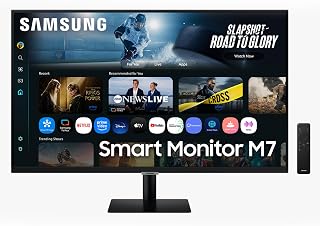
Samsung M70F 32 Inch 4K Smart AI Monitor
Why We Love It

LG Smart Monitor Swing 32U889SA-W 32-Inch 4K UHD (3840x2160)
Why We Love It

Samsung 32-Inch 4K Smart VA Monitor With Webcam
Why We Love It

LG Gaming Monitor LG Ultragear 27G810A-B 27 inch / 4K UHD
Why We Love It

ASUS ZenScreen MS27UC 27 Inch 4K Smart Monitor
Why We Love It

ASUS ProArt PA279CRV 27 Inch 4K UHD USB-C HDR Professional
Why We Love It

LG SMART Monitor 27U511SA-W - Full HD 1080p IPS 27 Inch
Why We Love It

LG 27" 4K UHD Ultrafine™ Monitor (27US550-W)
Why We Love It

LG SMART Monitor Swing 32U889SA-W
Why We Love It
Quick Pick
10 Best 4k Smart Monitor Of 2026
Quick Pick
Samsung 32" M8 M80F Smart Monitor (AI & Smart Features) 4K (3,840 x 2,160) 60hz, With Camera USB Type C, Height Adjustable, For Entertainment and Work, LS32FM801UMXUE
Samsung M70F 32 Inch 4K Smart AI Monitor, VA Panel, 3840 x 2160, 60Hz, 4ms (G/G), Speaker, Gaming Hub, 4K Upscaling, Voice Control, Smart TV Apps & AI Features, HDR10, USB-C, HDMI LS32FM700UUXEN
LG Smart Monitor Swing 32U889SA-W 32-Inch 4K UHD (3840x2160) IPS Touchscreen on a Fully Adjustable Wheeled Base HDR10, webOS, Built-in Speaker, HDMI, USB Type-C, Tilt/Height/Swivel/Pivot Stand, White
Samsung 32-Inch 4K Smart VA Monitor With Webcam,HDMI,USB-C,USB Hub,WiFi,Bluetooth M8 M80C White
LG Gaming Monitor LG Ultragear 27G810A-B 27 inch / 4K UHD /180Hz / IPS / 1ms GtG, Dual-Mode/VESA DisplayHDR 400 / HDMI 2.1 / NVIDIA G-SYNC Compatible, AMD FreeSync Premium/DCI-P3 95%
ASUS ZenScreen MS27UC 27 Inch 4K Smart Monitor, Speaker, HDMI, USB-C 90W | UHD (3840 x 2160) IPS, 99% sRGB, DisplayPort, Google TV, Harman Kardon, VESA Mount, Wireless Display, Netflix, YouTube
ASUS ProArt PA279CRV 27 Inch 4K UHD USB-C HDR Professional Monitor for Mac | Calman Verified, Delta E<2, Daisy Chain, IPS, USB-C PD 96W, Height Adjustable, 99% DCI-P3, 99% Adobe RGB
LG SMART Monitor 27U511SA-W - Full HD 1080p IPS 27 Inch, 100Hz, 5ms Response Time, Built-in Speakers, Wifi & Bluetooth Connectivity, Virtually Borderless, webOS Smart TV Apps, Remote Control, White
LG 27" 4K UHD Ultrafine™ Monitor (27US550-W), 3840 x 2160 IPS Display 5ms 60Hz HDR 10, Tilt/Height/Swivel/Pivot Adjustment DisplayPort, HDMI, White
LG SMART Monitor Swing 32U889SA-W - 4K UHD IPS Touchscreen 32 inch, HDR10, Ergonomic Rolling Stand, Built-in Speakers, Wifi, Bluetooth, Airplay webOS Smart TV app, HDMI, USB-C, POGO, White
Buying Guide: 4k Smart Monitor
📋 Table of Contents
1What resolution and refresh rate should I look for in a 4K smart monitor?
A true 4K monitor offers 3840x2160 resolution for sharp visuals, and a 60Hz refresh rate is standard for most tasks. For smoother motion, look for 120Hz or higher, especially if you use it for gaming or video editing. Higher refresh rates often come with higher price tags and may require a compatible graphics card.
2Does HDR support make a real difference for a 4K smart monitor?
Yes — HDR (High Dynamic Range) enhances contrast and color accuracy, making videos and images look more vivid and lifelike. Look for HDR10 or Dolby Vision support for better performance. HDR is most impactful for media consumption and content creation, not for general office use.
3What input options are essential for a 4K smart monitor?
At least one HDMI 2.1 port and a USB-C port with DisplayPort and power delivery are essential for modern devices. These allow for high-speed data transfer, 4K video output, and charging your laptop or phone. Multiple USB ports are also useful for connecting peripherals like keyboards or mice.
4Is a built-in smart TV platform worth the extra cost?
A built-in smart platform like Android TV or WebOS adds convenience for streaming and app access without needing a separate device. However, it increases the price and may add bloatware. If you already have a streaming stick or box, a basic monitor without smart features may be more cost-effective.
5What size and panel type should I choose for my needs?
For general use, 27-inch to 32-inch monitors with IPS panels are ideal for accurate colors and wide viewing angles. Larger sizes (34-inch and up) are better for multitasking or media consumption. VA panels offer deeper blacks but slower response times, while IPS is better for color accuracy and versatility.
How we choose
Our editors are people who genuinely love testing and writing about products. We compare each product's real-world usability and strengths, then distill what matters most into our own "Why We Love It" points — so you get an honest, at-a-glance sense of what counts before you buy.