10 Best 4k Hdmi Switches For Xbox Of 2026
4k Hdmi Switches For Xbox — Reviews, Recommendations & Updated Buying Guide November 2026


UGREEN HDMI Switch 3 in 1 Out
Why We Love It


UGREEN HDMI 2.1 Switch
Why We Love It

UGREEN Video Capture Card HDMI to USB C 2K@30Hz 1080P@60fps
Why We Love It

UGREEN 4K@60 Hz HDMI Switch
Why We Love It

UGREEN 8K@60 Hz HDMI 2.1 Switch
Why We Love It

BENFEI HDMI Switch 4 in 1 Out 4K@60Hz
Why We Love It

4K HDMI Splitter 1 in 2 Out (Mirror Only) – HDMI 2.0 4K@60Hz
Why We Love It

KASTWAVE 3 Port HDMI 2.1 HDR 3In 1Out
Why We Love It
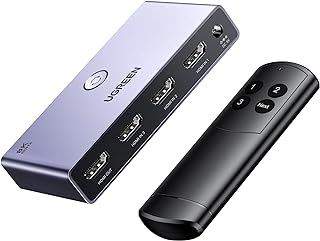
UGREEN HDMI 2.1 Switch
Why We Love It

UGREEN HDMI Switch 5 in 1 Out
Why We Love It
Quick Pick
10 Best 4k Hdmi Switches For Xbox Of 2026
Quick Pick
UGREEN HDMI Switch 3 in 1 Out, 4K@60Hz HDMI Splitter with Remote Supports HDR10+, 3D, Dolby Atmos, HDCP 2.2 Switcher Compatible with PS5/4/3 Xbox Series Roku TV Fire Stick Blu-Ray Player | Supports HDR10+, 3D, Dolby Atmos, HDCP 2.2 Switcher Compatible with PS5/4/3 Xbox Series Roku TV Fire Stick Blu-Ray Player
UGREEN HDMI 2.1 Switch, 4K@120Hz 8K@60Hz HDMI Switcher 2 IN 1 OUT, Hdmi Splitter Support HDCP 2.3, VRR & ALLM, Dolby Vision & Atmos for Switch 1/2, PS5 Pro/5/4, Xbox, Roku, Firestick, HDTV, Monitor | HDMI Splitter Support HDCP 2.3, VRR & ALLM, Dolby Vision & Atmos for Switch 1/2, PS5 Pro/5/4, Xbox, Roku, Firestick, HDTV
UGREEN Video Capture Card HDMI to USB C 2K@30Hz 1080P@60fps Game Record | 4K Passthrough Loop-out Streaming Device Compatible with Quest 3/3s PS5 PS4 Xbox Switch iPad DSLR Camera Mac Laptop PC
UGREEN 4K@60 Hz HDMI Switch, Bidirectional, 2-in-1-out/1-in-2-out | 3D, Compatible with Xbox, PS4, PS5, Blu-ray Players, Roku, TV Sticks, HDTVs and Monitors
UGREEN 8K@60 Hz HDMI 2.1 Switch, 2-in-1-out, 4K@120 Hz, 48 Gbps | 3D, CEC, HDR, Dolby Audio, Compatible with PS5/PS4, Fire TV Stick, Xbox, Apple TV and Blu-ray Players
BENFEI HDMI Switch 4 in 1 Out 4K@60Hz, 2K@144Hz, HDCP 2.3 【with Adaptive Equalization support 10M HDMI Transmit】Compatible for PS5/4, Xbox, Roku, FireStick, Switch
4K HDMI Splitter 1 in 2 Out (Mirror Only) – HDMI 2.0 4K@60Hz, 1080p@240Hz | Auto Downscaling, 18Gbps, HDCP 2.2, Smart Power Detection, Duplicate Screens for Dual Monitors for TV, Monitor, PS5, Xbox
KASTWAVE 3 Port HDMI 2.1 HDR 3In 1Out, 8K Switcher with Remote Control Directional, 8K@60Hz 4K@120Hz HDR 48Gbps 3D HDMI Video Converter, Compatible with XBOX PS5 Projectors Monitors
UGREEN HDMI 2.1 Switch, 4K@120Hz HDMI Switch 3 In 1 Out, 8K@60Hz HDMI Switcher Support VRR & ALLM, Dolby Vision & Atmos, High-Speed 48Gbps HDMI Splitter 3 In 1 Out for PS5, Xbox, TV Box, DVD Player
UGREEN HDMI Switch 5 in 1 Out, HDMI Splitter 4K@60Hz with Remote, 5 Port HDMI 2.0 Switcher Support 3D CEC HDR HDCP 2.2, Compatible with PS5/4, Xbox, TV Box, Blu-Ray, HDTV, Monitor, Projector (Black) | HDMI Switcher Support 3D CEC HDR HDCP 2.2, Compatible with PS5/4, Xbox, TV Box, Blu-Ray, HDTV, Monitor, Projector
Buying Guide: 4k Hdmi Switches For Xbox
📋 Table of Contents
1What HDMI version and bandwidth should I look for with 4K support?
Choose a switch with HDMI 2.1 and at least 48 Gbps bandwidth to handle 4K at 60Hz or 8K at 30Hz. Older versions like HDMI 2.0 may limit frame rates or color depth, especially for gaming on next-gen consoles like the Xbox Series X/S.
2Does the switch support variable refresh rate (VRR) and auto low latency mode (ALLM)?
Yes — VRR and ALLM reduce screen tearing and input lag, which is crucial for smooth Xbox gaming. Look for switches that explicitly list these features to ensure a better gaming experience with compatible displays.
3How many ports do I actually need for my setup?
Most users need at least 3-4 input ports for devices like the Xbox, a 4K Blu-ray player, and a streaming box. A 4x1 or 4x2 switch offers flexibility, while 2x1 models are best for minimal setups with only one or two devices.
4Is a powered or unpowered switch better for my Xbox?
A powered switch is recommended for stable 4K signal transmission, especially when using long HDMI cables or multiple devices. Unpowered switches may work for basic setups but can cause signal dropouts or reduced performance in more complex configurations.
5What should I check for compatibility with my Xbox and display?
Ensure the switch supports the same color depth (like 10-bit or 12-bit) and resolution as your display and Xbox. Also, confirm it works with your TV or monitor’s input settings to avoid issues like no signal or incorrect resolution detection.
How we choose
Our editors are people who genuinely love testing and writing about products. We compare each product's real-world usability and strengths, then distill what matters most into our own "Why We Love It" points — so you get an honest, at-a-glance sense of what counts before you buy.