10 Best 4k Document Camera Of 2026
4k Document Camera — Reviews, Recommendations & Updated Buying Guide November 2026


Ipevo V4K Ultra High Definition Usb Visualiser / Document
Why We Love It


INS-2 UHD 4K 13MP Document Camera
Why We Love It

INS-Flip 4 Foldable 4K 13MP Document Camera
Why We Love It
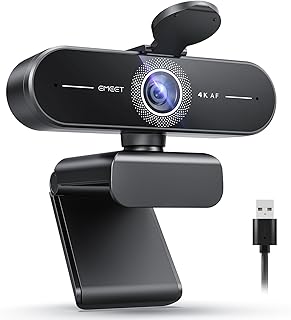
EMEET C60E 4K Webcam for Streaming & Gaming – PDAF Autofocus
Why We Love It

IRIScan Visualizer 7 4K Document Camera 13MP Grey Green A3
Why We Love It

IPEVO V4K PRO 120 4K USB Document Camera
Why We Love It

OKIOLABS OKIOCAM S2 Pro 4K USB Visualiser with OKIOPoint
Why We Love It
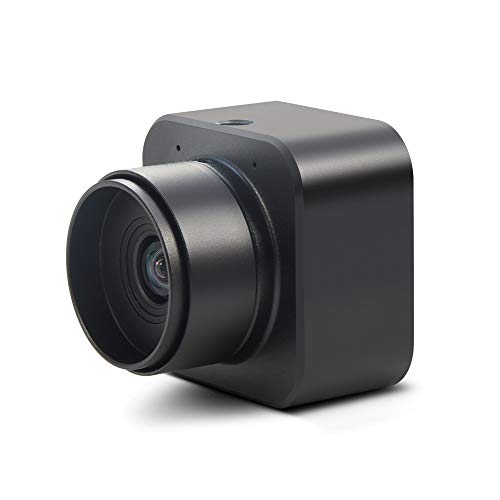
MOKOSE 4K HD USB Webcam Manual Focus Wide Angle for Desktop
Why We Love It

Ipevo V4K Ultra 13MP USB Document Camera
Why We Love It

8MP Visualiser/Document Camera, Webcam 4K with A3 format
Why We Love It
Quick Pick
10 Best 4k Document Camera Of 2026
Quick Pick
Ipevo V4K Ultra High Definition Usb Visualiser / Document Camera
INS-2 UHD 4K 13MP Document Camera, Built-in LED, Mic, A3 Capture | Dual Auto‑Focus, Plug & Play, Compatible with Mac, Windows, Chromebook, Ideal for large documents, artworks, big classrooms
INS-Flip 4 Foldable 4K 13MP Document Camera, LED, Mic,Light 0.67 lbs | Auto Focus, Plug & Play, Portable design, ultra-slim 0.68”, Works with Windows/Mac/Chromebook, Ideal for teaching & learning
EMEET C60E 4K Webcam for Streaming & Gaming – PDAF Autofocus | Dual Mics, Live Streaming Camera with Auto Light Correction, Plug & Play USB Webcam for PC & Mac
IRIScan Visualizer 7 4K Document Camera 13MP Grey Green A3 Portable Scanner for Education and Video Conferencing, USB Compatible with Windows and Mac
IPEVO V4K PRO 120 4K USB Document Camera, 120-degree FOV Lens, Sony CMOS Sensor, Swift Autofocus, AI Noise Reduction, Webcam, USB Plug and Play, Video Conferencing, Streaming, Work from Home
OKIOLABS OKIOCAM S2 Pro 4K USB Visualiser with OKIOPoint AI-Tracking, 13-mp, Webcam and Document Camera for Teaching, with LED Light, for PC/Mac/Chromebook, comes with Type-C Adaptor
MOKOSE 4K HD USB Webcam Manual Focus Wide Angle for Desktop and Laptop Live Streaming, 3840 x 2160 UVC Free Drive Video Calling Computer Camera
Ipevo V4K Ultra 13MP USB Document Camera, 4K Ultra HD Resolution, Auto-Focus, High-Definition Imaging, Plug and Play. On-The-go, for Teaching, visualization, Online Learning, and Web conferencing
8MP Visualiser/Document Camera, Webcam 4K with A3 format, LED Light, Image Invert Function, Fold, Dual Microphones for Mac OS, Windows, Zoom, OBS work (black)
Buying Guide: 4k Document Camera
📋 Table of Contents
1What frame rate should I look for in a 4K document camera for smooth video?
Aim for at least 30fps at 4K resolution for clear, smooth video. Some models offer 60fps for fast-moving objects or live demonstrations, but 30fps is standard and sufficient for most classroom or office use.
2Does a built-in LED light make a real difference in image quality?
Yes — a built-in LED light ensures consistent, even illumination, especially in low-light environments. Look for adjustable brightness and color temperature to avoid glare and match your room’s lighting conditions.
3What’s the ideal zoom range for a 4K document camera?
A digital zoom of 8x to 10x is typical and works well for most documents and objects. Optical zoom is rare in document cameras, so focus on models with sharp image quality at maximum digital zoom to avoid pixelation.
4Should I prioritize wired or wireless connectivity for my 4K document camera?
Wired HDMI or USB connections offer the most stable, high-quality signal with no lag, making them ideal for classrooms or presentations. Wireless models are more convenient but may suffer from latency or lower resolution, depending on the setup.
5What accessories are essential for a 4K document camera setup?
A sturdy stand or boom arm allows flexible positioning, while a remote control or software controls help adjust focus and zoom during use. A privacy cover or lens cap is also useful for protecting the camera when not in use.
How we choose
Our editors are people who genuinely love testing and writing about products. We compare each product's real-world usability and strengths, then distill what matters most into our own "Why We Love It" points — so you get an honest, at-a-glance sense of what counts before you buy.