10 Best 360 Rotating Laptop Stand For Desk Of 2026
360 Rotating Laptop Stand For Desk — Reviews, Recommendations & Updated Buying Guide November 2026


360° Rotating Laptop Stand for Desk
Why We Love It


SOUNDANCE 360 Rotating Laptop Stand
Why We Love It

NALACAL Adjustable Laptop Stand with 360° Rotating Base
Why We Love It

UGREEN Adjustable Laptop Stand for Desk | Rotating
Why We Love It

360° Rotating Laptop Stand for Desk
Why We Love It
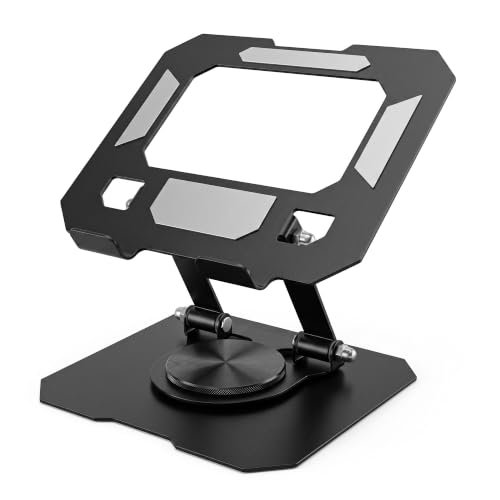
Duravel Laptop Stand for Desk
Why We Love It

Tounee Swivel Laptop Stand for Desk
Why We Love It

Adjustable Laptop Stand for Desk Ergonomic Riser with 360°
Why We Love It
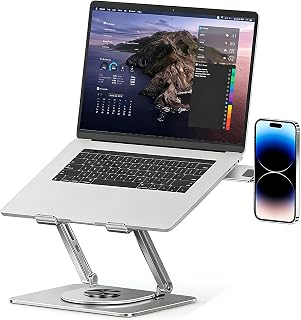
Laptop Stand for Desk
Why We Love It

Laptop Stand with 360° Rotating Base
Why We Love It
Quick Pick
10 Best 360 Rotating Laptop Stand For Desk Of 2026
Quick Pick
360° Rotating Laptop Stand for Desk,Adjustable Notebook Riser | Ergonomic, Height Adjustable,Hollow out Heat Dissipation Stable Structure for 10-16 Inch Laptop Macbook Notebook
SOUNDANCE 360 Rotating Laptop Stand, Adjustable Riser,10-17", Silver Grey | Ergonomic Height Angle, Foldable Protable, Hollow Heat Dissipation, Elevating Base for Office & Home
NALACAL Adjustable Laptop Stand with 360° Rotating Base - Portable Ergonomic Laptop Riser for Desk, Fits Laptops up to 15 Inches, Foldable and Easy to Carry, Ideal for Home, Office, and Travel
UGREEN Adjustable Laptop Stand for Desk | Rotating, Ergonomic Portable Computer Stand Laptop Holder Riser Compatible with MacBook, Air, Pro, All Laptop 10-17", Gray
360° Rotating Laptop Stand for Desk, Adjustable Aluminum Laptop Riser with Foldable Ergonomic Design, Height Adjustable Computer Holder for MacBook, iPad, HP, Lenovo Notebook 11-17.3 Inch, Silver
Duravel Laptop Stand for Desk, Adjustable Laptop Stand Holder with 360° Rotating Base, Ergonomic Laptop Riser Compatible with All Laptops and Tablets
tounee Swivel Laptop Stand for Desk, Adjustable Computer Stand Laptop Holder with 360° Rotating Base, Ergonomic Laptop Riser Compatible with Air, Pro, All Laptop 10-16"
Adjustable Laptop Stand for Desk Ergonomic Riser with 360° Rotating Base Foldable Notebook Computer Holder Compatible MacBook Air Pro Dell XPS More 10-17" Laptops (Black)
Laptop Stand for Desk, 360° Rotating Adjustable Laptop Holder with Magnetic Phone Holder – Sturdy Metal Tablet Stand, Ventilated Laptop accessories for Office & Home
Laptop Stand with 360° Rotating Base, Adjutable Height Muti-Angle, Ergonomic Laptop Riser for Collaborative Work, Foldable & Portable Laptop Stand, fits for All 10-17" Laptops (Gray)
Buying Guide: 360 Rotating Laptop Stand For Desk
📋 Table of Contents
1What weight capacity should I look for in a 360 rotating laptop stand?
Aim for a stand that supports at least 10–15 lbs (4.5–7 kg) to safely hold most 13–16-inch laptops and any added accessories like a keyboard or tablet. Lighter stands may wobble or tip, especially when rotated or adjusted mid-use.
2Is a 360-degree rotation really useful, or is 180 degrees enough?
A full 360-degree rotation is ideal for multi-angle positioning, especially if you use your laptop for video calls, presentations, or as a secondary monitor. 180-degree stands are cheaper but limit flexibility for shared viewing or ergonomic adjustments.
3What height range is best for a standing desk setup?
Look for a stand that adjusts from 10 to 20 inches (25–50 cm) above the desk to support proper sitting and standing postures. A wider range ensures compatibility with both standard and sit-stand desks, and helps align your screen with eye level.
4Should I prioritize a clamp or a suction base for my desk?
Clamp bases are more stable and work on most desk thicknesses (up to 2.5 inches or 6 cm), while suction bases are easier to move but less secure and only work on smooth, flat surfaces. For a permanent setup, a clamp is more reliable; for temporary use, suction is more convenient.
5Are built-in cooling vents or fans worth the extra cost?
If you use your laptop for gaming, video editing, or long work sessions, a stand with built-in cooling vents or a small fan can help prevent overheating. Basic models without cooling are fine for casual use, but airflow features add value for power users.
How we choose
Our editors are people who genuinely love testing and writing about products. We compare each product's real-world usability and strengths, then distill what matters most into our own "Why We Love It" points — so you get an honest, at-a-glance sense of what counts before you buy.