10 Best 34 Key Numeric Keypads Of 2026
34 Key Numeric Keypads — Reviews, Recommendations & Updated Buying Guide November 2026


Satechi Bluetooth Extended Numeric Keypad
Why We Love It


Satechi Bluetooth Extended Numeric Keypad
Why We Love It

Bluetooth Number Pad with Calculator
Why We Love It
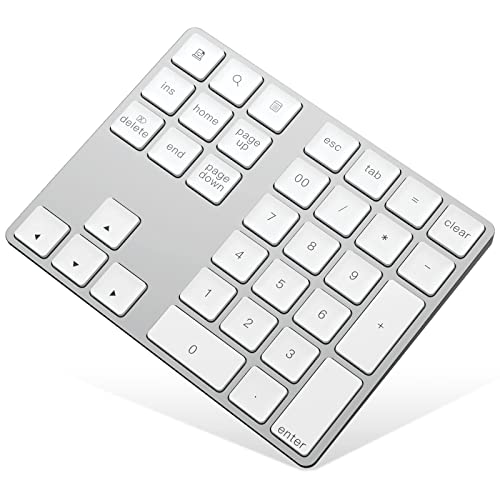
Excefore Bluetooth Number Pad
Why We Love It

LogiLink ID0120 Wireless Keypad 18 Keys Keypad for Windows
Why We Love It

Numeric Keypad, Ultra-Silent External Numeric Pad
Why We Love It

Bluetooth Numeric Keypad
Why We Love It

Bluetooth Numeric Keypad
Why We Love It

Qisan Numeric Keypad 34 Keys (30%) Mini Multifunctional
Why We Love It

Gurjot Number Pad
Why We Love It
Quick Pick
10 Best 34 Key Numeric Keypads Of 2026
Quick Pick
Satechi Bluetooth Extended Numeric Keypad, Rechargeable 34-Key, Space Gray | U.S. English layout, compatible with MacBook Air/Pro/Neo, iPad Air/Pro, Mac Mini, iMac
Satechi Bluetooth Extended Numeric Keypad, Rechargeable 34-Key, Silver | U.S. English layout, USB-C rechargeable, compatible with MacBook Air/Pro/Neo, iPad Air/Pro, Mac Mini, iMac
Bluetooth Number Pad with Calculator, Azonee Wireless 34-Key Numeric Keypad, 2-in-1 Slim Portable External Keypad for Data Entry & Calculation, Compatible with MacBook, Laptop, PC (White)
Excefore Bluetooth Number Pad, Rechargeable Wireless Numeric Keypad Slim 34-Keys External Numpad Keyboard Data Entry for Laptop, MacBook, MacBook Air/Pro, iMac, Windows, Surface Pro(Silver)
LogiLink ID0120 Wireless Keypad 18 Keys Keypad for Windows 2000/XP/ME/VISTA/7/8/10 Black
Numeric Keypad,Ultra-Silent External Numeric Pad,USB Rechargeable Number Pad Keyboard with 35 Keys for Ma cbook,Android, Windows(Black)
Bluetooth Numeric Keypad, Ultra-Thin Aluminum Rechargeable 34-Key Keypad, Bluetooth and Wired Connection Silent Portable, Compatible with Mac, Windows, iOS and Android Systems (Black, Numeric Keypad)
Bluetooth Numeric Keypad, Ultra-Thin Aluminum Rechargeable 34-Key Keypad, Bluetooth and Wired Connection Silent Portable, Compatible with Mac, Windows, iOS and Android Systems (White, Numeric Keypad)
Qisan Numeric Keypad 34 Keys (30%) Mini Multifunctional Wired Numpad Portable Keypad force
Gurjot Number Pad, Mechanical USB Wired Numeric Keypad with RGB LED Backlit,34 Keys Numpad Keyboard with PBT Keycaps Blue Switches for Windows/Mac Laptop,Computer,Desktop,PC,Notebook (Black)
Buying Guide: 34 Key Numeric Keypads
📋 Table of Contents
1What is the standard size and layout of a 34 key numeric keypad?
A 34 key numeric keypad typically includes a standard 10-digit numeric pad, a 26-key QWERTY layout, and often includes function keys or navigation buttons. Look for a compact, ergonomic design that fits comfortably on a desk or laptop, with key spacing that prevents accidental presses during fast typing.
2What materials are best for durability and tactile feedback?
Keycaps made from ABS or PBT plastic offer a good balance of durability and tactile feel, while rubber dome switches provide a soft, clicky response. Metal or reinforced plastic frames increase longevity, especially for heavy use in retail or office environments.
3Should I choose a wired or wireless 34 key numeric keypad?
Wired keypads offer consistent performance and lower latency, making them ideal for data entry or POS systems. Wireless models provide greater mobility but may require regular battery changes or charging. Choose based on your need for portability versus reliability in high-volume use.
4What features should I look for in a 34 key numeric keypad for data entry?
Look for keypads with anti-ghosting technology to ensure accurate multi-key presses, and backlighting for use in low-light environments. A dedicated numeric block with large, clearly labeled keys improves speed and accuracy, especially for cashiers or inventory clerks.
5Are there any common mistakes to avoid when buying a 34 key numeric keypad?
Avoid keypads with overly small or cramped keys, as they can slow down typing and increase errors. Also, check for compatibility with your computer or device, and ensure the keypad includes all necessary functions like number lock, arrow keys, and function keys if needed for your workflow.
How we choose
Our editors are people who genuinely love testing and writing about products. We compare each product's real-world usability and strengths, then distill what matters most into our own "Why We Love It" points — so you get an honest, at-a-glance sense of what counts before you buy.