10 Best 34 Inch Smart Monitor Of 2026
34 Inch Smart Monitor — Reviews, Recommendations & Updated Buying Guide November 2026


LG 34SR60QC-W 34-inch QHD (3440x1440) Curved Smart Monitor
Why We Love It


LG 34SR63QA-W 34 inch Smart Curved Monitor with Streaming TV
Why We Love It

KOORUI 34 inch Gaming Monitor
Why We Love It

LG UltraWide™ 34 Inch 144Hz 21:9 WQHD Curved (1800R) Monitor
Why We Love It

Z-Edge 34" Curved Ultrawide Gaming Monitor
Why We Love It

Z-EDGE 34inch Ultrawide Gaming Monitor
Why We Love It

Dell 34 Plus USB-C Monitor - S3425DW
Why We Love It
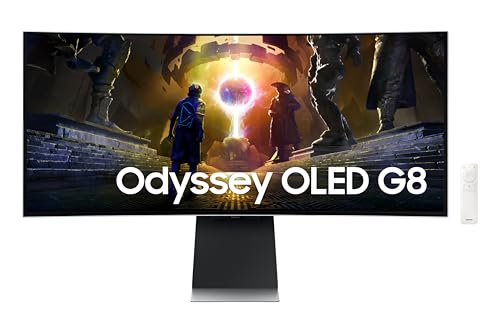
Samsung 34 Inch Gaming Monitor G8 Odyssey OLED Ultra Wide
Why We Love It

Xiaomi Mi Monitor G34WQI
Why We Love It

LG Ultra Gear Gaming Monitor 34″ Curved
Why We Love It
Quick Pick
10 Best 34 Inch Smart Monitor Of 2026
Quick Pick
LG 34SR60QC-W 34-inch QHD (3440x1440) Curved Smart Monitor with Streaming, UltraWide Screen, webOS, HDR10, 100Hz, Built-in Speaker, AirPlay2, Screen Share, Bluetooth, ThinQ App, White
LG 34SR63QA-W 34 inch Smart Curved Monitor with Streaming TV, QHD 1440p, UltraWide Screen, USB Type-C 65W PD, 1800R, webOS, HDR10, 100Hz, Built-in Speaker, AirPlay2, Screen Share, Bluetooth, White
KOORUI 34 inch Gaming Monitor, 240Hz, Ultrawide UWQHD (3440x1440P), Curved 1500R, HDR400, PIP/PBP, 1ms MPRT, Adaptive Sync, Height Adjustable, DP,HDMI,PS5 G3441XC
LG UltraWide™ 34 Inch 144Hz 21:9 WQHD Curved (1800R) Monitor 34U640B with USB-Type C (PD 65W), HDR 10, AMD FreeSync Premium, Tilt/Height Adjustment and sRGB 99% (Typ.)
Z-Edge 34" Curved Ultrawide Gaming Monitor, Max 240Hz,WQHD,VA LED, AG34P
Z-EDGE 34inch Ultrawide Gaming Monitor, Curved,165Hz,WQHD 3440x1440,UG34 | FreeSync/1ms/VESA Compatible/PIP&PBP/VA/HDMI & DisplayPort /for Game,Office
Dell 34 Plus USB-C Monitor - S3425DW, WQHD (3440x1440), 21:9 Curved, 120Hz, VA, 1ms, AMD FreeSync Premium, HDR10, Height Adjust, Built-in Speakers, 2 USB-C, 2 HDMI, 3 Year Warranty | AMD FreeSync Premium, 21:9 Curved, HDR10, Height Adjust, Built-in Speakers, 2 USB-C, 2 HDMI, 2 USB, 3 Year Warranty
Samsung 34 Inch Gaming Monitor G8 Odyssey OLED Ultra Wide QHD (3440 x 1440) Resolution with Smart Functions 175Hz 0.03Ms Screen Curvature 1800R - LS34DG852SMXUE
Xiaomi Mi Monitor G34WQI, 34 Inch Curved Gaming Monitor, Black, EU ELA5454EU, QHD Ultra Wide 1440p
LG Ultra Gear Gaming Monitor 34″ Curved, WQHD, OLED Panel, Smart, HDR10, 240 Hz, 0.03 ms 34GX90SA-W
Buying Guide: 34 Inch Smart Monitor
📋 Table of Contents
1What resolution should I look for in a 34-inch smart monitor?
Opt for at least 3440 x 1440 pixels (UltraWide QHD) for sharp visuals and immersive multitasking. 4K UHD (3840 x 2160) offers even more detail but may require a powerful graphics card for smooth performance, especially for gaming or video editing.
2Does IPS or VA panel matter for a smart monitor?
IPS panels provide wider viewing angles and more accurate color reproduction, ideal for design or video work. VA panels offer deeper blacks and higher contrast, which is better for media consumption but may have slower response times for gaming.
3What smart features should I prioritize?
Look for built-in webcams, microphones, and speakers for video conferencing, and support for voice assistants like Alexa or Google Assistant. Some models also include touchscreens or stylus support for creative tasks, though these add cost and complexity.
4How important is the refresh rate for a 34-inch smart monitor?
For general use, 60Hz is sufficient, but 120Hz or higher is better for smooth scrolling, video playback, and light gaming. If you plan to use it for competitive gaming, look for 144Hz or higher with low input lag and adaptive sync technology like FreeSync or G-Sync.
5What connectivity options should I check for?
Ensure the monitor has at least two HDMI ports, one DisplayPort, and USB-C for versatile connectivity. USB-C with DisplayPort and power delivery is especially useful for laptops. Additional USB ports can be handy for peripherals like keyboards or mice.
How we choose
Our editors are people who genuinely love testing and writing about products. We compare each product's real-world usability and strengths, then distill what matters most into our own "Why We Love It" points — so you get an honest, at-a-glance sense of what counts before you buy.