10 Best 32 Inch Monitor For Developer Of 2026
32 Inch Monitor For Developer — Reviews, Recommendations & Updated Buying Guide November 2026


LG 32G600A-B 32-inch Ultragear QHD (2560 x 1440) Curved
Why We Love It


Vision Forge V1 32 Inch 4K 160Hz Gaming Monitor
Why We Love It

Z-EDGE 32inch Curved Gaming Monitor
Why We Love It

KOORUI 32 Inch 4K UHD VA Monitor
Why We Love It
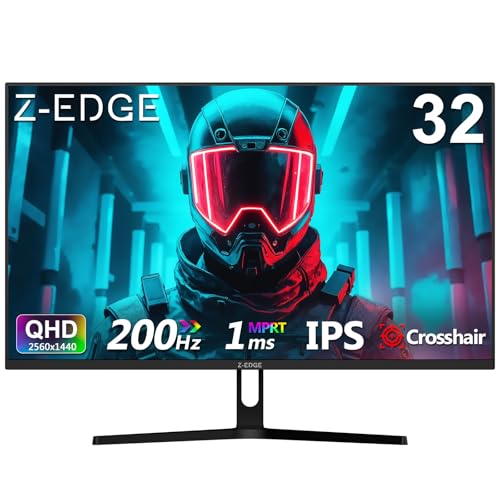
Z-Edge 32 Inch Gaming Monitor
Why We Love It

KTC 32 Inch Curved Monitor VA 1500R
Why We Love It

BenQ MA320U 32 inch 4K 3840x2160 Monitor for MacBook Pro/Air
Why We Love It

Samsung 32" Odyssey G5 G55C QHD Curved Gaming Monitor
Why We Love It

Samsung 32" M8 M80F Smart Monitor (AI & Smart Features) 4K
Why We Love It

Lenovo D32-40(C22320FD0) 32 Inch PC Monitor | FHD
Why We Love It
Quick Pick
10 Best 32 Inch Monitor For Developer Of 2026
Quick Pick
LG 32G600A-B 32-inch Ultragear QHD (2560 x 1440) Curved Gaming Monitor, 180Hz, 1ms, AMD FreeSync, HDMI, DisplayPort, Tilt/Height/Swivel Adjustable Stand, Black
Vision Forge V1 32 Inch 4K 160Hz Gaming Monitor, Fast IPS, 1ms Response Time, HDR, AMD FreeSync, HDMI 2.1, 450 nits, 5W Speakers, VRR, ALLM, VESA Mount
Z-EDGE 32inch Curved Gaming Monitor, 240Hz,LED, VA/FreeSync/HDR, FHD UG32P | MPRT 1ms/3000:1 Contrast Ratio/16.7 Million Colors/280cd/m²Brightness//VESA/HDMI 2.0 x 2 / DP 1.4 x 2
KOORUI 32 Inch 4K UHD VA Monitor, 3840x2160, 95% DCI-P3 & 99% sRGB, 10Bit 1.07B Colors, 3500:1 Contrast, HDR10, 60Hz, 3ms GTG, Speakers, HDMI/DP, VESA for Home & Gaming
Z-Edge 32 Inch Gaming Monitor, QHD 2K 200Hz,IPS LED,FreeSync,100% sRGB,UG32
KTC 32 Inch Curved Monitor VA 1500R, 2K QHD 1440P@180Hz Gaming Monitor | 1ms MPRT FreeSync Premium G-Sync HDR10 122%sRGB VESA HMDI 2.0 DP 1.4 Compatible with Desktop, Laptop, PS5, Xbox and More
BenQ MA320U 32 inch 4K 3840x2160 Monitor for MacBook Pro/Air, Dual USB-C, 90W Power Delivery, Mac Color Match, USB Hub, Brightness & Volume Control on Mac, Adjustable Stand, P3 Color Gamut
Samsung 32" Odyssey G5 G55C QHD Curved Gaming Monitor, 165Hz refresh rate and 1ms response time (MPRT), 1000R Curved Screen, AMD FreeSync, Middle East Version (New Launch) - LS32CG552EMXUE
Samsung 32" M8 M80F Smart Monitor (AI & Smart Features) 4K (3,840 x 2,160) 60hz, With Camera USB Type C, Height Adjustable, For Entertainment and Work, LS32FM801UMXUE
Lenovo D32-40(C22320FD0) 32 Inch PC Monitor | FHD, 1080p, 60Hz, 5ms, HDMI, DP
Buying Guide: 32 Inch Monitor For Developer
📋 Table of Contents
1What resolution should I look for in a 32-inch monitor for development?
For developers, a minimum of 1920x1080 (Full HD) is acceptable, but 2560x1440 (QHD) or 3840x2160 (4K) is better for multitasking and code readability. Higher resolutions allow more open tabs, split-screen coding, and detailed UIs, though they may require a more powerful GPU for smooth performance.
2Is IPS or TN panel better for a developer monitor?
IPS panels offer wider viewing angles and more accurate color reproduction, which is better for developers working with design tools or debugging UIs. TN panels have faster response times but are less common for development use due to their narrower viewing angles and less vibrant colors.
3What refresh rate matters most for a developer monitor?
A 60Hz refresh rate is standard and sufficient for most development tasks. However, if you plan to use the monitor for video conferencing or light gaming, a 75Hz or 144Hz model can provide smoother motion and a more responsive experience, though it’s not a top priority for coding.
4Should I prioritize a monitor with built-in speakers or a headphone jack?
A headphone jack is more useful for developers who need clear audio for calls, video conferencing, or background music without disturbing others. Built-in speakers are often low-quality and not ideal for professional use, so prioritize a monitor with a 3.5mm jack for better sound options.
5What ergonomic features should I look for in a 32-inch developer monitor?
Look for adjustable height, tilt, and swivel support to reduce eye strain and neck pain during long coding sessions. A monitor with a stand that allows for a near-horizontal position or a VESA mount for wall mounting can also improve workspace ergonomics and desk space management.
How we choose
Our editors are people who genuinely love testing and writing about products. We compare each product's real-world usability and strengths, then distill what matters most into our own "Why We Love It" points — so you get an honest, at-a-glance sense of what counts before you buy.