10 Best 32-inch Gaming Monitor 4k Of 2026
32-inch Gaming Monitor 4k — Reviews, Recommendations & Updated Buying Guide November 2026


LG 32UR500K-B Ultrafine 32-inch 4K UHD (3840x2160) Computer
Why We Love It


KOORUI 32 Inch 4K UHD VA Monitor
Why We Love It

Vision Forge V1 32 Inch 4K 160Hz Gaming Monitor
Why We Love It

GAMEON GOP32UHD144IPS Premium Series
Why We Love It

LG 32G810SA-W 32-inch Ultragear 4K UHD (3840 x 2160) IPS
Why We Love It
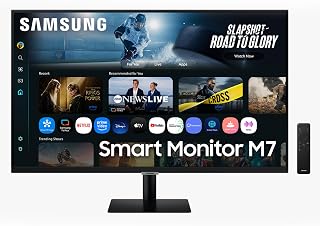
Samsung M70F 32 Inch 4K Smart AI Monitor
Why We Love It

Samsung Odyssey Neo Quantum Mini LED G85NB LS32BG850NPXXU
Why We Love It

ASUS ROG XG32UCG 32 Inch 4K 60Hz USB-C G-SYNC UHD Gaming
Why We Love It
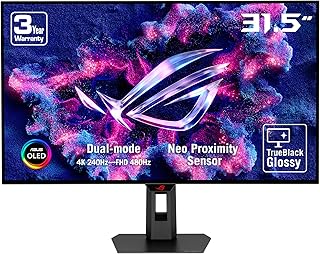
ASUS ROG Strix XG32UCWMG Monitor ―32" TrueBlack Glossy
Why We Love It

ASUS ROG Strix XG32UCWG
Why We Love It
Quick Pick
10 Best 32-inch Gaming Monitor 4k Of 2026
Quick Pick
LG 32UR500K-B Ultrafine 32-inch 4K UHD (3840x2160) Computer Monitor HDR10 Built-in Speaker x2 OnScreen Control Reader Mode Flicker Safe Borderless Design HDMIx2 DisplayPort Black
KOORUI 32 Inch 4K UHD VA Monitor, 3840x2160, 95% DCI-P3 & 99% sRGB, 10Bit 1.07B Colors, 3500:1 Contrast, HDR10, 60Hz, 3ms GTG, Speakers, HDMI/DP, VESA for Home & Gaming
Vision Forge V1 32 Inch 4K 160Hz Gaming Monitor, Fast IPS, 1ms Response Time, HDR, AMD FreeSync, HDMI 2.1, 450 nits, 5W Speakers, VRR, ALLM, VESA Mount
GAMEON GOP32UHD144IPS Premium Series, Black Gaming Monitor 32 inch, 3840x2160p 4K UHD Fast IPS Panel, 144Hz, 0.5ms, HDMI 2.1, G-Sync & Freesync, Supports HDR, PS5
LG 32G810SA-W 32-inch Ultragear 4K UHD (3840 x 2160) IPS Gaming Monitor, 144Hz, 1ms, NVIDIA G-Sync Compatible, AMD FreeSync Premium, VESA DisplayHDR 400, HDMI, DisplayPort, USB Type-C, White
Samsung M70F 32 Inch 4K Smart AI Monitor, VA Panel, 3840 x 2160, 60Hz, 4ms (G/G), Speaker, Gaming Hub, 4K Upscaling, Voice Control, Smart TV Apps & AI Features, HDR10, USB-C, HDMI LS32FM700UUXEN
Samsung Odyssey Neo Quantum Mini LED G85NB LS32BG850NPXXU 32" Curved 4K Ultra HD Gaming Monitor Matte Screen - 240Hz, 1ms, 3840x2160, HDR2000, HDMI 2.1, 1000R, Freesync Premium Pro, Height Adjust
ASUS ROG XG32UCG 32 Inch 4K 60Hz USB-C G-SYNC UHD Gaming Monitor | Dual Mode FHD 320Hz, Fast IPS, ELMB Sync, DCI-P3 95%, Gaming AI, DisplayHDR 400, Aura Sync, 1ms, DP, 0.3ms, for PS5 and Xbox
ASUS ROG Strix XG32UCWMG Monitor ―32" TrueBlack Glossy, Dual Mode (4K@240Hz, FHD@480Hz), 0.03ms, heatsink, OLED Care Pro, Neo Proximity Sensor, VESA DisplayHDR 400 True Black, USB-C, HDMI 2.1 | Dual Mode 4K@240Hz FHD @ 480Hz, 0.03ms, Sync-Tech, HDR 400 TrueBlack, USB-C, DP, HDMI. USB Hub
ASUS ROG Strix XG32UCWG, 31.5" 4K UHD OLED Gaming Monitor (3840 x 2160), 0.03ms Response Time, 165Hz, Compatible with G-SYNC, USB-C, DisplayPort, HDMI, Audio Jack, Display Widget Center, Black | (3840x2160), 0.03ms Response Time, 165Hz, Compatible with G-SYNC, USB-C, DisplayPort, HDMI, Audio Jack, DisplayWidget Center
Buying Guide: 32-inch Gaming Monitor 4k
📋 Table of Contents
1What resolution should I look for in a 32-inch 4K gaming monitor?
A 4K resolution (3840 x 2160) is standard for 4K monitors, providing sharp and detailed visuals, which is ideal for gaming and multimedia use.
2What key specifications should I prioritize for gaming performance?
Look for a high refresh rate (144Hz or higher), low input lag, and support for adaptive sync technologies like G-Sync or FreeSync to ensure smooth gameplay.
3How important is the aspect ratio for a 32-inch gaming monitor?
A 16:9 aspect ratio is standard and compatible with most games, but some monitors offer 21:9 for a wider field of view, which can be beneficial for certain genres like racing or strategy games.
4When should I pay more for a 32-inch 4K gaming monitor?
Pay more if you need advanced features like HDR support, higher refresh rates, or superior panel types like IPS for color accuracy or OLED for contrast, depending on your gaming needs.
5What are common mistakes to avoid when buying a 32-inch 4K gaming monitor?
Avoid neglecting compatibility with your graphics card, overlooking the stand's adjustability, or not checking the monitor's response time, which can affect motion clarity in fast-paced games.
How we choose
Our editors are people who genuinely love testing and writing about products. We compare each product's real-world usability and strengths, then distill what matters most into our own "Why We Love It" points — so you get an honest, at-a-glance sense of what counts before you buy.