10 Best 32 Inch Curved Computer Monitor Of 2026
32 Inch Curved Computer Monitor — Reviews, Recommendations & Updated Buying Guide November 2026


LG 32G600A-B 32-inch Ultragear QHD (2560 x 1440) Curved
Why We Love It


Z-EDGE 32inch Curved Gaming Monitor
Why We Love It
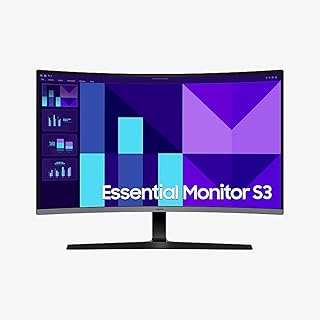
Samsung 32" Essential S3 Curved Full HD Monitor
Why We Love It

KTC 32 Inch Curved Monitor VA 1500R
Why We Love It

Samsung 32" Odyssey G5 G55C QHD Curved Gaming Monitor
Why We Love It

KTC 32 inch 240Hz Curved Gaming Monitor 1500R 1080P 125%
Why We Love It

ViewSonic VX3218C-2K 32-inch QHD 1440p Curved Gaming Monitor
Why We Love It

Samsung LS32D396GAUXXU 32" Curved Full HD monitor with
Why We Love It

ASUS ROG Strix XG32WCS USB Type-C Gaming Monitor–32-inch
Why We Love It

ASUS TUF Gaming 32" 1080P Curved Monitor (VG328H1B)
Why We Love It
Quick Pick
10 Best 32 Inch Curved Computer Monitor Of 2026
Quick Pick
LG 32G600A-B 32-inch Ultragear QHD (2560 x 1440) Curved Gaming Monitor, 180Hz, 1ms, AMD FreeSync, HDMI, DisplayPort, Tilt/Height/Swivel Adjustable Stand, Black
Z-EDGE 32inch Curved Gaming Monitor, 240Hz,LED, VA/FreeSync/HDR, FHD UG32P | MPRT 1ms/3000:1 Contrast Ratio/16.7 Million Colors/280cd/m²Brightness//VESA/HDMI 2.0 x 2 / DP 1.4 x 2
Samsung 32" Essential S3 Curved Full HD Monitor, 1500R Curved Screen, 100Hz Refresh Rate, Response Time 4(GTG) Game Mode, Eye Saver Mode - LS32D392GAMXUE
KTC 32 Inch Curved Monitor VA 1500R, 2K QHD 1440P@180Hz Gaming Monitor | 1ms MPRT FreeSync Premium G-Sync HDR10 122%sRGB VESA HMDI 2.0 DP 1.4 Compatible with Desktop, Laptop, PS5, Xbox and More
Samsung 32" Odyssey G5 G55C QHD Curved Gaming Monitor, 165Hz refresh rate and 1ms response time (MPRT), 1000R Curved Screen, AMD FreeSync, Middle East Version (New Launch) - LS32CG552EMXUE
KTC 32 inch 240Hz Curved Gaming Monitor 1500R 1080P 125% sRGB 1ms | Freesync/G-sync HDR10,HDMI/DP/USB Ports VESA,Tilt Adjustable,Xbox PS5 Switch,Black
ViewSonic VX3218C-2K 32-inch QHD 1440p Curved Gaming Monitor, 165Hz, 1ms, AMD FreeSync Premium, Integrated Speakers, HDMI, DisplayPort
Samsung LS32D396GAUXXU 32" Curved Full HD monitor with Speakers - 1920x1080p, 1800R, HDMI, VGA, Speakers
ASUS ROG Strix XG32WCS USB Type-C Gaming Monitor–32-inch, 2560x1440, Curved, 180Hz (Above 144Hz), 1ms (GTG), Fast VA, Extreme Low Motion Blur Sync, USB Type-C, FreeSync, DisplayWidget Center, HDR
ASUS TUF Gaming 32" 1080P Curved Monitor (VG328H1B) - Full HD, 165Hz (Supports 144Hz), 1ms, Extreme Low Motion Blur, Speaker, Adaptive-Sync, FreeSync Premium, VESA Mountable, HDMI, Tilt Adjustable
Buying Guide: 32 Inch Curved Computer Monitor
📋 Table of Contents
1What resolution should I look for in a 32-inch curved computer monitor?
For a 32-inch curved monitor, aim for at least 1440p (QHD) or 4K (UHD) resolution. QHD offers a good balance of detail and performance, while 4K is ideal for graphic design, video editing, or multitasking. Lower resolutions like 1080p may appear pixelated on such a large screen.
2What curvature radius is best for a 32-inch monitor?
A curvature radius of 1800R to 2100R is typically optimal for a 32-inch curved monitor. This range provides a natural, immersive viewing experience without causing eye strain. Too tight a curve can distort the image, while too loose may feel like a flat screen.
3Does a high refresh rate matter for general use?
For general computing, a 60Hz refresh rate is sufficient. However, if you use the monitor for gaming or video editing, look for at least 144Hz. Higher refresh rates reduce motion blur and provide smoother visuals, though they may come with a higher price tag.
4What panel type is best for a 32-inch curved monitor?
IPS panels are ideal for curved monitors due to their wide color gamut, accurate color reproduction, and good viewing angles. TN panels offer faster response times but have narrower viewing angles and less color accuracy, which may not be ideal for creative work.
5Are built-in speakers worth it on a 32-inch curved monitor?
Built-in speakers are convenient for casual use but lack the audio quality of external speakers or headphones. If you need high-quality sound for video calls, streaming, or media, invest in a separate sound system. Look for monitors with 3.5mm audio jacks for easy connectivity.
How we choose
Our editors are people who genuinely love testing and writing about products. We compare each product's real-world usability and strengths, then distill what matters most into our own "Why We Love It" points — so you get an honest, at-a-glance sense of what counts before you buy.