10 Best 3 In 1 Memory Card Adapters Of 2026
3 In 1 Memory Card Adapters — Reviews, Recommendations & Updated Buying Guide November 2026


USB C to SD Card Reader
Why We Love It


SD Card Reader for iPhone iPad
Why We Love It

SD Card Reader for iPhone iPad
Why We Love It

BIGTHREE Magnetic Card Reader
Why We Love It

Loydia 3 in 1 USB C MicroSD Card Reader
Why We Love It

Wahbite Apple Lightning to SD & TF Card USB Camera Adapter
Why We Love It
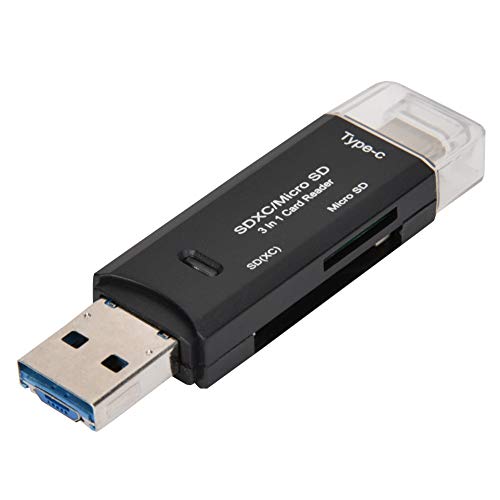
Folany Memory Card Adapter
Why We Love It

SD Card Reader for iPhone 15 USB C
Why We Love It

SD Card Reader
Why We Love It

USB C CF/SD/TF Card Reader 3 in 1
Why We Love It
Quick Pick
10 Best 3 In 1 Memory Card Adapters Of 2026
Quick Pick
USB C to SD Card Reader, SD Card Adapter with SD MicroSD USB3.0 3 in 1 Digital Camera Viewer Plug and Play Memory Card Reader for iPhone 15 Pro Max,iPad Pro/Mac/Laptop and More Type C Devices
SD Card Reader for iPhone iPad, Portable USB Camera Adapter 3 in 1 Female OTG Compatible SD/TF Card, Memory Card Reader Portable USB Reader for iPhone iPad
SD Card Reader for iPhone iPad, Portable USB Camera Adapter 3 in 1 USB Female OTG Adapter Compatible SD/TF Card, Portable Memory Card Reader for iPhone iPad
BIGTHREE Magnetic Card Reader, 3 in 1 SD Card Reader, USB C to Micro SD Card Adapter, High-Speed Reading, Stable Transmission, Support SD/Tf Card Trail, SD Card Reader for Mac, for PC, for MacBook.
Loydia 3 in 1 USB C MicroSD Card Reader, SD Card Adapter for iPhone, Lightning Camera Card Reader SD/TF Memory Card Adapter, Plug & Play, Memory Card Reader for iPhone, Laptop, Tablet, Huawei
Wahbite Apple Lightning to SD & TF Card USB Camera Adapter for iPhone/iPad, 3 in 1 Card Reader USB Dongle for USB Flash Drive, Keyboard, Mouse, Hubs, MIDI, Micro SD TF Memory Card, Plug & Play
Folany Memory Card Adapter, SD Card Reader Type-C 3 in 1 with LED Indicator for PC Laptop for Mobile Phone(black)
SD Card Reader for iPhone 15 USB C, 3 in 1 Memory Card Reader with SD TF Card Slot and USB Port, Camera Card Adapter for iPad, for MacBook, for Huawei, Plug and Play Photo Video Transfer
SD Card Reader, USB-C SD Card Reader for iPhone 15/iPad/Mac/Laptop, 3 in 1 Type-C Memory Card Reader Supports SD, Micro SD and USB Flash Disk, Plug & Play
USB C CF/SD/TF Card Reader 3 in 1, Compact Flash Reader 3-Slot Memory Card Adapter for Type-C Device Supports Micro SD Memory Card Compatible with MacBook Pro/Air M1 iPad Pro Android Galaxy S20 S21U
Buying Guide: 3 In 1 Memory Card Adapters
📋 Table of Contents
1What file systems are typically supported by 3 in 1 memory card adapters?
Look for adapters that support common file systems like FAT16, FAT32, and exFAT. These formats ensure compatibility with most devices, including cameras, smartphones, and computers. Avoid models that only support older or niche formats unless you have specific needs.
2Which memory card types are most commonly included in a 3 in 1 adapter?
Most 3 in 1 adapters support SD, microSD, and CF (CompactFlash) cards. These combinations are ideal for users with multiple devices, such as cameras, drones, and smartphones. Ensure the adapter has secure slots to prevent card damage during insertion or removal.
3How important is the read/write speed of a 3 in 1 memory card adapter?
Read/write speed matters if you frequently transfer large files, like photos or videos. Look for adapters with speeds of at least 10-30 MB/s for standard use, and up to 100 MB/s or more for high-performance needs. Faster speeds reduce transfer times and improve workflow efficiency.
4What should I look for in terms of build quality and durability?
Choose adapters with metal or reinforced plastic construction for better durability. A sturdy build prevents bending or breaking, especially if you use the adapter frequently. Look for models with dust-proof or water-resistant features if you use them in harsh environments.
5Are there any common mistakes to avoid when buying a 3 in 1 memory card adapter?
Avoid adapters that don’t clearly list supported card types or file systems. Also, be wary of overly cheap models that may have poor contact points or unreliable performance. Always check user reviews for reports of compatibility issues or frequent malfunctions.
How we choose
Our editors are people who genuinely love testing and writing about products. We compare each product's real-world usability and strengths, then distill what matters most into our own "Why We Love It" points — so you get an honest, at-a-glance sense of what counts before you buy.