10 Best 2k Qhd Computer Monitor Of 2026
2k Qhd Computer Monitor — Reviews, Recommendations & Updated Buying Guide November 2026


BenQ EW270Q 27" 2K QHD 200Hz IPS Gaming Monitor with USB-C
Why We Love It


GAMEON GOAE24QHD180IPS 24 Inch Gaming Monitor QHD 2K 180Hz
Why We Love It
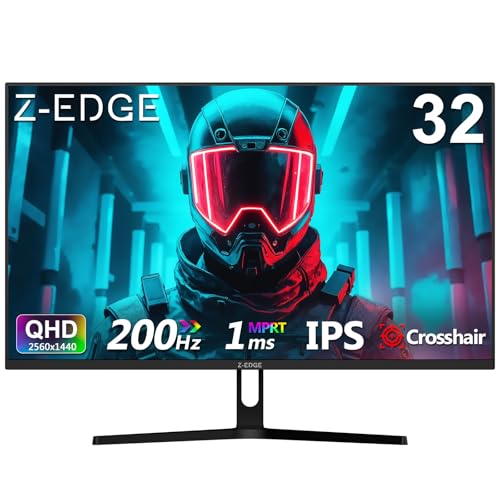
Z-Edge 32 Inch Gaming Monitor
Why We Love It

Xiaomi 2K Gaming Monitor G27Qi
Why We Love It

BenQ PD2706QN 27” IPS 2K QHD Display P3 90W USB-C Designer
Why We Love It

KTC 32 Inch Curved Monitor VA 1500R
Why We Love It

ASUS ProArt Display PA278QV Gen2 (PA278QGV) Professional
Why We Love It

LG 32G600A-B 32-inch Ultragear QHD (2560 x 1440) Curved
Why We Love It

KTC 24 Inch QHD 100Hz Computer Monitor IPS 2K
Why We Love It

Gawfolk 27 inch 2K Gaming Monitor 120Hz QHD(2560x1440)
Why We Love It
Quick Pick
10 Best 2k Qhd Computer Monitor Of 2026
Quick Pick
BenQ EW270Q 27" 2K QHD 200Hz IPS Gaming Monitor with USB-C (65W) HDRi | 1200:1 Contrast | 90% P3 Gamut | 350 Nits | Built-in Speakers (5W x2) | AMD FreeSync Premium | HDMI | Game Color Mode
GAMEON GOAE24QHD180IPS 24 Inch Gaming Monitor QHD 2K 180Hz Fast IPS Computer Monitor, 0.5ms MPRT, HDMI 2.1, HDR, 99% sRGB, G-Sync & FreeSync Compatible, Built-in Speakers, PS5 & Console Ready, Black
Z-Edge 32 Inch Gaming Monitor, QHD 2K 200Hz,IPS LED,FreeSync,100% sRGB,UG32
Xiaomi 2K Gaming Monitor G27Qi, QHD 2560×1440, Fast IPS, 180Hz 1ms, AMD Freesync, 100% sRGB, 178 Viewing Angle, 2× HDMI2.0 DP 1.4×2, Black
BenQ PD2706QN 27” IPS 2K QHD Display P3 90W USB-C Designer Monitor
KTC 32 Inch Curved Monitor VA 1500R, 2K QHD 1440P@180Hz Gaming Monitor | 1ms MPRT FreeSync Premium G-Sync HDR10 122%sRGB VESA HMDI 2.0 DP 1.4 Compatible with Desktop, Laptop, PS5, Xbox and More
ASUS ProArt Display PA278QV Gen2 (PA278QGV) Professional Monitor – 27-inch, IPS, QHD (2560 x 1440), 120Hz, Light Sync, ergonomic stand, VESA MediaSync, Green Sustainability - Grey
LG 32G600A-B 32-inch Ultragear QHD (2560 x 1440) Curved Gaming Monitor, 180Hz, 1ms, AMD FreeSync, HDMI, DisplayPort, Tilt/Height/Swivel Adjustable Stand, Black
KTC 24 Inch QHD 100Hz Computer Monitor IPS 2K, 1300:1 Contrast, Anti-Blue Light Screen, 122% sRGB, Support FreeSync and GSync, HDMI2.0/DP/Earphone for Gaming and Office Working H24T27
Gawfolk 27 inch 2K Gaming Monitor 120Hz QHD(2560x1440) Display Screen | 1440P Computer Monitors 300cd/m² 120%sRGB Suitable for Image & Video Production, Home & Office Use
Buying Guide: 2k Qhd Computer Monitor
📋 Table of Contents
1What resolution and refresh rate should I look for in a 2K QHD monitor?
A 2K QHD monitor typically offers a resolution of 2560x1440 pixels. For smooth performance, look for a refresh rate of at least 144Hz, especially if you play games or work with motion-heavy content. Higher refresh rates like 165Hz or 240Hz are ideal for competitive gaming, while 60Hz is sufficient for general use or office work.
2Is a QHD monitor better than a 4K monitor for gaming?
QHD monitors often provide a better balance of resolution and performance, especially for gaming. They require less GPU power than 4K monitors, allowing for higher frame rates and smoother gameplay. However, if you prioritize sharp visuals and have a powerful graphics card, a 4K monitor may be more suitable for your needs.
3What panel type is best for a 2K QHD monitor?
IPS panels are ideal for 2K QHD monitors as they offer wider viewing angles and more accurate color reproduction, which is great for design and video editing. TN panels provide faster response times, making them better for gaming, while VA panels offer deeper blacks but may have slower response times and narrower viewing angles.
4What size should I choose for a 2K QHD monitor?
For a 2K QHD monitor, sizes typically range from 27 to 32 inches. A 27-inch monitor is ideal for most users, offering a good balance of screen real estate and clarity. Larger sizes like 32 inches can be used for immersive experiences but may require a higher refresh rate and better GPU performance to maintain visual quality.
5Are adaptive sync technologies like G-Sync or FreeSync worth it for a 2K QHD monitor?
Yes, adaptive sync technologies like G-Sync or FreeSync help eliminate screen tearing and reduce input lag, making them especially valuable for gaming. They ensure your monitor's refresh rate matches your GPU's output, resulting in smoother visuals. Look for monitors with at least 144Hz and a compatible adaptive sync feature if you're a serious gamer or video editor.
How we choose
Our editors are people who genuinely love testing and writing about products. We compare each product's real-world usability and strengths, then distill what matters most into our own "Why We Love It" points — so you get an honest, at-a-glance sense of what counts before you buy.