10 Best 2k Monitor For Developer Of 2026
2k Monitor For Developer — Reviews, Recommendations & Updated Buying Guide November 2026


BenQ EW270Q 27" 2K QHD 200Hz IPS Gaming Monitor with USB-C
Why We Love It


GAMEON GOAE24QHD180IPS 24 Inch Gaming Monitor QHD 2K 180Hz
Why We Love It

Z-EDGE 27inch Gaming Monitor
Why We Love It
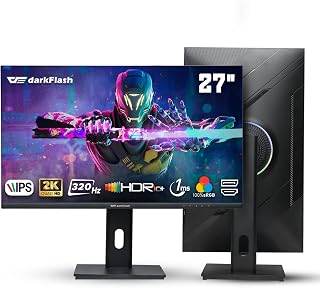
DarkFlash S275QT 27 Inch 2K(QHD) 320Hz 1MS Fast IPS Gaming
Why We Love It

KTC 32 Inch Curved Monitor VA 1500R
Why We Love It

Xiaomi 2K Gaming Monitor G27Qi
Why We Love It

UPERFECT 24.5" 2K 165Hz Portable Monitor w/VESA &
Why We Love It

BenQ PD2706QN 27” IPS 2K QHD Display P3 90W USB-C Designer
Why We Love It

ASUS ProArt Display PA278QV Gen2 (PA278QGV) Professional
Why We Love It

ASUS ProArt Display PA278QV 27” WQHD (2560 x 1440) Monitor
Why We Love It
Quick Pick
10 Best 2k Monitor For Developer Of 2026
Quick Pick
BenQ EW270Q 27" 2K QHD 200Hz IPS Gaming Monitor with USB-C (65W) HDRi | 1200:1 Contrast | 90% P3 Gamut | 350 Nits | Built-in Speakers (5W x2) | AMD FreeSync Premium | HDMI | Game Color Mode
GAMEON GOAE24QHD180IPS 24 Inch Gaming Monitor QHD 2K 180Hz Fast IPS Computer Monitor, 0.5ms MPRT, HDMI 2.1, HDR, 99% sRGB, G-Sync & FreeSync Compatible, Built-in Speakers, PS5 & Console Ready, Black
Z-EDGE 27inch Gaming Monitor,IPS,Max 180Hz,QHD 2560×1440,1ms,Black,UG27QF | FreeSync/Frameless/1ms/Brightness 350cd/m²/HDR/VESA Compatible/HDMI & DisplayPort/for Game,Office
DarkFlash S275QT 27 Inch 2K(QHD) 320Hz 1MS Fast IPS Gaming Monitor, HDR10+, 100% sRGB,1.07B Colors,Compatible with HDMI 2.1, ARGB Backlight Computer Monitor for Gamers (27 Inch 320hz QHD)
KTC 32 Inch Curved Monitor VA 1500R, 2K QHD 1440P@180Hz Gaming Monitor | 1ms MPRT FreeSync Premium G-Sync HDR10 122%sRGB VESA HMDI 2.0 DP 1.4 Compatible with Desktop, Laptop, PS5, Xbox and More
Xiaomi 2K Gaming Monitor G27Qi, QHD 2560×1440, Fast IPS, 180Hz 1ms, AMD Freesync, 100% sRGB, 178 Viewing Angle, 2× HDMI2.0 DP 1.4×2, Black
UPERFECT 24.5" 2K 165Hz Portable Monitor w/VESA & 180°Adjustable Stand, 2560 * 1440 QHD FreeSync IPS HDR Large Gaming Display, USB-C HDMI Travel Second Monitor for Laptop Switch Phone
BenQ PD2706QN 27” IPS 2K QHD Display P3 90W USB-C Designer Monitor
ASUS ProArt Display PA278QV Gen2 (PA278QGV) Professional Monitor – 27-inch, IPS, QHD (2560 x 1440), 120Hz, Light Sync, ergonomic stand, VESA MediaSync, Green Sustainability - Grey
ASUS ProArt Display PA278QV 27” WQHD (2560 x 1440) Monitor, 100% sRGB/Rec. 709 ΔE < 2, IPS, DisplayPort HDMI DVI-D Mini DP, Calman Verified, Eye Care, Anti-glare, Tilt Pivot Swivel Height Adjustable
Buying Guide: 2k Monitor For Developer
📋 Table of Contents
1What resolution and refresh rate should I prioritize for a 2K monitor as a developer?
A 2K (2560x1440) resolution is ideal for code readability and multitasking. Look for a 144Hz refresh rate or higher for smoother scrolling and window switching, especially if you use multiple apps or IDEs simultaneously.
2Does IPS or VA panel type matter more for developers?
IPS panels offer better color accuracy and wider viewing angles, which is useful for long coding sessions and collaborative work. VA panels provide deeper blacks but may have slower response times, which can be distracting during fast-paced tasks.
3What kind of connectivity ports should I look for?
Ensure the monitor has at least one HDMI 2.0 or DisplayPort 1.4 port for high-resolution output. USB-C with DisplayPort Alt Mode is a bonus for docking stations and charging, especially if you use a laptop as your primary device.
4Is a high brightness level necessary for a 2K monitor used in a developer setup?
A brightness level of 250-300 nits is sufficient for most indoor environments. If you work in a brightly lit space or use the monitor in a dual setup, look for models with adjustable brightness and anti-glare coatings for comfort.
5Should I consider a monitor with built-in speakers or a headphone jack?
Built-in speakers are generally not ideal for focused work due to sound quality and distractions. A headphone jack or USB audio support is more practical for developers who need clear audio for video calls, music, or debugging tools.
How we choose
Our editors are people who genuinely love testing and writing about products. We compare each product's real-world usability and strengths, then distill what matters most into our own "Why We Love It" points — so you get an honest, at-a-glance sense of what counts before you buy.