10 Best 2k Computer Monitor Of 2026
2k Computer Monitor — Reviews, Recommendations & Updated Buying Guide November 2026


BenQ EW270Q 27" 2K QHD 200Hz IPS Gaming Monitor with USB-C
Why We Love It


GAMEON GOAE24QHD180IPS 24 Inch Gaming Monitor QHD 2K 180Hz
Why We Love It

UPERFECT 2K 144Hz Portable Monitor 17.3 Inch 2560x1440P
Why We Love It

Xiaomi 2K Gaming Monitor G27Qi
Why We Love It

UPERFECT 22" 2K Portable Monitor w/VESA & 180°Adjustable
Why We Love It
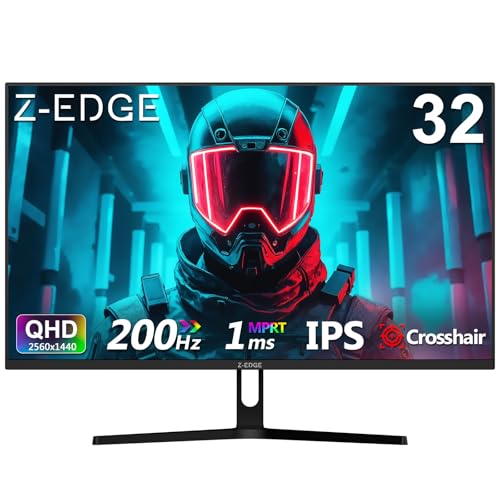
Z-Edge 32 Inch Gaming Monitor
Why We Love It

LG 32G600A-B 32-inch Ultragear QHD (2560 x 1440) Curved
Why We Love It

Gawfolk 27 inch 2K Gaming Monitor 120Hz QHD(2560x1440)
Why We Love It

CRUA 27 inch Gaming Monitor 2K 165Hz Curved 1800R Computer
Why We Love It

KTC 24 Inch QHD 100Hz Computer Monitor IPS 2K
Why We Love It
Quick Pick
10 Best 2k Computer Monitor Of 2026
Quick Pick
BenQ EW270Q 27" 2K QHD 200Hz IPS Gaming Monitor with USB-C (65W) HDRi | 1200:1 Contrast | 90% P3 Gamut | 350 Nits | Built-in Speakers (5W x2) | AMD FreeSync Premium | HDMI | Game Color Mode
GAMEON GOAE24QHD180IPS 24 Inch Gaming Monitor QHD 2K 180Hz Fast IPS Computer Monitor, 0.5ms MPRT, HDMI 2.1, HDR, 99% sRGB, G-Sync & FreeSync Compatible, Built-in Speakers, PS5 & Console Ready, Black
UPERFECT 2K 144Hz Portable Monitor 17.3 Inch 2560x1440P Portable Gaming Monitor Travel Monitor for Laptop HDR IPS Screen with VESA, Cover Stand, Dual Speakers for PC Phone Game Console
Xiaomi 2K Gaming Monitor G27Qi, QHD 2560×1440, Fast IPS, 180Hz 1ms, AMD Freesync, 100% sRGB, 178 Viewing Angle, 2× HDMI2.0 DP 1.4×2, Black
UPERFECT 22" 2K Portable Monitor w/VESA & 180°Adjustable Stand, 2560 * 1440 QHD FreeSync IPS HDR Large Gaming Display, USB-C HDMI Travel Second Monitor for Laptop Switch Phone
Z-Edge 32 Inch Gaming Monitor, QHD 2K 200Hz,IPS LED,FreeSync,100% sRGB,UG32
LG 32G600A-B 32-inch Ultragear QHD (2560 x 1440) Curved Gaming Monitor, 180Hz, 1ms, AMD FreeSync, HDMI, DisplayPort, Tilt/Height/Swivel Adjustable Stand, Black
Gawfolk 27 inch 2K Gaming Monitor 120Hz QHD(2560x1440) Display Screen | 1440P Computer Monitors 300cd/m² 120%sRGB Suitable for Image & Video Production, Home & Office Use
CRUA 27 inch Gaming Monitor 2K 165Hz Curved 1800R Computer Monitors 1ms GTG | QHD(2560x1440P) Display Screen 120%sRGB FreeSync 3000:1 Contrast Suitable for e-sports, home, office, and design
KTC 24 Inch QHD 100Hz Computer Monitor IPS 2K, 1300:1 Contrast, Anti-Blue Light Screen, 122% sRGB, Support FreeSync and GSync, HDMI2.0/DP/Earphone for Gaming and Office Working H24T27
Buying Guide: 2k Computer Monitor
📋 Table of Contents
1What resolution should I look for in a 2k computer monitor?
A 2k monitor typically refers to a resolution of 2560x1440 pixels, offering sharper text and images than 1080p. This resolution is ideal for content creation, graphic design, and multitasking, as it provides more screen real estate without overwhelming the eye.
2What refresh rate is best for a 2k monitor?
For general use, a 60Hz refresh rate is sufficient, but if you're into gaming or video editing, look for at least 120Hz. Higher refresh rates reduce motion blur and provide smoother visuals, especially when paired with a capable graphics card.
3Does panel type matter for a 2k monitor?
Yes — IPS panels offer wider viewing angles and more accurate color reproduction, making them ideal for design work. TN panels are faster but have narrower viewing angles, while VA panels provide deep blacks but may have slower response times. Choose based on your primary use case.
4What size 2k monitor is best for my setup?
A 27-inch 2k monitor is the most common and balanced size, offering a good amount of screen space without being too large. If you have a larger desk or prefer more real estate, consider 32 inches, but ensure your desk and eyes can comfortably handle the increased size.
5Are there any common mistakes to avoid when buying a 2k monitor?
Avoid monitors with low brightness or poor color accuracy if you work with graphics or video. Also, ensure the monitor supports your GPU’s output capabilities, and check for features like HDR or adaptive sync if you're gaming or editing media. Don’t overlook cable types and port availability either.
How we choose
Our editors are people who genuinely love testing and writing about products. We compare each product's real-world usability and strengths, then distill what matters most into our own "Why We Love It" points — so you get an honest, at-a-glance sense of what counts before you buy.