10 Best 27 Inch Qhd Gaming Monitors Of 2026
27 Inch Qhd Gaming Monitors — Reviews, Recommendations & Updated Buying Guide November 2026


KOORUI 27" QHD IPS Gaming Monitor: Immerse in 95% DCI-P3
Why We Love It


KOORUI 27 Inch Curved Gaming Monitor
Why We Love It

Samsung Odyssey G5 G53F 27" QHD 200Hz Refresh Rate
Why We Love It

KOORUI 27-inch QHD 260Hz 1ms IPS Gaming Monitor
Why We Love It

Dell 27 Plus Monitor - S2725DSM
Why We Love It

ASUS ROG Strix OLED XG27AQWMG gaming monitor
Why We Love It

Gigabyte MO27Q2A 27” OLED 2K QHD Gaming Monitor
Why We Love It
27 Inch Curved Gaming Monitor
Why We Love It
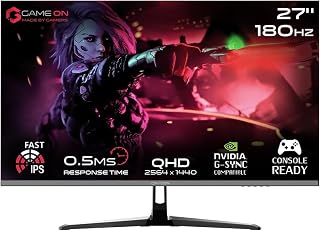
GAMEON GOPS27QHD180IPS 27 Inch Gaming Monitor QHD 2K 180Hz
Why We Love It

Z-Edge 27 Inch Curved Gaming Monitor
Why We Love It
Quick Pick
10 Best 27 Inch Qhd Gaming Monitors Of 2026
Quick Pick
KOORUI 27" QHD IPS Gaming Monitor: Immerse in 95% DCI-P3 Color | 200Hz, 1ms, 350 Nits, HDR400, FreeSync Premium,Tilt Adjustable,Black
KOORUI 27 Inch Curved Gaming Monitor,180Hz, VA Display, QHD 1440P Computer Monitor, 1ms, HDR10,90% DCI-P3, Adaptive Sync, VESA Compatible,Tilt Adjustable 27E6QCA
Samsung Odyssey G5 G53F 27" QHD 200Hz Refresh Rate, 1Ms Response Time Gaming Monitor, LS27FG532EMXUE
KOORUI 27-inch QHD 260Hz 1ms IPS Gaming Monitor, Flat PC Screen, HDR400, 99% sRGB, HDMI/DP, Black - Ideal for Competitive Gaming & Home Office
Dell 27 Plus Monitor - S2725DSM, QHD (2560x1440), 144Hz, IPS, 1ms MPRT, AMD FreeSync, 99% sRGB, Height Adjustment, Built-in Speakers, DisplayPort, HDMI, 3 Year Warranty, White
ASUS ROG Strix OLED XG27AQWMG gaming monitor - 27-inch 1440p TrueBlack GlossyTandem, 280Hz, 0.03ms, Neo Proximity Sensor, OLED Care Pro, VESA DisplayHDR True Black 500, 99 percent DCI-P3 | TrueBlack Glossy, Neo Proximity Sensor, 0.03ms, DisplayHDR True Black 500, 99% DCI-P3, DP, HDMI, USB Hub, VESA, for PS5
Gigabyte MO27Q2A 27” OLED 2K QHD Gaming Monitor - 2560 x 1440, 280Hz, 0.03ms, 250 cd/m², FreeSync Premium Pro, DisplayHDR True Black 400, HDMI 2.1, DisplayPort 1.4
27 Inch Curved Gaming Monitor,180Hz, VA Display, QHD 1440P Computer Monitor, 1ms, HDR10,90% DCI-P3, Adaptive Sync, VESA Compatible,Tilt Adjustable
GAMEON GOPS27QHD180IPS 27 Inch Gaming Monitor QHD 2K 180Hz Fast IPS Computer Monitor, 0.5ms MPRT, HDMI 2.1, HDR, 99% sRGB, G-Sync & FreeSync Compatible, Built-in Speakers, PS5 & Console Ready, Black
Z-Edge 27 Inch Curved Gaming Monitor,QHD 240Hz 2K,Max 240Hz,VA,HDR,UG27PX
Buying Guide: 27 Inch Qhd Gaming Monitors
📋 Table of Contents
1Is QHD resolution worth it over Full HD for gaming?
QHD (2560x1440) delivers sharper visuals and more screen real estate, ideal for competitive or story-driven games. However, it requires a more powerful GPU to maintain high frame rates, especially in graphically intense titles.
2What refresh rate should I prioritize for smooth gameplay?
Look for at least 144Hz for competitive gaming, as it reduces motion blur and input lag. Higher refresh rates like 165Hz or 240Hz offer even smoother performance, but ensure your GPU can consistently hit those frame rates in your preferred games.
3Does a 1ms response time make a real difference in fast-paced games?
Yes — a 1ms (GtG) response time minimizes ghosting and lag in fast action, especially in FPS or fighting games. However, ensure the panel type (IPS, VA, or TN) matches your needs for color accuracy and viewing angles, not just speed.
4What panel type is best for a 27-inch QHD gaming monitor?
IPS panels offer the best color accuracy and wide viewing angles, making them ideal for immersive gaming. VA panels provide deeper blacks but may have slower response times, while TN panels are fast but less vibrant. Choose based on your priority: color, contrast, or speed.
5Are adaptive sync technologies like G-Sync or FreeSync essential?
Adaptive sync (G-Sync or FreeSync) eliminates screen tearing and stutter by syncing the monitor's refresh rate with your GPU. For a smooth experience in variable frame rate games, look for at least 120Hz FreeSync or G-Sync support, depending on your GPU brand.
How we choose
Our editors are people who genuinely love testing and writing about products. We compare each product's real-world usability and strengths, then distill what matters most into our own "Why We Love It" points — so you get an honest, at-a-glance sense of what counts before you buy.