10 Best 27 Inch Curved Gaming Monitor Of 2026
27 Inch Curved Gaming Monitor — Reviews, Recommendations & Updated Buying Guide November 2026


27 Inch Curved Gaming Monitor
Why We Love It


Z-Edge 27 inch Curved Gaming Monitor 300Hz Monitor
Why We Love It
KOORUI 27 Inch Curved Gaming Monitor
Why We Love It
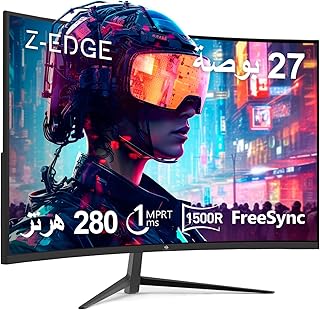
Z-Edge 27-inch Curved Gaming Monitor 16:9 1920x1080 280Hz
Why We Love It

Z-EDGE 27-inch Curved Gaming Monitor
Why We Love It

Z-Edge Gaming Monitor 27 inch 180 Hz
Why We Love It

Samsung Odyssey G5 Series 27-Inch WQHD Curved Gaming Monitor
Why We Love It

ViewSonic VX2719-PC-MHD 27 inch 240Hz 1ms Full HD Curved
Why We Love It
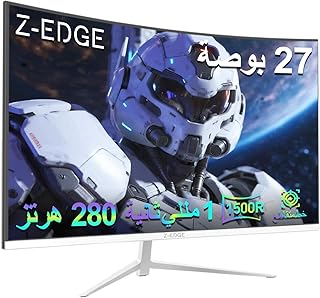
Z-EDGE 27-inch Curved Gaming Monitor
Why We Love It

LG FHD Curved Monitor (27U421A) - 27” FHD (1920x1080)
Why We Love It
Quick Pick
10 Best 27 Inch Curved Gaming Monitor Of 2026
Quick Pick
27 Inch Curved Gaming Monitor,180Hz, VA Display, QHD 1440P Computer Monitor, 1ms, HDR10,90% DCI-P3, Adaptive Sync, VESA Compatible,Tilt Adjustable
Z-Edge 27 inch Curved Gaming Monitor 300Hz Monitor, 1ms 16:9 FHD 1080P Frameless Curved Monitor, UG27S Freesync Eye Care, 2×Display Port, 2×HDMI
KOORUI 27 Inch Curved Gaming Monitor,180Hz, VA Display, QHD 1440P Computer Monitor, 1ms, HDR10,90% DCI-P3, Adaptive Sync, VESA Compatible,Tilt Adjustable 27E6QCA
Z-Edge 27-inch Curved Gaming Monitor 16:9 1920x1080 280Hz 1ms Frameless LED Gaming Monitor, UG27P AMD Freesync Premium Display Port HDMI
Z-EDGE 27-inch Curved Gaming Monitor - 16:9 Full HD 1920x1080, 300Hz Refresh Rate, 1ms Response Time, Frameless LED Display, AMD FreeSync Premium - DisplayPort & HDMI Ports UG27H White | MPRT 1ms/3000:1 Contrast Ratio/HDR/VESA/16.7 Million Colors/HDMI 2.0 x 2 / DP x 2 / Audio x 1
Z-Edge Gaming Monitor 27 inch 180 Hz, 1 ms, FreeSync, Screen FHD 1080P with DP Cable, 350cd/m², 1500R VA Frameless, HDMI2.0 & DP1.4, VESA, sRGB 99%, 178° Angle View, Adjustable Tilt
Samsung Odyssey G5 Series 27-Inch WQHD Curved Gaming Monitor 144Hz 1ms HDMI Display Port FreeSync Premium
ViewSonic VX2719-PC-MHD 27 inch 240Hz 1ms Full HD Curved Gaming Monitor, 1500R Curved screen
Z-EDGE 27-inch Curved Gaming Monitor - 16:9 Full HD 1920x1080, 280Hz Refresh Rate, 1ms Response Time, Frameless LED Display, AMD FreeSync - DisplayPort & HDMI Ports UG27P White | 8 Bit/HDR/FreeSync/HDR/VESA Compatible/PS5/HDMI & DisplayPort /for Game,Office
LG FHD Curved Monitor (27U421A) - 27” FHD (1920x1080), 100Hz, sRGB 99%, USB-C, Reader Mode, Flicker Safe, Dynamic Action Sync, Black Stabilizer, Eye Comfort, 3-Side Borderless, Tilt Adjustable
Buying Guide: 27 Inch Curved Gaming Monitor
📋 Table of Contents
1What resolution should I look for in a 27 inch curved gaming monitor?
For a 27-inch curved monitor, 1440p (QHD) is ideal for most gamers, offering a balance of sharpness and performance. 4K (UHD) is also available but may require a more powerful GPU. 1080p is acceptable for budget builds but lacks the detail of higher resolutions.
2What refresh rate is best for gaming on a 27 inch curved monitor?
A minimum of 144Hz is recommended for smooth gameplay, especially in fast-paced genres like FPS or racing. Monitors with 165Hz or higher provide even better responsiveness, and G-Sync or FreeSync support helps eliminate screen tearing and stutter.
3Does the curvature of a 27 inch monitor affect immersion and comfort?
A 1800R curvature is standard for 27-inch curved monitors, offering a more immersive experience by reducing the need to move your head. However, if you have a smaller desk or prefer a wider field of view, a flatter panel might be more comfortable for long sessions.
4What input lag should I prioritize for competitive gaming?
Look for a monitor with input lag under 4ms, ideally 1ms, for the best responsiveness in competitive games. Low input lag is crucial for first-person shooters and fighting games, where split-second reactions matter. Ensure the monitor is set to 'Game' or 'FPS' mode for optimal performance.
5Are RGB lighting and extra features worth the cost?
RGB lighting and extra features like built-in speakers or USB hubs are mostly aesthetic or convenience additions. If you're on a budget, prioritize core specs like resolution, refresh rate, and response time. These features can enhance your setup but aren't essential for gaming performance.
How we choose
Our editors are people who genuinely love testing and writing about products. We compare each product's real-world usability and strengths, then distill what matters most into our own "Why We Love It" points — so you get an honest, at-a-glance sense of what counts before you buy.