10 Best 240hz Qhd Tvs Of 2026
240hz Qhd Tvs — Reviews, Recommendations & Updated Buying Guide November 2026


Samsung 27-Inch QHD VA Curved Gaming Monitor 240hz
Why We Love It


GAMEON GOML27QHD240IPS Midnight Signature 27" Black Gaming
Why We Love It

ASUS ROG Strix XG27AQDMGR
Why We Love It

Alienware 27 Gaming Monitor - AW2726DM
Why We Love It

GAMEON 27" Black OLED QHD Gaming Monitor
Why We Love It

LG UltraGear 27GX704A-B 67.3 cm (26.5") QHD OLED Gaming
Why We Love It

AOC Gaming Q27G42ZE - 27 inch Quad HD Gaming Monitor
Why We Love It

AOC Q27G41ZDF 26.5 inch WQHD Monitor 240Hz
Why We Love It
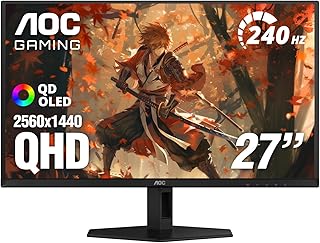
AOC 27" Gaming Monitor QHD 240Hz QD OLED G-SYNC Compatible
Why We Love It

KOORUI Gaming Ercan 27 inch – QHD 2560 x 1440 IPS PC Display
Why We Love It
Quick Pick
10 Best 240hz Qhd Tvs Of 2026
Quick Pick
Samsung 27-Inch QHD VA Curved Gaming Monitor 240hz,1ms,Wireless,HDMI,Display Port,USB Hub,Ethernet,Bluetooth
GAMEON GOML27QHD240IPS Midnight Signature 27" Black Gaming Monitor, 2560x1440p 2K QHD Fast IPS, 240Hz Refresh Rate, Ultra-Fast Response, HDMI 2.1, FreeSync/G-Sync, Crosshair, HDR, PS5, VRR Support.
ASUS ROG Strix XG27AQDMGR - OLED-Monitor - Gaming - 68.6 cm (27")
Alienware 27 Gaming Monitor - AW2726DM, QHD (2560x1440), 240Hz, QD OLED, 0.03ms, AMD FreeSync Premium, VESA AdaptiveSync, 99% DCI-P3, HDR10, DisplayPort, 2 HDMI, 3 Year Warranty | 0.03ms, AMD FreeSync Premium, VESA AdaptiveSync, 99% DCI-P3, HDR10, DisplayPort, 2 HDMI, 3yr Warranty
GAMEON 27" Black OLED QHD Gaming Monitor, 240Hz, 0.03ms, HDMI 2.1, DP 1.4, USB-C 65W, HDR10, FreeSync, G-Sync, 10-Bit, 98.5% DCI-P3, KVM, RGB, Adjustable Height Tilt Pivot Swivel
LG UltraGear 27GX704A-B 67.3 cm (26.5") QHD OLED Gaming Monitor 16:9 HDMI/DP 240Hz 0.03ms (GtG) (27GX704A-B.AEU)
AOC Gaming Q27G42ZE - 27 inch Quad HD Gaming Monitor, 240 Hz, 1 ms, G-Sync comp., HDR10 (2560x1440) Black-red
AOC Q27G41ZDF 26.5 inch WQHD Monitor 240Hz, QD-OLED Panel, 0.03ms GtG, Adaptive Sync, HDR10, G-Sync Compatible, (2560x1440 HDMI 1x 2.0 DP 1x1.4 USB Hub) Black/red
AOC 27" Gaming Monitor QHD 240Hz QD OLED G-SYNC Compatible 0.03ms, Q27GAZD | 2560×1440 Computer Monitor, HDR, DP 1.4, HDMI 2.0, Earphone Out, VESA Mount, Console Ready
KOORUI Gaming Ercan 27 inch – QHD 2560 x 1440 IPS PC Display, 240 Hz, 1 ms, Adpitive-Sync, Gsync Compatibility HDMI DisplayPort HDR 10
Buying Guide: 240hz Qhd Tvs
📋 Table of Contents
1What resolution and refresh rate combination is best for gaming on a 240Hz QHD TV?
A 240Hz QHD (2560x1440) TV offers a balance of sharp visuals and smooth motion, ideal for competitive gaming. It’s especially beneficial for fast-paced games where high frame rates reduce input lag and motion blur, though QHD may require a powerful GPU to maintain consistent performance at 240fps.
2How does a 240Hz QHD TV compare to 4K 120Hz models for gaming?
While 4K offers higher resolution, 240Hz QHD TVs provide smoother motion handling and lower input lag, which is critical for responsiveness. QHD is also less demanding on hardware, making it a better choice for gamers with mid-range GPUs who prioritize frame rate over pixel density.
3What panel type should I look for in a 240Hz QHD TV?
Look for IPS panels for wider viewing angles and accurate color reproduction, or VA panels for deeper blacks and better contrast, though they may have slower response times. For gaming, ensure the TV has a low motion blur setting and a 1ms response time for the best performance.
4Is HDR support important for a 240Hz QHD TV?
HDR enhances color and contrast, making games and media more vivid, but it’s not essential for gaming performance. If you play HDR-compatible titles or watch HDR content, look for TVs with HDR10 or Dolby Vision support for the best visual experience without compromising refresh rate or input lag.
5What should I consider regarding input lag and gaming modes?
Opt for a TV with a Game Mode that disables unnecessary processing to minimize input lag. Look for models with less than 10ms input lag in Game Mode, and ensure the TV supports variable refresh rate (VRR) and auto low latency mode (ALLM) for seamless gameplay with consoles and PCs.
How we choose
Our editors are people who genuinely love testing and writing about products. We compare each product's real-world usability and strengths, then distill what matters most into our own "Why We Love It" points — so you get an honest, at-a-glance sense of what counts before you buy.