10 Best 240hz Ips Monitors Of 2026
240hz Ips Monitors — Reviews, Recommendations & Updated Buying Guide November 2026


Z-Edge 24.5 inch 300Hz 280Hz 240Hz Gaming Monitor
Why We Love It


Z-EDGE 24.5" Gaming Monitor - 240Hz/1ms/IPS/FreeSync
Why We Love It

Z-EDGE 24inch IPS Gaming Monitor
Why We Love It

Z-EDGE 25-inch Gaming Monitor - 16:9 Full HD 1920x1080
Why We Love It

Dell 24 Gaming Monitor - SE2426HG
Why We Love It

Z-EDGE 27inch gaming monitor
Why We Love It

Z-Edge 27-inch Gaming Monitor 1920x1080 IPS 240Hz Gaming
Why We Love It

KOORUI 27 inch 240HZ FHD Gaming Monitor DCI-P3 90% Color
Why We Love It

ASUS TUF Gaming Series 5 VG279QML5A Gaming Monitor: 27-inch
Why We Love It
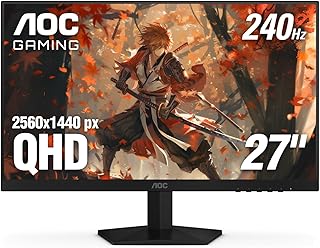
AOC Gaming Q27G41ZE QHD IPS Gaming Monitor 27" 2560x1440
Why We Love It
Quick Pick
10 Best 240hz Ips Monitors Of 2026
Quick Pick
Z-Edge 24.5 inch 300Hz 280Hz 240Hz Gaming Monitor, UG25S FHD 1080p, Ultra Fast MPRT 1ms, IPS Monitor Gaming, PC Computer Monitor, 16.7M Colors, DP x2, HDMI x2
Z-EDGE 24.5" Gaming Monitor - 240Hz/1ms/IPS/FreeSync - Full HD (1920x1080) Resolution - Frameless Design - DP&HDMI Support, UG25 | Frameless Design ,DP&HDMI ,VESA Support
Z-EDGE 24inch IPS Gaming Monitor, FHD 1080P, Max 240Hz,LED,UG24PJ,Black | FreeSync/Frameless/1ms/Brightness 350cd/m²/VESA Compatible/HDMI & DisplayPort/for Game,Office
Z-EDGE 25-inch Gaming Monitor - 16:9 Full HD 1920x1080, 240Hz Refresh Rate, 1ms Response Time, Frameless LED Display, AMD FreeSync Premium - DisplayPort & HDMI Ports UG25I | MPRT 1ms/5000:1 Contrast Ratio/16.7 Million Colors/350cd/m²Brightness/VA/VESA/HDMI 2.0 & DP1.4
Dell 24 Gaming Monitor - SE2426HG, Full HD (1920x1080), 240Hz, Fast IPS | 0.5ms, AMD FreeSync Premium, 99% sRGB, HDR10, VESA (100x100mm), DisplayPort, 2 HDMI, 3 Year Warranty, Black
Z-EDGE 27inch gaming monitor,16:9 2K 2560x1440,240Hz/IPS/FreeSync,UG27QS | MPRT 1ms/1000:1 Contrast Ratio/16.7 Million Colors/400cd/m²Brightness/VESA/HDMIx 2 & DP x 2
Z-Edge 27-inch Gaming Monitor 1920x1080 IPS 240Hz Gaming Monitor 1ms Frameless LED, UG27PJ AMD Freesync Premium Display Port HDMI | 1ms/16.7 Million Colors/Contrast Ratio 1200:1/Frameless /VESA/PS5/LED/HDMI x2 & DP x 2
KOORUI 27 inch 240HZ FHD Gaming Monitor DCI-P3 90% Color Gamut 1MS,1080P, Freesync,DisplayPort.HDMI Cable Black VESA
ASUS TUF Gaming Series 5 VG279QML5A Gaming Monitor: 27-inch Full HD Fast-IPS panel, 240Hz, 0.3ms, G-SYNC® compatible, AMD FreeSync™ Premium, ELMB SYNC, 99% sRGB, Height adjustment - Black
AOC Gaming Q27G41ZE QHD IPS Gaming Monitor 27" 2560x1440 240Hz 0.3ms, Game Console Ready, 3 Sides, Frameless, 1 HDMI 2.0, 1 Display Port, 3 Year Zero Glow Spot
Buying Guide: 240hz Ips Monitors
📋 Table of Contents
1Is 240Hz really better than 144Hz for gaming?
Yes — 240Hz monitors can display up to twice as many frames per second as 144Hz models, reducing motion blur and input lag. This makes a big difference in fast-paced games like FPS or fighting games where split-second reactions matter most.
2What panel size and resolution work best with 240Hz IPS?
27-inch models with 2560x1440 (QHD) or 3440x1440 (WQHD) offer a good balance of speed, clarity, and screen real estate. Avoid 4K at 240Hz unless you have a high-end GPU, as it can strain performance and reduce frame rates.
3Should I prioritize overdrive or G-Sync/FreeSync?
Both matter — a 5ms or lower overdrive setting minimizes ghosting, while G-Sync or FreeSync syncs your GPU to the monitor to eliminate screen tearing. For the best experience, look for a 240Hz IPS with both low overdrive and adaptive sync support.
4What input lag is acceptable for competitive gaming?
Aim for under 10ms of input lag for competitive play. Most 240Hz IPS monitors hit 1-5ms in game mode, but some budget models may add extra lag through processing. Always check user reports or enable 'low input lag' mode if available.
5Are curved 240Hz IPS monitors worth the extra cost?
Curved screens can enhance immersion in games and reduce eye strain during long sessions, but they add cost and may cause distortion at the edges. If you prioritize speed and accuracy over immersion, a flat 240Hz IPS is often the better choice for competitive gamers.
How we choose
Our editors are people who genuinely love testing and writing about products. We compare each product's real-world usability and strengths, then distill what matters most into our own "Why We Love It" points — so you get an honest, at-a-glance sense of what counts before you buy.