10 Best 240hz Freesync Gaming Monitors Of 2026
240hz Freesync Gaming Monitors — Reviews, Recommendations & Updated Buying Guide November 2026


Z-Edge 24.5" Gaming Monitor
Why We Love It


KOORUI 27 inch 240HZ FHD Gaming Monitor DCI-P3 90% Color
Why We Love It

Z-Edge 27-inch Gaming Monitor 1920x1080 IPS 240Hz Gaming
Why We Love It

Z-EDGE 32inch Curved Gaming Monitor
Why We Love It

ASUS TUF Gaming Series 5 VG279QML5A Gaming Monitor: 27-inch
Why We Love It

Samsung Odyssey 27" OLED Gaming Monitor G6 G61SH QHD 240Hz
Why We Love It

Z-EDGE 25-inch Gaming Monitor - 16:9 Full HD 1920x1080
Why We Love It

Z-Edge 27 Inch Curved Gaming Monitor
Why We Love It

UPERFECT 24.5" Portable Monitor 240Hz Gaming Monitor 2000:1
Why We Love It
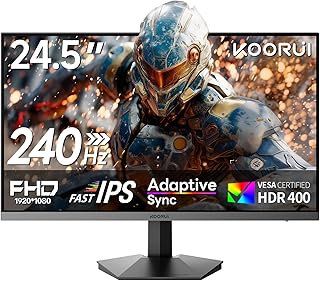
24.5 Inch FHD 1080P Fast IPS 240Hz Gaming Monitor
Why We Love It
Quick Pick
10 Best 240hz Freesync Gaming Monitors Of 2026
Quick Pick
Z-Edge 24.5" Gaming Monitor,Max 240Hz,FHD,1ms,VA LED,Freesync,5000:1,UG25F | 1ms/350cd/m²Brightness /16.7 Million Colors/HDR/16:9/VESA/HDMI x2 & DP x 1
KOORUI 27 inch 240HZ FHD Gaming Monitor DCI-P3 90% Color Gamut 1MS,1080P, Freesync,DisplayPort.HDMI Cable Black VESA
Z-Edge 27-inch Gaming Monitor 1920x1080 IPS 240Hz Gaming Monitor 1ms Frameless LED, UG27PJ AMD Freesync Premium Display Port HDMI | 1ms/16.7 Million Colors/Contrast Ratio 1200:1/Frameless /VESA/PS5/LED/HDMI x2 & DP x 2
Z-EDGE 32inch Curved Gaming Monitor, 240Hz,LED, VA/FreeSync/HDR, FHD UG32P | MPRT 1ms/3000:1 Contrast Ratio/16.7 Million Colors/280cd/m²Brightness//VESA/HDMI 2.0 x 2 / DP 1.4 x 2
ASUS TUF Gaming Series 5 VG279QML5A Gaming Monitor: 27-inch Full HD Fast-IPS panel, 240Hz, 0.3ms, G-SYNC® compatible, AMD FreeSync™ Premium, ELMB SYNC, 99% sRGB, Height adjustment - Black
Samsung Odyssey 27" OLED Gaming Monitor G6 G61SH QHD 240Hz Refresh Rate, 0.03Ms Response Time, Glare Free, Height Adjustable and Pivot, Safeguard+, FreeSync Premium Pro, LS27HG612SMXUE
Z-EDGE 25-inch Gaming Monitor - 16:9 Full HD 1920x1080, 240Hz Refresh Rate, 1ms Response Time, Frameless LED Display, AMD FreeSync Premium - DisplayPort & HDMI Ports UG25I | MPRT 1ms/5000:1 Contrast Ratio/16.7 Million Colors/350cd/m²Brightness/VA/VESA/HDMI 2.0 & DP1.4
Z-Edge 27 Inch Curved Gaming Monitor,QHD 240Hz 2K,Max 240Hz,VA,HDR,UG27PX
UPERFECT 24.5" Portable Monitor 240Hz Gaming Monitor 2000:1 Contrast FreeSync 0.1ms Fast IPS Large Screen, Built-in 180° Adjustable Stand/VESA, USB-C HDMI Second Screen for Laptop, Phone, Game Console
24.5 Inch FHD 1080P Fast IPS 240Hz Gaming Monitor,1ms,HDR 400, 99% sRGB,Freesync,VESA,HDMI2.0/DP1.4 for Immersive Gaming & Work G2511X
Buying Guide: 240hz Freesync Gaming Monitors
📋 Table of Contents
1Does 240Hz really make a difference over 144Hz or 165Hz?
Yes — 240Hz reduces input lag and motion blur, making fast-paced games like FPS or fighting games feel smoother and more responsive. It’s most noticeable in competitive play where split-second reactions matter.
2What panel type is best for a 240Hz FreeSync monitor?
TN panels offer the fastest response times (1ms GtG) and are ideal for 240Hz performance, while IPS or VA panels provide better color and viewing angles but may have slightly slower response times. Choose TN for speed, or IPS for color accuracy with a 1ms overdrive setting.
3How much FreeSync range do I need for my GPU?
Look for a 144-240Hz FreeSync range to match most modern GPUs. A wider range ensures smoother frame rate transitions and reduces screen tearing, especially when frame rates dip below 240FPS in demanding games.
4Is a 1ms response time always necessary at 240Hz?
For competitive gaming, 1ms GtG is ideal to avoid ghosting in fast action. However, some 240Hz monitors use overdrive to achieve 1ms, which can cause overshoot. Test the monitor or read reviews to ensure it handles motion cleanly without artifacts.
5What resolution should I pair with a 240Hz monitor?
1080p is best for 240Hz due to lower pixel density and easier GPU performance, while 1440p offers a sharper image but may require a more powerful GPU to hit 240FPS consistently. 4K at 240Hz is rare and not recommended for most setups.
How we choose
Our editors are people who genuinely love testing and writing about products. We compare each product's real-world usability and strengths, then distill what matters most into our own "Why We Love It" points — so you get an honest, at-a-glance sense of what counts before you buy.