10 Best 24 Inch Ips Computer Monitor Of 2026
24 Inch Ips Computer Monitor — Reviews, Recommendations & Updated Buying Guide November 2026


BenQ 24" Eye-Care Monitor GW2491
Why We Love It

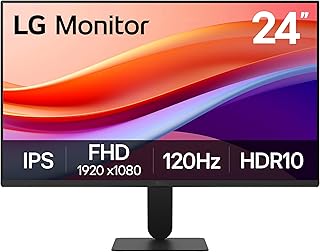
LG 24U411A-B 24-inch Full HD (1920 x 1080) IPS Computer
Why We Love It

Samsung 24" Essential Monitor S33F FHD (1
Why We Love It

KOORUI Gaming Monitor 24-inch IPS FHD 1080p
Why We Love It
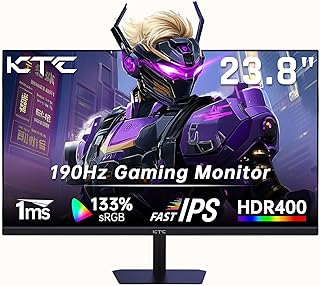
KTC 24 Inch 180Hz/190Hz Gaming Monitor
Why We Love It

Samsung 24" Essential Monitor S3 S30GD Full HD Monitor
Why We Love It

Samsung 24-Inch IPS Full HD 1080p 75Hz Borderless Monitor
Why We Love It

Z-EDGE 24inch IPS Gaming Monitor
Why We Love It

KOORUI E2411H 23.8 inch Monitor Full HD
Why We Love It

GAMEON GOE24FHD165IPS 24 Inch Gaming Monitor FHD 1080p 165Hz
Why We Love It
Quick Pick
10 Best 24 Inch Ips Computer Monitor Of 2026
Quick Pick
BenQ 24" Eye-Care Monitor GW2491, 1080p FHD 100Hz IPS, HDMI, DisplayPort, 1920x1080, Ultra Slim Bezel, TUV-Certified, Flicker-Free, Low Blue Light Plus, Eye-CareU
LG 24U411A-B 24-inch Full HD (1920 x 1080) IPS Computer Monitor, 120Hz, HDR10, Reader Mode, Flicker Safe, HDMI, Slim Stand Base, Black
Samsung 24" Essential Monitor S33F FHD (1,920 x 1,080) 100Hz Refresh Rate 5Ms for Gaming and Office Use, (New Launch) LS24F330EAMXUE
KOORUI Gaming Monitor 24-inch IPS FHD 1080p, 200Hz 1ms HDR400 90% DCI-P3 Color Gamut, Adaptive Sync Ultra Slim Frame, VESA Mountable, HDMI x 2, DisplayPort, Black, G2411P
KTC 24 Inch 180Hz/190Hz Gaming Monitor, FHD PC Computer Monitor H24F8 | with Fast IPS Panel, HDR400, 133% sRGB, Bluelight Filter, 2 HDMI & 1 DP Port, Compatible Freesync and Wall Mountable
Samsung 24" Essential Monitor S3 S30GD Full HD Monitor, 100Hz Refresh Rate, Response Time 5 (GTG), IPS Panel, Game Mode, Eye Saver Mode - LS24D300GAMXUE
Samsung 24-Inch IPS Full HD 1080p 75Hz Borderless Monitor With HDMI, VGA - LS24C310
Z-EDGE 24inch IPS Gaming Monitor, FHD 1080P, Max 180Hz,HDR,LED,1ms,UG24F | FreeSync/Frameless/Brightness 350cd/m²/VESA Compatible/5000:1Contrast Ratio/HDMI & DisplayPort/for Game,Office
KOORUI E2411H 23.8 inch Monitor Full HD, 120 Hz, 5ms, Eye Comfort, sRGB% 99 Farbumfangs, (1920 x 1080, HDMI, VGA, Neigbar, VESA 75x75)
GAMEON GOE24FHD165IPS 24 Inch Gaming Monitor FHD 1080p 165Hz Fast IPS Computer Monitor, 0.5ms MPRT, HDMI 2.1, HDR400, 99% sRGB, G-Sync & FreeSync, Built-in Speakers, PS5 Ready, Black
Buying Guide: 24 Inch Ips Computer Monitor
📋 Table of Contents
1What resolution should I look for in a 24-inch IPS computer monitor?
For a 24-inch IPS monitor, 1920x1080 (Full HD) is standard and sufficient for most tasks, while 2560x1440 (QHD) offers sharper detail for graphic design or video editing. Higher resolutions may require a more powerful GPU for smooth performance, so balance your needs with your system's capabilities.
2Does IPS panel type matter more than size for color accuracy?
Yes — IPS panels provide wider viewing angles and more accurate color reproduction compared to TN panels, making them ideal for photo editing, video work, or multitasking. While size is important, the IPS technology ensures consistent color and clarity across the screen, which is critical for professional use.
3What refresh rate is best for general use versus gaming?
For general use like office work or web browsing, a 60Hz refresh rate is sufficient. If you're into gaming or fast-paced video editing, look for at least 75Hz or 144Hz for smoother motion and reduced input lag. Higher refresh rates often come with lower response times, which is important for competitive gaming.
4What should I consider regarding connectivity options?
Ensure the monitor has at least one HDMI and one DisplayPort input for versatility with different devices. USB-C ports with power delivery are increasingly useful for docking stations and charging laptops. Multiple ports allow you to connect peripherals without needing extra adapters.
5Is a built-in webcam and speakers worth the extra cost?
A built-in webcam and speakers can be convenient for video calls and multimedia use, but they often compromise on quality. If you need high-definition video conferencing, invest in an external webcam instead. Speakers are usually basic, so consider external options for better audio clarity and volume.
How we choose
Our editors are people who genuinely love testing and writing about products. We compare each product's real-world usability and strengths, then distill what matters most into our own "Why We Love It" points — so you get an honest, at-a-glance sense of what counts before you buy.