10 Best 22mp Photo Scanner Of 2026
22mp Photo Scanner — Reviews, Recommendations & Updated Buying Guide November 2026


Scanner Movies, Viewer Slides
Why We Love It


Magnasonic All-In-One 24MP Film Scanner with Large 5"
Why We Love It

KODAK RODFS70 Kodak Slide And Scan Digital Film Scanner 7
Why We Love It

22MP Film & Slide Scanner with 5" LCD
Why We Love It
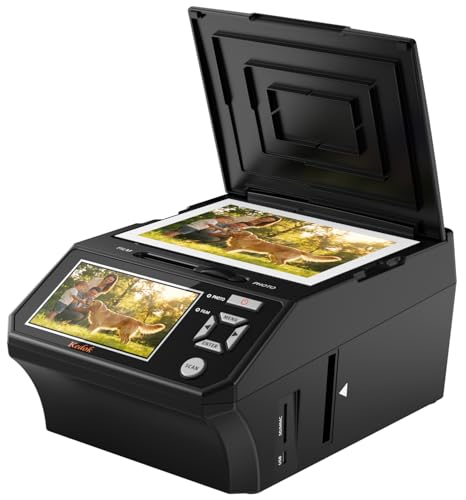
Multifunction Scanner for Photos
Why We Love It

ClearClick Virtuoso 2.0 (Second Generation) 22MP Film &
Why We Love It

QPIX DIGITAL Film Negative Scanner 22 MP 110 135 126KPK
Why We Love It

PORTTA Film Scanner with 5" LCD Screen
Why We Love It

Photo, Slide & Negative Scanner with 5” Large Screen
Why We Love It

MUNBYN Portable Scanner
Why We Love It
Quick Pick
10 Best 22mp Photo Scanner Of 2026
Quick Pick
Scanner Movies, Viewer Slides, Negatives and Photos | 35mm/135, JPEG 22MP, 2.4" LCD, 4GB SD, Photo Scanner, Negative Scanner, Digital Slide Converter, USB Windows/Mac
Magnasonic All-In-One 24MP Film Scanner with Large 5" Display & HDMI, Converts 35mm/126/110/Super 8 Film & 135/126/110 Slides into Digital Photos, Built-in Memory (FS71)
KODAK RODFS70 Kodak Slide And Scan Digital Film Scanner 7 Inches Max - Large 7 Inches LCD Screen, Convert Color and B and W Negatives and Slides 35 mm, High Resolution 22 MP JPEGs,Black
22MP Film & Slide Scanner with 5" LCD, Converts 35mm 126 110 | Quick convert color/B&W negatives to JPEGs digital photos; saves to SD or SDHC card (not included); standalone operation
Multifunction Scanner for Photos, Slides and Negatives, LCD 5"
ClearClick Virtuoso 2.0 (Second Generation) 22MP Film & Slide Scanner with Extra Large 5" LCD Screen - Convert 35mm, 110, 126 Slides and Negatives to Digital Photos
QPIX DIGITAL Film Negative Scanner 22 MP 110 135 126KPK Super 8 Negative Photo Scanner 35mm Slide Film Scanner Film Converter High Resolution 22MP 2.4" LCD(White)
PORTTA Film Scanner with 5" LCD Screen, 22MP Slide & Negative Scanner, Converts 135, 126, 110 Film & Slides to Digital Photos, HDMI Output, SD Card Storage, No Computer Required
Photo, Slide & Negative Scanner with 5” Large Screen | Convert 35mm/110 Negatives, Slides & Physical Photos to 22MP Digital Image, Includes 8GB SD Card, No Computer Required
MUNBYN Portable Scanner, 900 DPI Handheld A4 Document/Photo Scanner, 16GB | 3-5 Sec A4 Scans, 300/600/900 DPI, JPEG/PDF, USB Transfer, No Driver, AA Battery Power, For Documents, Photos and Book Pages
Buying Guide: 22mp Photo Scanner
📋 Table of Contents
1What resolution is actually needed for a 22mp photo scanner?
A 22mp (megapixel) scanner captures fine details suitable for enlargements up to 16x20 inches or larger. This resolution is ideal for archival-quality scans of photos, negatives, or slides, ensuring clarity even when digitally restored or printed at high sizes.
2Should I look for a flatbed or film scanner for 22mp scans?
For 22mp scans, a flatbed scanner is best for documents and photos, while a dedicated film scanner offers higher precision for negatives and slides. Film scanners often have better optical resolution and light control, but flatbeds are more versatile for everyday use.
3What scanning speed can I expect with a 22mp scanner?
22mp scanners typically scan at 10-30 pages per minute, depending on the model and whether you're scanning in color or black-and-white. Higher resolution scans take longer, so look for models with automatic document feeders if you need speed for large batches.
4Does optical resolution matter more than the stated 22mp?
Yes — a 22mp scanner with a lower optical resolution (e.g., 4800dpi) may not deliver the same quality as one with 6000dpi or higher. Optical resolution determines how much detail the scanner can capture, so prioritize models with at least 4800dpi for sharp, high-quality scans.
5What software features should I look for in a 22mp photo scanner?
Look for built-in software that includes color correction, dust and scratch removal, and batch scanning. Advanced tools like auto-crop, image enhancement, and OCR (optical character recognition) can save time and improve the quality of your scanned photos and documents.
How we choose
Our editors are people who genuinely love testing and writing about products. We compare each product's real-world usability and strengths, then distill what matters most into our own "Why We Love It" points — so you get an honest, at-a-glance sense of what counts before you buy.