10 Best 2.5k Portable Monitors Of 2026
2.5k Portable Monitors — Reviews, Recommendations & Updated Buying Guide November 2026


UPERFECT 2.5K 240Hz Portable Gaming Monitor
Why We Love It

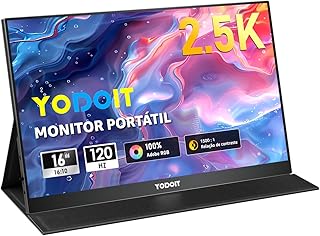
Yodoit Portable Monitor 16" 2.5K QHD 120 Hz Monitor Screen
Why We Love It

Portable Screen Displays 2.5K QHD Display
Why We Love It

Prechen 10.5" OLED Touchscreen Portable Monitor 2.5K
Why We Love It

UPERFECT 2K 120Hz Portable Gaming Monitor
Why We Love It

16" 2.5K Laptop Screen Extender
Why We Love It

UPERFECT 2K Portable Monitor
Why We Love It

UPERFECT QLED 18 Inch Portable Monitor 2.5K 144Hz
Why We Love It

ARZOPA 2.5K Portable Monitor 16" 2560x1600 HDR Kickstand
Why We Love It

ARZOPA 16.1'' 180Hz 2.5K Portable Monitor
Why We Love It
Quick Pick
10 Best 2.5k Portable Monitors Of 2026
Quick Pick
UPERFECT 2.5K 240Hz Portable Gaming Monitor, 16" 2560x1600 QHD 100% DCI-P3 400 Nits Portable Monitor for Laptop w/Stand & VESA, Adaptive Sync HDMI 2.1 External Screen for PC Phone Game Console
Yodoit Portable Monitor 16" 2.5K QHD 120 Hz Monitor Screen IPS 2560x1600 16:10 Display with USB Type C Port and Built-in Speakers with Smart Cover Monitor Compatible with PC, Laptop, MacBook, Xbox
Portable Screen Displays 2.5K QHD Display, 100% sRGB 144Hz Refresh Rate Gaming Display, Dual Type C HDMI Second Computer Screen, Travel Monitor for PS4/5 Xbox Switch MAC (16" 144Hz 2.5K)
Prechen 10.5" OLED Touchscreen Portable Monitor 2.5K 2560x1600, 100% NTSC, 54000:1 Contrast, Mini Second Touch Display with Protect Case & Speaker, USB-C, HDMI, Small Screen for Laptop Mini PC Phone
UPERFECT 2K 120Hz Portable Gaming Monitor, 16" 2560x1600 QHD HDR FreeSync Laptop Screen w/VESA & Smart Case Matte IPS Eye Care External Second Display for PC Phone Game Console
16" 2.5K Laptop Screen Extender, Triple Portable Monitor QHD 2560x1600 IPS, 100% sRGB, Detachable Dual Screens, 235° Rotation, USB-C Laptop Monitor for 13–17" Laptops
UPERFECT 2K Portable Monitor, 16" 2560x1600 QHD Portable Gaming Monitor | HDR FreeSync Laptop Monitor w/VESA & Smart Case Matte IPS Eye Care External Second Screen for PC Laptop Phone Game Console
UPERFECT QLED 18 Inch Portable Monitor 2.5K 144Hz – 16:10 Format 100% DCI-P3 1500:1 500 Nits Large Mobile Monitor 2560 x 1600 for Laptop/PC/Console, HDMI/USB-C, VESA
ARZOPA 2.5K Portable Monitor 16" 2560x1600 HDR Kickstand Display, 500nits 8bit QHD USB-C HDMI Laptop Monitor, 16:10 IPS Eye Care External Second Screen for Mac PC Phone PS4/5 Xbox Switch - Z1RC | Built-in Stand USB-C HDMI Eye Care External Second Screen for Mac Laptop Phone PS4/5 Xbox Switch -Z1RC
ARZOPA 16.1'' 180Hz 2.5K Portable Monitor, 2560x1440 QHD 107% sRGB Kickstand Portable Gaming Monitor with HDR, Ultra Slim, Eye Care, External Second Screen for Laptop, PC, PS5, Mac, Xbox - Z3FC
Buying Guide: 2.5k Portable Monitors
📋 Table of Contents
1What resolution should I look for in a 2.5k portable monitor?
A 2.5k resolution typically refers to 2560x1440 pixels, which offers sharp text and vibrant visuals. Look for monitors with IPS panels for wider viewing angles and accurate color reproduction, especially if you're using it for design or video work. Avoid TN panels for better color consistency across different angles.
2How important is the refresh rate for a 2.5k portable monitor?
For general use like browsing or office work, a 60Hz refresh rate is sufficient. However, if you're gaming or editing video, look for at least 120Hz for smoother motion. Higher refresh rates often come with higher price tags, so balance your needs with your budget.
3What connectivity options should I prioritize?
Most 2.5k portable monitors use USB-C with DisplayPort Alt Mode for power and video, which is ideal for laptops and tablets. Ensure the monitor supports your device’s port type and has enough power delivery to charge your device while in use. HDMI and USB-A ports can also be useful for additional devices.
4What size is best for a 2.5k portable monitor?
Common sizes range from 13 to 15.6 inches, with 14-inch models offering a good balance between portability and screen real estate. Larger screens provide more workspace but are heavier and less convenient for travel. Consider your primary use case when choosing the size.
5Are there any common mistakes to avoid when buying a 2.5k portable monitor?
Avoid models with low brightness (under 250 nits) if you plan to use them in bright environments. Also, check for built-in speakers and battery life if you need it to function without a power source. Lastly, ensure the monitor is compatible with your device’s operating system and software before purchasing.
How we choose
Our editors are people who genuinely love testing and writing about products. We compare each product's real-world usability and strengths, then distill what matters most into our own "Why We Love It" points — so you get an honest, at-a-glance sense of what counts before you buy.