10 Best 2.5g Laptop Network Adapters Of 2026
2.5g Laptop Network Adapters — Reviews, Recommendations & Updated Buying Guide November 2026


UGREEN USB C to Ethernet Adapter 2.5G
Why We Love It


2 in 1 Network Adapter Compatible
Why We Love It

2.5G USB C Ethernet Adapter USB 3.0
Why We Love It

ASUS 2.5G Ethernet USB Adapter (USB-C2500) Wired LAN Network
Why We Love It

ASUS USB-C2500 V2 USB-C 2.5G Ethernet Adapter: Compatible
Why We Love It
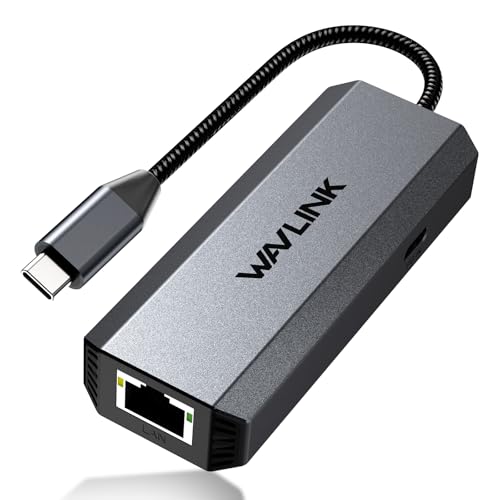
WAVLINK USB-C to Ethernet Adapter
Why We Love It

Cable Matters USB C to 2.5 Gigabit Ethernet Adapter
Why We Love It
ASUS USB-C2500 V2 2.5Gbps Type-C Wired Network Adapter
Why We Love It

USB 3.0 to 2.5G Ethernet Adapter
Why We Love It

BrosTrend 2.5Gb USB C to Ethernet Adapter
Why We Love It
Quick Pick
10 Best 2.5g Laptop Network Adapters Of 2026
Quick Pick
UGREEN USB C to Ethernet Adapter 2.5G, Ethernet Adapter for Laptop Aluminum | Type C (Thunderbolt 4/3 Compatible) to RJ45 Network Internet, Compatible for NAS, MacBook Air/Pro, iPhone 17 Pro/Max
2 in 1 Network Adapter Compatible, Dual Connectivity USB-A/USB-C, to 2.5G Ethernet Adapter, High Speed RJ45 Network Converter for PC Laptop Windows Mac OS Linux
2.5G USB C Ethernet Adapter USB 3.0, Thunderbolt 3/4 Compatible Type-C to RJ45 Gigabit LAN Network Adapter for Laptop MacBook Air Pro, NAS, iPhone 16/15 Pro, Plug and Play, Aluminum Alloy
ASUS 2.5G Ethernet USB Adapter (USB-C2500) Wired LAN Network Connection for Mac OS, Linux, Windows, Backward Compatible on 2.5G, 1G, 100Mbps, Ideal for Gaming
ASUS USB-C2500 V2 USB-C 2.5G Ethernet Adapter: Compatible with 2.5G/1G/100Mbps networks, Instant Plug and Play, Sleek, Compact Design for Easy Portability - Black
WAVLINK USB-C to Ethernet Adapter, 2.5 Gbps RJ45 Plug and Play, Network Adapter with PD 95W, Compatible with Windows/Mac OS/iOS/Linux/Chrome OS
Cable Matters USB C to 2.5 Gigabit Ethernet Adapter, USB to 2.5 Gigabit Ethernet Adapter, Not Compatible with M2 Macs (2.5g Ethernet to USB, 2.5gbps Ethernet Port) -Compatible with Thunderbolt 4 USB 4 | USB to 2.5 Gb Ethernet Adapter, 2500Mbps, Compatible with Thunderbolt 4/USB4, Not Compatible with M2 Macs
ASUS USB-C2500 V2 2.5Gbps Type-C Wired Network Adapter, RJ45 LAN, USB-C High-Speed Transfer, Compatible with 2.5G/1G/100Mbps
USB 3.0 to 2.5G Ethernet Adapter, Aluminum USB 3.2 USB AM to 2.5Gbps Ethernet Adapter ForWin for OS X, for Chrome OS for
BrosTrend 2.5Gb USB C to Ethernet Adapter, Plug & Play Lifetime Protection | Aluminum USB 3.2 to RJ45 Network Adapter for Laptop MacBook Pro/Air, iPad, Compatible with Thunderbolt, Windows, MacOS, iOS
Buying Guide: 2.5g Laptop Network Adapters
📋 Table of Contents
1What does the 2.5g rating mean for a laptop network adapter?
The 2.5g rating refers to the data transfer speed capability, typically meaning it supports up to 2.5 gigabits per second. This is ideal for high-speed Wi-Fi 6 or 6E connections, ensuring faster downloads, smoother streaming, and better performance in crowded networks with multiple devices.
2Should I choose a 2.5g adapter over a 1g or 1.2g one?
If you frequently use bandwidth-heavy applications like 4K video streaming, online gaming, or large file transfers, a 2.5g adapter offers a noticeable improvement. However, for basic web browsing and light use, a 1g or 1.2g adapter may be sufficient and more cost-effective.
3What type of Wi-Fi standard does a 2.5g adapter support?
A 2.5g adapter typically supports Wi-Fi 6 (802.11ax) or Wi-Fi 6E, which operate on the 2.4GHz, 5GHz, and 6GHz frequency bands. These standards provide faster speeds, lower latency, and better performance in congested environments compared to older Wi-Fi 5 (802.11ac) adapters.
4Are there differences in performance between USB 3.0 and USB-C 2.5g adapters?
USB-C 2.5g adapters often offer better power delivery and more compact designs, making them ideal for modern laptops with USB-C ports. However, both USB 3.0 and USB-C 2.5g adapters can deliver similar network speeds, so the choice depends on your laptop's port availability and power needs.
5What should I look for in terms of compatibility with my laptop?
Check that the adapter is compatible with your laptop’s operating system (Windows, macOS, or Linux) and that it supports the correct USB standard (USB 3.0 or USB-C). Also, ensure it works with your laptop’s Wi-Fi bands and that any necessary drivers are available for installation.
How we choose
Our editors are people who genuinely love testing and writing about products. We compare each product's real-world usability and strengths, then distill what matters most into our own "Why We Love It" points — so you get an honest, at-a-glance sense of what counts before you buy.