10 Best 2 Input Monitor Controllers Of 2026
2 Input Monitor Controllers — Reviews, Recommendations & Updated Buying Guide November 2026


Azonee Video Wall Controller 2x2 Splicer
Why We Love It


StudioMan M04 Passive Monitor Controller
Why We Love It

Mackie Big Knob Series
Why We Love It

Pyle 2-Channel Audio Mixer
Why We Love It

AV Access KVM Switch Dock 2 Monitors 2 Laptops
Why We Love It

Audient Nero Desktop Monitor Controller
Why We Love It
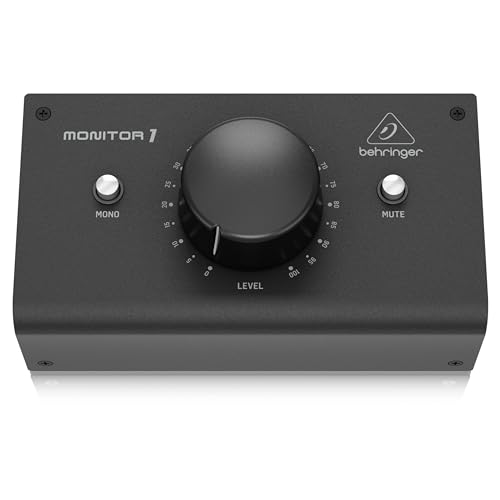
Behringer MONITOR1 Premium Passive Stereo Monitor and Volume
Why We Love It

Victron Energy MK2 Version Controller/Monitor System
Why We Love It

5V 3A AC Power Adapter
Why We Love It

Pwm Dc Motor Speed Controller
Why We Love It
Quick Pick
10 Best 2 Input Monitor Controllers Of 2026
Quick Pick
Azonee Video Wall Controller 2x2 Splicer, HDMI Picture Splicer & DVI Input, 1080P 60HZ Support, Multiple Display Modes, RS232 & IR Remote, 1080P Output for LED Video Wal (1-HDMI Input, 4-HDMI Output)
StudioMan M04 Passive Monitor Controller - 2 Input 4 Output Studio Volume Controller with Mute Button, 1/4" Unbalanced Connectors for Powered Studio Monitors & Power Amplifiers (2 IN 4 OUT)
Mackie Big Knob Series, 3x2 Studio Monitor Controller 192kHz USB I/O (BIG KNOB STUDIO)
Pyle 2-Channel Audio Mixer - DJ Sound Controller Interface with USB Soundcard for PC Recording, XLR and 3.5mm Microphone Jack, 18V Power, RCA Input and Output for Professional and Beginners - PAD10MXU
AV Access KVM Switch Dock 2 Monitors 2 Laptops, 4K KVM Switch Dual Monitor, 2 USB C MST Ports, 60W PD for Each PC, 1G Ethernet, EDID Emulation, 2K@144Hz, 1080P@240Hz, Ideal for Home Office & Gaming
Audient Nero Desktop Monitor Controller
Behringer MONITOR1 Premium Passive Stereo Monitor and Volume Controller
Victron Energy MK2 Version Controller/Monitor System
5V 3A AC Power Adapter, Universal DC Supply (Compatible with 2.5A / 2A / 1A) with 4 Selectable Tips for Kindle Fire Tablet, USB-HUB, Nextbook, Bluetooth Speaker, and Most 5V Devices
Pwm Dc Motor Speed Controller, 1.8V-15V 2A Compact Module
Buying Guide: 2 Input Monitor Controllers
📋 Table of Contents
1What input types should I look for in a 2 input monitor controller?
Most 2 input controllers support HDMI and DisplayPort, or sometimes DVI. Ensure the inputs match your devices — for example, if you use a GPU and a capture card, check if both use HDMI or one uses DisplayPort for higher resolution support.
2How important is 4K support for my use case?
If you're switching between 4K sources like a 4K camera and a 4K computer, look for a controller that supports 4K at 60Hz to avoid lag or downscaling. Lower-end models may only handle 1080p or 4K at 30Hz, which is fine for static content but not for real-time video.
3Should I prioritize a manual switch or an automatic one?
Manual switches are better for precise control, especially in professional setups where you don’t want the device to switch inputs unexpectedly. Automatic switches are more convenient for casual use but may struggle with similar signal types or inactive sources.
4What about audio pass-through and control?
Some 2 input controllers include audio switching, which is essential if you need to route sound from both sources. Look for models with separate audio outputs or the ability to mute one input while switching to avoid audio bleed or mismatched sources.
5Are there any common mistakes to avoid when choosing one?
Don’t assume all 2 input controllers support the same resolution and refresh rate — always check the maximum supported specs. Also, avoid models with poor build quality or no EDID management, which can cause display compatibility issues with certain devices.
How we choose
Our editors are people who genuinely love testing and writing about products. We compare each product's real-world usability and strengths, then distill what matters most into our own "Why We Love It" points — so you get an honest, at-a-glance sense of what counts before you buy.