10 Best 2 In 1 External Memory Card Reader Of 2026
2 In 1 External Memory Card Reader — Reviews, Recommendations & Updated Buying Guide November 2026


UGREEN SD Card Reader
Why We Love It


BIGTHREE 2 in 1 SD Card Reader
Why We Love It

USB C Lightning to Micro SD Card Reader(2in1)for iPhone17 16
Why We Love It

USB C to SD Card Reader
Why We Love It

Lexar Multi-Card 2-in-1 USB 3.1 External Card Readers
Why We Love It
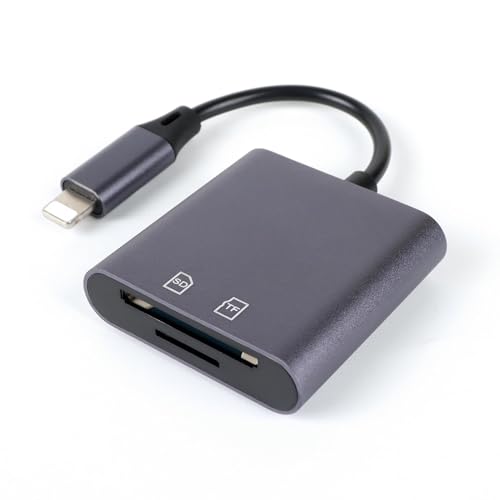
KASTWAVE Aluminum SD Card Reader for iPhone/Ipad
Why We Love It

SYOSI Cross 2-in-1 Micro SD Card Reader USB Lightning Type-C
Why We Love It

2-in-1 USB Card Reader
Why We Love It

T Tersely 2 in 1 Type-C Lighting to SD/TF Memory Card Reader
Why We Love It

USB to SD Card Reader 2 in 1 High-Speed USB Micro SD/TF Card
Why We Love It
Quick Pick
10 Best 2 In 1 External Memory Card Reader Of 2026
Quick Pick
UGREEN SD Card Reader, USB C 170MB/s Adapter with Dual-Slot for TF/SD | 170MB/s Super Speed SD Card Reader Simultaneous Read and Write Compatible with iPhone 17 Pro Max Air 16 Galaxy S25 MacBook
BIGTHREE 2 in 1 SD Card Reader, Dual-Slot SD Card Reader, Lightning to SD/TF Cards Camera Memory Card Adapter, SD Card Readers for iPhone, High-Speed Transmission, Plug and Play.
USB C Lightning to Micro SD Card Reader(2in1)for iPhone17 16 15 Pro for Apple Adapter Digital Camera TF Memory Photo Storage Transfer for iPad Compatible for Samsung Type C Compact Accessories Android
USB C to SD Card Reader, SD Card Adapter with SD MicroSD USB3.0 2 in 1 Digital Camera Viewer Plug and Play Memory Card Reader for iPhone 16 15 Pro Max, iPad Pro/Mac/Laptop and More Devices
Lexar Multi-Card 2-in-1 USB 3.1 External Card Readers, Up to 312 MB/s for UHS-I UHS-II SD Card and Micro SD Card, Card Reader USB Compatible with USB 3.0/2.0, Card Adapter (LRW450UBAMZN)
KASTWAVE Aluminum SD Card Reader for iPhone/Ipad, 2 in 1 Memory Card Reader for SDXC/SDHC/SD/MMC/RS-MMC/Micro SDXC/Micro SD/Micro SDHC Card/UHS-II, and UHS-I Cards
SYOSI Cross 2-in-1 Micro SD Card Reader USB Lightning Type-C Adapter for iPhone 14 15 16 17 Pro, iPad, Android, MacBook, TF Memory Stick Transfer, High-Speed Portable Data Adapter, 1 Pcs
2-in-1 USB Card Reader, Micro SD and TF Memory Card Reader for PC and Laptop, Black or White
T Tersely 2 in 1 Type-C Lighting to SD/TF Memory Card Reader for IPhone | MacBook M1 M2 Mac/iPad Pro Air/Surface, for Samsung S23, for Google Pixel, and More
USB to SD Card Reader 2 in 1 High-Speed USB Micro SD/TF Card Reader Adapter | Memory Card Reader for Camera with Dual Slot Compatible with SD/SDHC/MMC/Micro SDXC/UHS-II Cards, MacBook, Dell, More Laptop
Buying Guide: 2 In 1 External Memory Card Reader
📋 Table of Contents
1What card formats does a 2 in 1 external memory card reader typically support?
Most 2 in 1 readers support common formats like SD, microSD, and sometimes CF or MMC. Look for models that explicitly list support for SDHC, SDXC, and microSDHC to ensure compatibility with modern devices like smartphones, cameras, and drones.
2What transfer speeds should I look for in a 2 in 1 card reader?
For everyday use, USB 2.0 speeds (up to 480 Mbps) are sufficient, but for high-resolution video or large files, choose USB 3.0 or 3.1 models (up to 5 Gbps or 10 Gbps). Faster speeds reduce transfer time and improve efficiency when working with high-capacity cards.
3Is a built-in USB hub useful in a 2 in 1 card reader?
A built-in USB hub can be convenient for connecting multiple devices at once, but it’s not essential. If you need to charge or connect peripherals while transferring data, look for a model with at least two additional USB ports for added flexibility and convenience.
4What should I consider when choosing between a USB-A and USB-C 2 in 1 card reader?
USB-C is more modern and offers faster data transfer and smaller form factor, but USB-A is still widely used. Choose USB-C if your device has a USB-C port, but ensure the reader is compatible with your computer or phone. Some models offer both ports for universal use.
5Are there any common mistakes to avoid when buying a 2 in 1 card reader?
Avoid models that don’t specify supported card types or transfer speeds, as they may not work with your devices. Also, be wary of overly cheap models that may have poor build quality or unreliable performance. Always check user reviews for real-world reliability and compatibility feedback.
How we choose
Our editors are people who genuinely love testing and writing about products. We compare each product's real-world usability and strengths, then distill what matters most into our own "Why We Love It" points — so you get an honest, at-a-glance sense of what counts before you buy.