10 Best 1tb External Hard Drives Of 2026
1tb External Hard Drives — Reviews, Recommendations & Updated Buying Guide November 2026


Seagate Expansion Portable, 1TB
Why We Love It

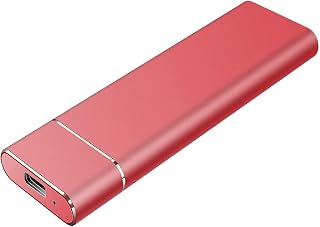
External Hard Drive Type C USB 2.0 Portable 1TB 2TB Hard
Why We Love It

SanDisk 1TB Portable SSD Drive
Why We Love It

LaCie Mobile Drive 1TB External Hard Drive Portable HDD
Why We Love It

SanDisk Portable SSD, 1TB
Why We Love It

WD 1TB My Passport portable external storage
Why We Love It

ADATA Dashdrive Durable HD710 Pro External Hard Disk Drive
Why We Love It

Verbatim 53071 Store 'n' Go SuperSpeed I 1 TB I Silver I
Why We Love It

Toshiba Canvio Flex 1TB Portable 2.5’’ External Hard Drive
Why We Love It

Samsung MU-PC1T0T/WW Portable SSD T7 SSD 1TB USB 3.2 Gen.2
Why We Love It
Quick Pick
10 Best 1tb External Hard Drives Of 2026
Quick Pick
Seagate Expansion Portable, 1TB, External Hard Drive, 2.5 Inch, USB 3.0, for Mac and PC (STKM1000400)
External Hard Drive Type C USB 2.0 Portable 1TB 2TB Hard Drive External HDD Compatible for Mac Laptop and PC 2TB (RED-LN2)
SanDisk 1TB Portable SSD Drive, Up to 600MB/s Read Speed, USB-C, USB 3.2 Gen 2, PC & Mac Compatible Solid state Drive
LaCie Mobile Drive 1TB External Hard Drive Portable HDD - Moon Silver, USB-C 3.2, for PC and Mac, Post-Consumer Recycled, with Adobe All Apps Plan and Rescue Services (STLP1000400)
SanDisk Portable SSD, 1TB, up to 800MB/s Read Speed, USB 3.2 Gen 2, Fastening Loop, Durable Rubber, Grey
WD 1TB My Passport portable external storage, external hard drive, USB 3.0, portable HDD with software for device management, backup and password protection, works with PC, Xbox &Playstation, Black
ADATA Dashdrive Durable HD710 Pro External Hard Disk Drive, USB 3.1 (1TB, Blue)
Verbatim 53071 Store 'n' Go SuperSpeed I 1 TB I Silver I External Hard Drive I USB 3 I Hard Drive External I for Windows & Mac OS X & Linux I Portable Hard Drive I USB Hard Drive I Hard Drive | With Nero backup software & fast data backup for PC and Mac, matte surface
Toshiba Canvio Flex 1TB Portable 2.5’’ External Hard Drive (HDD) for Mac, Windows PC, Smartphone and Tablet Use, Compatible with Most USB-C and USB-A Devices, Warm Silver, Metallic Blue (HDTX210ESCAA)
Samsung MU-PC1T0T/WW Portable SSD T7 SSD 1TB USB 3.2 Gen.2 1050MB/s Read 1000MB/s Write External SSD Hard Drive for iPhone 15 and Later, Mac, PC, Smartphone and Game Console, Grey
Buying Guide: 1tb External Hard Drives
📋 Table of Contents
1What interface type should I look for on a 1TB external hard drive?
USB 3.0 or USB-C is ideal for faster data transfer speeds, typically up to 5Gbps, while USB 2.0 is slower and outdated. For compatibility with older systems, look for drives with both USB-A and USB-C ports, or consider a USB-C to USB-A adapter for broader use.
2Is a 1TB external hard drive suitable for backing up a full computer?
Yes, but only if your system has less than 1TB of data. For full system backups, consider a 2TB or larger drive, as operating systems, apps, and files can easily exceed 1TB. A 1TB drive is better suited for media storage, documents, or secondary backups.
3What are the differences between HDD and SSD 1TB external drives?
HDDs use spinning disks and are cheaper per gigabyte but slower and more prone to damage. SSDs use flash memory, offering faster read/write speeds, better durability, and silent operation, but at a higher price. Choose SSD for performance, HDD for budget or large data storage.
4How important is the form factor for a 1TB external hard drive?
A 2.5-inch drive is more portable and suitable for laptops, while a 3.5-inch drive is bulkier but often includes a built-in power supply. For on-the-go use, look for compact, lightweight models with USB-C or USB-A ports and a durable casing for protection.
5What should I look for in terms of reliability and warranty?
Look for drives with at least a 3-year warranty and a reputation for reliability, such as those from reputable brands like Seagate, Western Digital, or Samsung. Check for features like shock resistance, error correction, and S.M.A.R.T. monitoring to ensure long-term data safety and performance.
How we choose
Our editors are people who genuinely love testing and writing about products. We compare each product's real-world usability and strengths, then distill what matters most into our own "Why We Love It" points — so you get an honest, at-a-glance sense of what counts before you buy.