10 Best 180hz Curved Computer Monitor Of 2026
180hz Curved Computer Monitor — Reviews, Recommendations & Updated Buying Guide November 2026


27 Inch Curved Gaming Monitor
Why We Love It

KOORUI 27 Inch Curved Gaming Monitor
Why We Love It

LG 32G600A-B 32-inch Ultragear QHD (2560 x 1440) Curved
Why We Love It

Z-EDGE 24-inch Curved Gaming Monitor
Why We Love It

Z-Edge Gaming Monitor 27 inch 180 Hz
Why We Love It

LG 24GS50F-B 24-inch FHD (1920 x 1080) UltraGear Gaming
Why We Love It

KOORUI 34 Inch UltraWide Curved Gaming Monitor
Why We Love It

GAMEON 24” Curved Gaming Monitor – FHD 1080p
Why We Love It

KTC 32 Inch Curved Monitor VA 1500R
Why We Love It
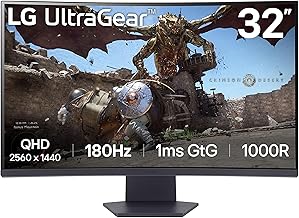
LG 32GS60QC-B Ultragear 32-inch Curved Gaming Monitor QHD
Why We Love It
Quick Pick
10 Best 180hz Curved Computer Monitor Of 2026
Quick Pick
27 Inch Curved Gaming Monitor,180Hz, VA Display, QHD 1440P Computer Monitor, 1ms, HDR10,90% DCI-P3, Adaptive Sync, VESA Compatible,Tilt Adjustable
KOORUI 27 Inch Curved Gaming Monitor,180Hz, VA Display, QHD 1440P Computer Monitor, 1ms, HDR10,90% DCI-P3, Adaptive Sync, VESA Compatible,Tilt Adjustable 27E6QCA
LG 32G600A-B 32-inch Ultragear QHD (2560 x 1440) Curved Gaming Monitor, 180Hz, 1ms, AMD FreeSync, HDMI, DisplayPort, Tilt/Height/Swivel Adjustable Stand, Black
Z-EDGE 24-inch Curved Gaming Monitor,200Hz,Frameless/FreeSync/HDR,FHD UG24 | MPRT 1ms/16.7 Million Colors/300cd/m²Brightness/LED/VESA/DP1.4 & HDMI2.1 Ports
Z-Edge Gaming Monitor 27 inch 180 Hz, 1 ms, FreeSync, Screen FHD 1080P with DP Cable, 350cd/m², 1500R VA Frameless, HDMI2.0 & DP1.4, VESA, sRGB 99%, 178° Angle View, Adjustable Tilt
LG 24GS50F-B 24-inch FHD (1920 x 1080) UltraGear Gaming monitor with 180Hz, 1ms MBR, HDR10, AMD FreeSync, HDMI, DisplayPort, 3-Side Virtually Borderless Design, Black
KOORUI 34 Inch UltraWide Curved Gaming Monitor, WQHD 180Hz, HDR400 | 3440x1440, 1000R VA Panel, 1ms MPRT, Adaptive Sync, 90% DCI-P3, PiP/PbP, DP 1.4, HDMI 2.0, VESA 75 × 75 mm
GAMEON 24” Curved Gaming Monitor – FHD 1080p, 180Hz, 0.5ms MPRT, FreeSync, VRR, HDMI 2.1 + VGA, Built-In Speakers, Smooth Console & PC Gameplay, VESA Mount, 100% sRGB, Low Input Lag
KTC 32 Inch Curved Monitor VA 1500R, 2K QHD 1440P@180Hz Gaming Monitor | 1ms MPRT FreeSync Premium G-Sync HDR10 122%sRGB VESA HMDI 2.0 DP 1.4 Compatible with Desktop, Laptop, PS5, Xbox and More
LG 32GS60QC-B Ultragear 32-inch Curved Gaming Monitor QHD (2560x1440) 180Hz 1ms 1000R AMD FreeSync HDR10 HDMIx2 DisplayPort Borderless Design Black Stabilizer DAS Crosshair FPS Counter - Black
Buying Guide: 180hz Curved Computer Monitor
📋 Table of Contents
1What resolution should I look for in an 180Hz curved computer monitor?
For smooth gaming and multitasking, aim for at least 1080p, with 1440p or 4K being ideal for higher detail. Higher resolutions can slightly reduce refresh rate effectiveness, so balance clarity with performance based on your GPU capabilities.
2Does the curvature of the monitor affect my viewing experience?
A 1800R or 1500R curvature is common and provides a more immersive feel, reducing eye strain during long sessions. Too tight a curve may cause distortion at the edges, so ensure the monitor’s size and curvature match your desk space and usage needs.
3What panel type is best for an 180Hz curved monitor?
IPS panels offer better color accuracy and wide viewing angles, while TN panels provide faster response times. For gaming, look for IPS with a 1ms GTG response time or a TN panel with low input lag, depending on your priority between color and speed.
4Is a high refresh rate alone enough for competitive gaming?
No — a 180Hz monitor needs low input lag, adaptive sync (like G-Sync or FreeSync), and a compatible GPU to avoid screen tearing. Prioritize monitors with 1ms response time and 1ms input lag for the best competitive edge.
5What size should I choose for an 180Hz curved monitor?
27-inch to 32-inch sizes are most common, with 27-inch being ideal for gaming and 32-inch for immersive experiences. Larger screens may require a more powerful GPU and can cause eye strain if not positioned correctly, so consider your desk space and usage type.
How we choose
Our editors are people who genuinely love testing and writing about products. We compare each product's real-world usability and strengths, then distill what matters most into our own "Why We Love It" points — so you get an honest, at-a-glance sense of what counts before you buy.