10 Best 17.3 Inch Portable Monitor For Laptop Of 2026
17.3 Inch Portable Monitor For Laptop — Reviews, Recommendations & Updated Buying Guide November 2026


Portable Monitor Arzopa A1 M 17
Why We Love It


UPERFECT 2K 144Hz Portable Monitor 17.3 Inch 2560x1440P
Why We Love It

UPERFECT 17.3 Inch 144Hz Portable Gaming Monitor
Why We Love It
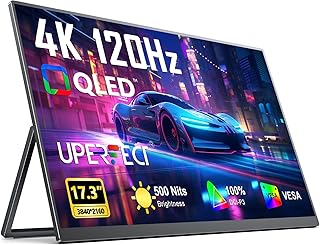
UPERFECT Portable Monitor 4K 120HZ 17.3"
Why We Love It

ASUS ROG Strix 17.3" 1080P Portable Gaming Monitor
Why We Love It

UPERFECT 17.3'' 4K Portable Monitor
Why We Love It

Portable Monitor 2K 17.3 Inch 120Hz Ultra Slim Aluminium
Why We Love It

Yodoit Portable Monitor 17.3" 100% sRGB 1920×1080 100% SRGB
Why We Love It

Newsoul 4K QLED Portable Monitor 120Hz Gaming Monitor 17.3"
Why We Love It

ARZOPA Portable Monitor, 17.3 Inches
Why We Love It
Quick Pick
10 Best 17.3 Inch Portable Monitor For Laptop Of 2026
Quick Pick
Portable Monitor Arzopa A1 M 17,3"
UPERFECT 2K 144Hz Portable Monitor 17.3 Inch 2560x1440P Portable Gaming Monitor Travel Monitor for Laptop HDR IPS Screen with VESA, Cover Stand, Dual Speakers for PC Phone Game Console
UPERFECT 17.3 Inch 144Hz Portable Gaming Monitor, FreeSync Premium, FHD 1080P HDR IPS Laptop Computer Monitor w/VESA & Stand HDMI USB C External Screen for Esports Xbox Switch PS5
UPERFECT Portable Monitor 4K 120HZ 17.3" | 0.1ms Gaming Monitor, 500 Nits | 3840*2160 UHD |100% DCI-P3 | Fast IPS | USB-C & HDMI | VESA & Kickstand | Travel Screen for Laptop, Computer, Game Consoles
ASUS ROG Strix 17.3" 1080P Portable Gaming Monitor (XG17AHP)-FHD, IPS, 240Hz, Adaptive-Sync, Built-in Battery, ROG Bag, Tripod Stand, USB Type-C, Micro HDMI for Laptop, PC, Console, 3-Year Warranty
UPERFECT 17.3'' 4K Portable Monitor, 500 Nits 100% AdobeRGB UHD FreeSync HDR IPS 2 Speakers Eye Care Travel Monitor, 2 Fully Functional Type-C Port & HDMI for Laptop PC Phone, VESA & Kickstand
Portable Monitor 2K 17.3 Inch 120Hz Ultra Slim Aluminium Alloy Case Laptop Game Office Monitor 100% sRGB FHD USB Type-C HDMI Monitor for Computer Phone Switch Xbox PS4 PS5
Yodoit Portable Monitor 17.3" 100% sRGB 1920×1080 100% SRGB FHD Screen IPS Display with USB Type C Built-in Speakers Eye Care for PC, Laptop, MacBook, Xbox, PS 3/4/5, Switch
Newsoul 4K QLED Portable Monitor 120Hz Gaming Monitor 17.3", 100% DCI-P3 | 2000:1 Contrast | Fast IPS 0.1ms, Built-in Stand | VESA | Speaker, USB-C HDMI Portable Screen for Laptop, Phone, Game Console
ARZOPA Portable Monitor, 17.3 Inches, Large Portable Monitor with FHD HDR IPS Display and Stand, Perfect as USB-C and HDMI Second Display for Laptop, PC, Smartphone, PS5, Xbox
Buying Guide: 17.3 Inch Portable Monitor For Laptop
📋 Table of Contents
1What resolution should I look for in a 17.3 inch portable monitor for laptop?
Opt for at least 1080p (Full HD) for clear visuals, with 2K (QHD) or 4K being ideal for graphic design, video editing, or multitasking. Higher resolutions offer sharper text and images but may require a more powerful laptop to handle the increased processing load.
2Does the monitor's brightness matter for outdoor use?
Yes — look for a brightness rating of 300-400 nits for decent outdoor visibility. Monitors with higher brightness and anti-glare coatings perform better in sunlight, making them more versatile for use in different environments.
3What connectivity options are essential for a 17.3 inch portable monitor?
HDMI and USB-C (with DisplayPort Alt Mode) are the most common and reliable connections. USB-C is especially useful for power delivery and data transfer, allowing you to use the monitor as an external display and charge your laptop simultaneously.
4How important is the weight and portability of a 17.3 inch monitor?
A monitor weighing under 3.5 lbs (1.6 kg) is ideal for frequent travel. Look for models with foldable stands, built-in handles, or cases for easier transport. Heavier models may be more durable but less convenient for on-the-go use.
5Are there any common mistakes to avoid when buying a 17.3 inch portable monitor?
Avoid models with low refresh rates (below 60Hz) if you plan to use them for gaming or video editing. Also, ensure the monitor is compatible with your laptop’s ports and operating system, and check for built-in speakers or the need for external audio if you plan to use it as a secondary display for calls or media.
How we choose
Our editors are people who genuinely love testing and writing about products. We compare each product's real-world usability and strengths, then distill what matters most into our own "Why We Love It" points — so you get an honest, at-a-glance sense of what counts before you buy.