10 Best 16k Pressure Drawing Tablet Of 2026
16k Pressure Drawing Tablet — Reviews, Recommendations & Updated Buying Guide November 2026


XP-Pen Deco 01 V3 Drawing Tablet
Why We Love It


XPPen Deco 640 Drawing Tablet with 16K Pressure Levels
Why We Love It

XP-PEN Deco mini7 7" Portable Graphic Drawing Tablet with
Why We Love It
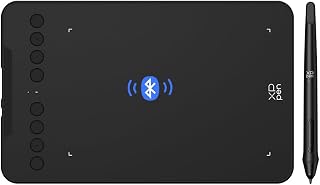
XPPen Deco mini7W V2 Drawing Tablet with 17.8x11.1cm Active
Why We Love It

XP-PEN Artist Pro (Gen 2) Drawing Display Computer Digital
Why We Love It

Ugee 15.4 inch Drawing Tablet with Screen,143% sRGB UE16
Why We Love It

XPPen Artist 12 3rd 11.9" Drawing Tablet with Screen
Why We Love It

XP-PEN Deco Pro LW Graphic Drawing Tablet Bluetooth with
Why We Love It

XP-PEN Deco Pro MW (Gen 2) Graphic Drawing Tablet Bluetooth
Why We Love It

XP-PEN Deco Pro XLW (Gen 2) Graphic Drawing Tablet Bluetooth
Why We Love It
Quick Pick
10 Best 16k Pressure Drawing Tablet Of 2026
Quick Pick
XP-Pen Deco 01 V3 Drawing Tablet, 10x6.25 Inch, 16384 Levels Pressure | Graphic Tablet, Battery-Free Stylus with Tilt Function, 8 Shortcut Keys, Compatible with PC, Chromebook, Android, MAC
XPPen Deco 640 Drawing Tablet with 16K Pressure Levels Purple
XP-PEN Deco mini7 7" Portable Graphic Drawing Tablet with Passive Stylus Supports Windows, Mac and Android
XPPen Deco mini7W V2 Drawing Tablet with 17.8x11.1cm Active Area, Battery-Free Stylus, 16K Pressure Levels, 8 Customisable Shortcut Keys, Wireless Graphic Tablet for Android/Windows/Mac/Chromebook
XP-PEN Artist Pro (Gen 2) Drawing Display Computer Digital Graphic Tablet with Battery-Free Stylus Supports 16K Pressure (16 Inch)
Ugee 15.4 inch Drawing Tablet with Screen,143% sRGB UE16 Computer Graphics Tablet with Full-Laminated Screen 8+1 Hot Keys 16K Level Pressure Battery-Free Stylus,Drawing Pad for PC/Windows/Mac/Android
XPPen Artist 12 3rd 11.9" Drawing Tablet with Screen | X4 Pen 16K Pressure | Dial Wheels+8 Keys | AG Etched Glass Portable Art Drawing Tablet Compatible with Windows/macOS/Android/ChromeOS/Linux
XP-PEN Deco Pro LW Graphic Drawing Tablet Bluetooth with Shortcut Remote Battery-Free Stylus Supports 16K Pressure (11" x 7")
XP-PEN Deco Pro MW (Gen 2) Graphic Drawing Tablet Bluetooth with Shortcut Remote Battery-Free Stylus Supports 16K Pressure (9" x 6")
XP-PEN Deco Pro XLW (Gen 2) Graphic Drawing Tablet Bluetooth with Shortcut Remote Battery-Free Stylus Supports 16K Pressure (15" x 9")
Buying Guide: 16k Pressure Drawing Tablet
📋 Table of Contents
1What does '16k pressure' mean for a drawing tablet, and why is it important?
A 16k pressure sensitivity means the tablet can detect 16,384 levels of pressure, allowing for extremely nuanced line weight and shading. This is crucial for artists who need fine control, especially in digital illustration or ink work, where subtle pressure changes make a big difference in the final output.
2How does 16k pressure compare to lower sensitivity tablets like 1024 or 2048?
16k pressure offers much finer control than 1024 or 2048, which are better suited for basic sketching or stylus-only use. For professionals or those using brush engines that rely on pressure, 16k ensures smoother gradients and more natural brush behavior, especially with high-end software like Photoshop or Procreate.
3What size and resolution should I look for in a 16k pressure drawing tablet?
Look for a tablet with a resolution of at least 2540 DPI and a size between 12x18 inches for a full drawing experience. Higher resolution ensures more accurate pen-to-screen mapping, while a larger active area allows for more natural hand movement and reduces the need for frequent repositioning.
4Are there any common mistakes buyers make when choosing a 16k pressure tablet?
Many buyers overlook the importance of a responsive and low-latency stylus, or assume that higher pressure sensitivity alone guarantees a better experience. Also, some neglect to check if the tablet supports tilt sensitivity or has customizable shortcut buttons, which are essential for workflow efficiency and precision.
5What accessories are worth investing in with a 16k pressure drawing tablet?
A high-quality stylus with 16k pressure compatibility and tilt support is essential. A protective case or sleeve is also useful for transport, and a stand or docking station can improve ergonomics during long sessions. Some tablets also benefit from a pen holder or extra batteries for extended use.
How we choose
Our editors are people who genuinely love testing and writing about products. We compare each product's real-world usability and strengths, then distill what matters most into our own "Why We Love It" points — so you get an honest, at-a-glance sense of what counts before you buy.